As of October 2026, Garmin has no HYROX race mode, so you time a HYROX race on a Garmin by pressing LAP at every changeover. A built-in activity records those laps without names. Hybrid Smash, a Garmin Connect IQ watch app, names every run, station and Roxzone: its Race Day mode takes 32 LAP presses with Rox Zones on.
Key takeaways
- Hybrid Smash's Race Day takes 32 LAP presses with Rox Zones on, or 17 with it off. A short buzz confirms every LAP press, so you don't have to look at the watch.
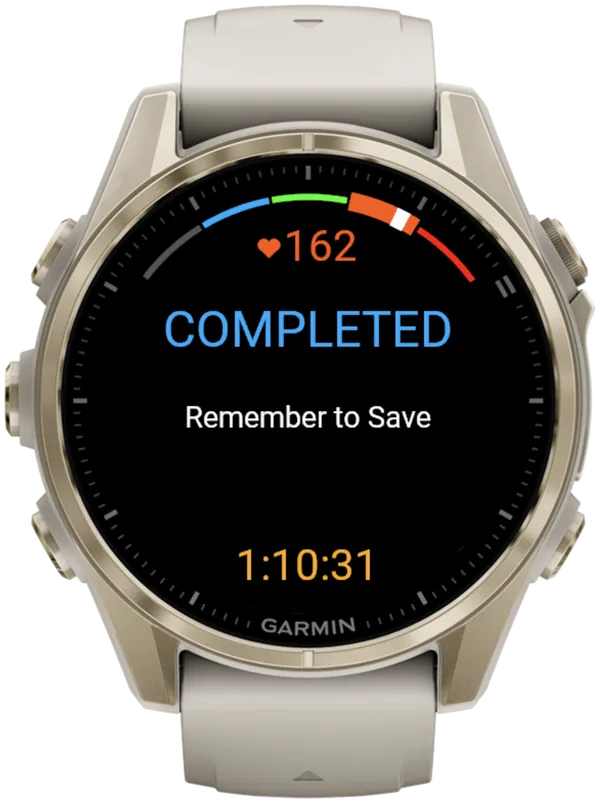
- Nothing is saved until you choose Save & Exit. At the finish, the watch shows "COMPLETED" and "Remember to Save".
- Your watch shows a shorter Run 8 and a longer Roxzone total than results.hyrox.com, because Hybrid Smash times a Roxzone before Wall Balls.
Is there a Garmin HYROX race mode?
No. As of October 2026, no Garmin watch has a HYROX activity, profile or mode. The Forerunner 970 manual (September 2026) lists Obstacle Racing and Mixed Session, but nothing for HYROX. Why Garmin has no HYROX mode sets out the evidence.
The Roxzone is the transition area between the running course and the workout stations. Connect IQ is Garmin's platform and store for third-party watch apps.
A "HYROX" activity on a Garmin is only a renamed copy of a built-in profile such as Cardio. It has no stations and no Roxzone. Without an app, you press LAP at each mat yourself. Every Garmin method, compared covers that route.
Hybrid Smash's Race Day follows the race format and your weight class, then saves the race to Garmin Connect.
What should you set in Race Day on your Garmin before the HYROX event?
Set your Weight Class, Run Pace, Run Type and Rox Zones the night before. Race Day's own menu has only two settings: your target pace and your Run Type. Everything else follows the race format, your Weight Class and the global Rox Zones setting.
| Setting | Where on the watch | What to choose |
|---|---|---|
| Weight Class | Settings → Weight Class | Men Open, Women Open, Men Pro, Women Pro, Men Doubles, Women Doubles or Mixed Doubles |
| Run Pace | Race Day → Run Pace | Your target, 3:00–9:00/km in 5-second steps |
| Run Type | Race Day → Run Type | Indoor (default, no GPS) for an indoor venue. Outdoor (GPS, more battery) for an outdoor course. Cardio for timed runs with no live pace |
| Rox Zones | Settings → Rox Zones | On (default) times each Roxzone separately |
Race Day settings in Hybrid Smash V26.2, checked 6 Oct 2026. There are no Doubles Pro or Relay classes.
You can't change Weight Class or Rox Zones mid-race. The in-workout menu only toggles Prioritize Pace and Touch Toggle. To change either one, you'd need Discard & Exit, Settings, then a fresh start.
Weight Class sets your station weights and your Wall Balls target. Wall Balls are 100 reps in every weight class, matching the 26/27 Singles rulebook. For Mixed Doubles, the watch shows both target heights, "6kg(2.7/3m)", because the height is set per racer.
The Doubles classes change the targets only. The flow is the same as singles, with no partner switching.
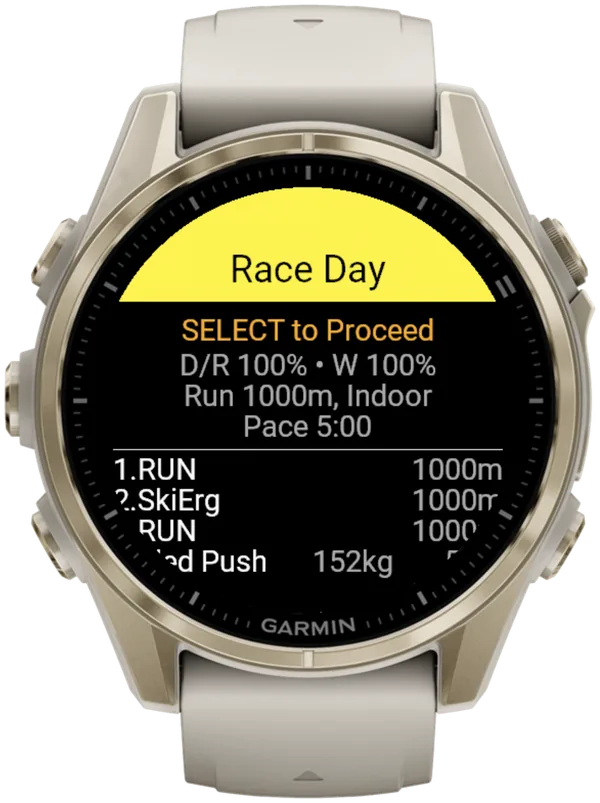
Check all of this in View & Start before the start tunnel. It lists your settings, then every run and station with its weight.
What should you check on your watch before the start?
Four things affect your splits before you press a single button:
- Indoor pace is an estimate. On Indoor, pace and distance come from your watch's wrist sensor. Pace reads --:-- until you're moving. A paired footpod gives more reliable indoor pace.
- Live pace is quicker since V26.2. It averages your last three readings, so a new pace shows in about 3 seconds.
- Heart rate comes from your watch's heart-rate source, including a paired chest strap.
- Auto-Pause must be off. Turn it off in your watch's activity settings, for running and for the Cardio activity type. The app can't override it, and it can cut slow stations such as the sled push from your times.
How to time a HYROX race on Garmin with Race Day, segment by segment
Open Race Day before the start tunnel, then press LAP at every changeover. Hybrid Smash doesn't detect stations automatically, but it knows what comes next. Each press closes one segment and names the next.
- Open Race Day before the start tunnel. Choose Race Day → View & Start, check the weights for your Weight Class, then press SELECT.
- Warm up with the app open. The screen shows "Lap to Start". Warm-up time is recorded separately and stays out of your race time.
- Press LAP as you cross the start line. That press starts the race clock and Run 1.
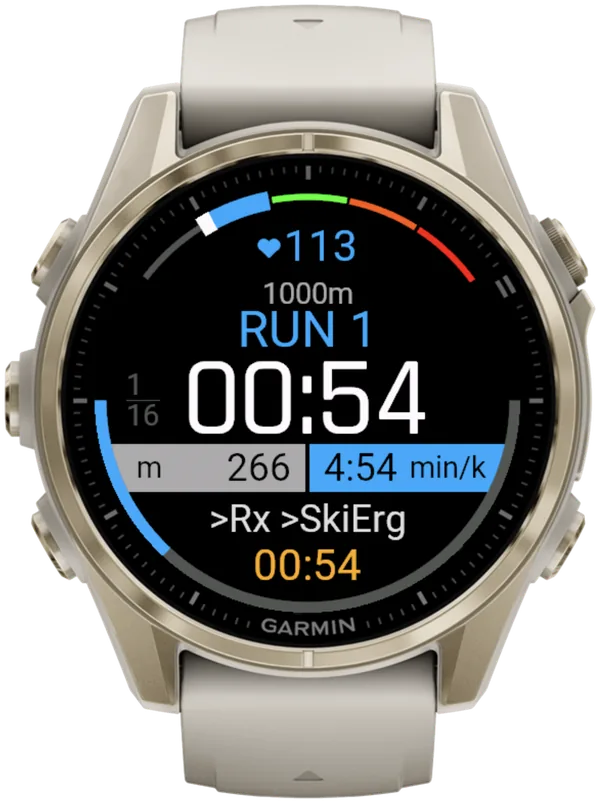
- Run: press LAP at the Roxzone IN arch. The screen shows "Run 1", the segment timer, the running total, a heart-rate gauge and what comes next, ">Rx >SkiErg".
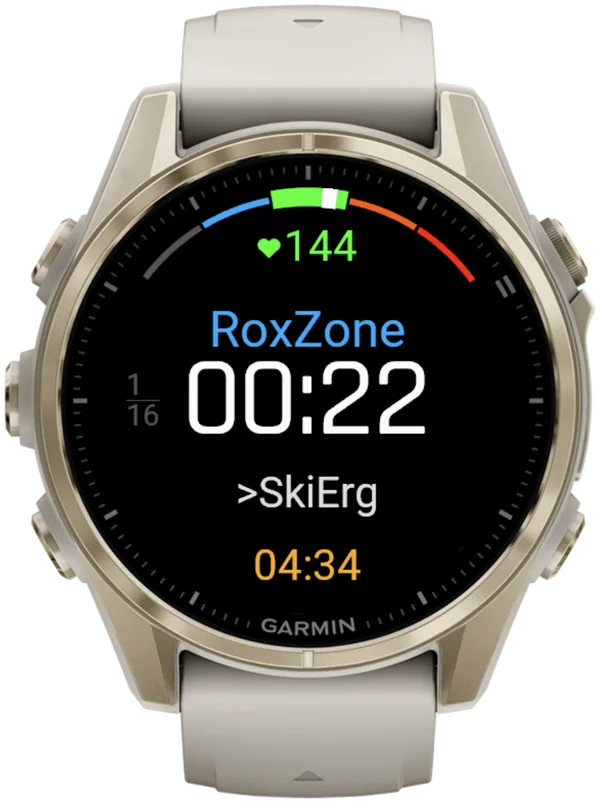
- Roxzone in: press LAP as you enter the station. The screen reads "RoxZone", with ">SkiErg" next.
- Station: press LAP as you leave it. The screen shows the station, its target and the weight for your class, in metric units. For Men Open, Sled Push shows 50 m and 152kg, the rulebook total including the sled (335 lb).
- Roxzone out: press LAP at the OUT arch. That starts the next run. Repeat steps 4 to 7 for rounds 1 to 7.
- Run 8 and Wall Balls: press LAP three times. Press as you leave the running course into the Roxzone, at your wall-ball target, and when Wall Balls is done. There is no Roxzone after Wall Balls, so that last press stops the clock.
- Save the race. At "COMPLETED" and "Remember to Save", press LAP or SELECT for the menu. Choose Save & Exit.
One light pulse tells you when a run reaches its target, but it never moves you to the next segment.
Choose Race Day, open View & Start, press SELECT, then press LAP at every changeover. That's the whole learning curve. For the night before, use the race-day checklist.
What if you press LAP at the wrong moment?
Press DOWN. It undoes the last press instantly, with no confirmation.
- Buzz: a short buzz confirms every LAP press, so you don't have to look at the watch. Undo gets its own buzz, and so does the finish.
- Other ways to undo: swipe up, if Touch Gestures is on, or Undo in the in-workout menu, which asks you to confirm.
- Other ways to advance: BACK does the same as LAP, and so does a swipe down with Touch Gestures on.
- No pause: opening the in-workout menu doesn't stop the race clock.
Pressed LAP too early at the end? Press DOWN on the COMPLETED screen. The last segment reopens and the workout carries on.
For Garmin's own lap undo and where it isn't available, see how to undo a mistaken LAP press.
What happens after you save?
The summary shows your total and your run, station and Roxzone times. Heart rate per segment (average and max) is in the shared web breakdown.
Hybrid Smash saves the race as Indoor Run, Outdoor Run or Cardio, by Run Type. Every segment is a lap, with its station name.
Race Day press map: 32 LAP presses from start line to finish
A full HYROX race in Race Day takes 32 LAP presses with Rox Zones on: one to end the warm-up, then one for each of 31 segments. With Rox Zones off, it takes 17.
| Where you press | What the press ends | Presses |
|---|---|---|
| Start line | Warm-up | 1 |
| Roxzone IN arch, or the Roxzone before Wall Balls | Each run | 8 |
| Station entry | Each Roxzone in | 8 |
| Station exit (the last one is the finish) | Each station | 8 |
| Roxzone OUT arch | Each Roxzone out | 7 |
| Total | 32 |
With Rox Zones off, you press only at the start and at each station entry and exit.
These presses follow the official Rox In and Rox Out timing points at stations 1 to 7. Official timing has no Rox In read before Wall Balls. For the Roxzone presses without an app, see how to time every Roxzone on a Garmin. The LAP button map gives the same press points for a built-in Garmin activity.
Why don't your watch splits match your official HYROX result?
Your watch times your presses. The official result times chip reads at the mats. Expect three differences:
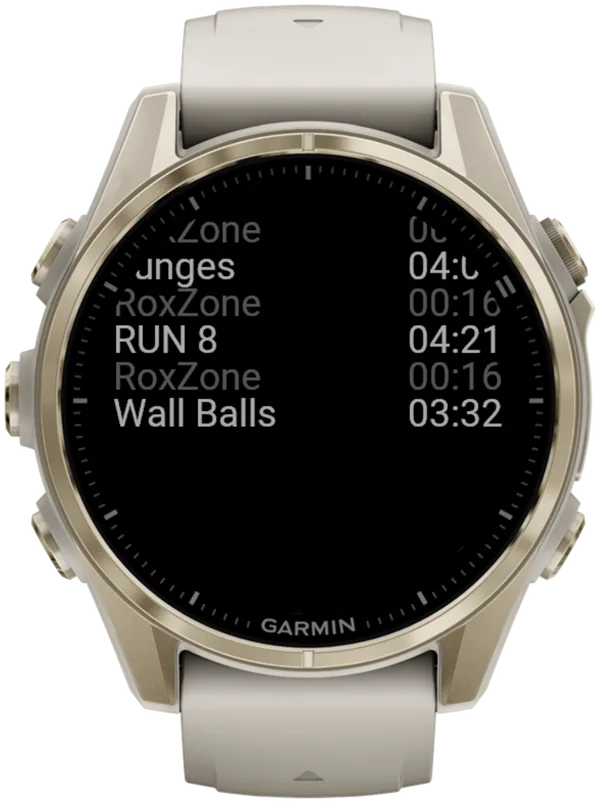
- Run 8 and Roxzone. Hybrid Smash times a Roxzone before Wall Balls, but official results don't. So your watch shows a shorter Run 8 and a longer Roxzone total than results.hyrox.com, even with perfect presses. That's why Run 8 looks different from your official result.
- Run distance. The HYROX 26/27 Singles rulebook (version of 14 September 2026) sets runs of approximately 1,000 m in venue laps, and indoor watch distance is an estimate. Count your laps yourself: Auto Lap every 1 km won't match your official splits.
- Press timing. A late press moves time from one segment into the next.
What is Hybrid Smash?
Hybrid Smash is a Garmin Connect IQ watch app that tracks and paces HYROX races, simulations and workouts while you do them. One press of the LAP button per changeover, and every run, station and Roxzone is timed, labelled and saved to Garmin Connect.
It is a one-time purchase on the Connect IQ store with no account, no subscription and no phone needed while you train. It offers Race Day (the official sequence of 8 × 1 km runs and 8 stations, with station targets for your weight class), Hyrox Sim, Free Training (pick the next station on the watch as you go), 8 ready-made HYROX workouts and 3 custom workouts.
It is built for the balance between simplicity and the right features: a clean screen, few options and a design nobody needs a tutorial for.
- Three controls run the session: LAP for the next segment, DOWN to undo a mistaken press, SELECT for the menu.
- Saved to Garmin Connect as Indoor Run, Outdoor Run or Cardio, depending on the Run Type you pick, with every segment as a lap.
- Works on most current Garmin watches, including Forerunner, fēnix, epix, Venu and vívoactive models. Check your model on the Connect IQ store.
- On race day: Race Day locks the race format; you only choose your target pace and Run Type.
FAQ
Can you wear a Garmin in a HYROX race?
The HYROX 26/27 Singles rulebook (version of 14 September 2026) doesn't mention Garmin watches either way, but it bans phones and headphones on the race floor. Watches are widely worn. As of October 2026, HYROX's official wearable partner sells race-mode watches. If you're unsure, ask your event's race director about what you may wear on the race floor.
What happens if Hybrid Smash closes in the middle of a race?
It offers to continue. After a crash, a reboot or a flat battery, the next launch shows "In Progress": choose Continue to restore your segment, lap history and settings. The race clock includes the time the app was closed. The resumed race saves as a new Garmin activity. The prompt appears only once you've pressed LAP at least once.
I already use Smash Coach. Do I need Hybrid Smash on race day?
No. Smash Coach includes race-day tracking, so if you're on Smash Coach, race day is built in. Hybrid Smash is a separate one-time-purchase Garmin watch app for athletes who want to track races, simulations and workouts with no sign-up and no subscription. Smash Coach plans your HYROX training week by week; Hybrid Smash runs the session.
Sources
- HYROX Singles Rulebook 26/27 (EN), HYROX, version of 14 September 2026. Accessed 5 October 2026.
- HYROX official results, HYROX (timing by mika:timing), 26/27. Accessed 5 October 2026.
- Garmin Forerunner 970 Owner's Manual (PDF), Garmin, September 2026. Accessed 5 October 2026.