Your HYROX Run 8 time is usually not wrong: it's measured differently. In 26/27 results, Runs 1 to 7 end as you enter the Roxzone, but Run 8 ends at Wall Balls. So Run 8 includes your walk or jog through the last Roxzone. If you pressed LAP on entering it, add the next lap to your watch's Run 8.
Key takeaways
- HYROX Data Lab (5 May 2026, 395,452 solo results) puts the average Run 8 at 6:10 for men and 6:38 for women, against 4:39 and 5:14 for Run 1.
- With Rox Zones on, Hybrid Smash times a Roxzone after Run 8, so its Run 8 reads shorter and its Roxzone total longer than results.hyrox.com.
- To compare, add the lap between Run 8 and Wall Balls to your watch's Run 8, and take it off your Roxzone total.
Is your HYROX Run 8 time wrong?
Usually not: your other runs end as you enter the Roxzone, but official timing ends Run 8 at Wall Balls.
The Roxzone is the transition area between the running course and the workout stations. At stations 1 to 7, timing mats read the chip on your ankle four times. The first read is as you enter the Roxzone (Rox In), and the last as you leave it (Rox Out).
| Split | Measured from → to |
|---|---|
| Run 1 | Start → Rox In |
| Runs 2 to 7 | Rox Out → Rox In |
| Stations 1 to 7 | Station In → Station Out |
| Run 8 | Rox Out after Sandbag Lunges → Wall Balls In |
| Wall Balls | Wall Balls In → Finish |
| Roxzone Time | (Rox In → Station In) + (Station Out → Rox Out), stations 1 to 7 |
From the race replay on results.hyrox.com, 25/26 and 26/27 results, checked 4–6 Oct 2026.
Roxzone Time is the total time between the Roxzone timing mats and the stations, for stations 1 to 7. That's 14 timed transitions, none of them around Wall Balls, so Run 8 includes your walk or jog through the last Roxzone. For where to press LAP at each of these points, see the LAP button map.
Is the Roxzone included in the 1 km run?
Not in Runs 1 to 7: their run times stop at the Roxzone mats, and your transition time counts as Roxzone Time. Run 8 is the exception, because it includes the last Roxzone entry.
The HYROX 26/27 Singles rulebook (version of 14 September 2026, §7.2) says every course combines "the Run Course, Roxzone and workout station distances". The run portion alone is 8,000 m, in eight segments of approximately 1,000 m, so Roxzone movement is extra. Here's how the Roxzone and its arches work.
Why is your 8th HYROX run so slow in the results?
Two things can slow Run 8 in your results. It comes straight after the Sandbag Lunges, and it's the only official run split that includes Roxzone time.
HYROX Data Lab analysed 395,452 solo Open and Pro results from seasons 7 and 8 (published 5 May 2026). It finds Run 8, the leg after the lunges, the slowest on average:
| Average split | Men | Women |
|---|---|---|
| Run 1 | 4:39 | 5:14 |
| Run 7 | 5:23 | 5:56 |
| Run 8 | 6:10 | 6:38 |
Source: HYROX Data Lab, 5 May 2026. Averages, not medians.
Those averages are built from official results, so their Run 8 also includes the walk to Wall Balls. Results alone can't separate the two causes.
Your watch can. If you pressed LAP as you entered the Roxzone after Run 8, your watch's Run 8 covers the run course only. Compare it with your Runs 2 to 7 from the same race.
Run 8 isn't slower everywhere. On one 26/27 result from Toronto, Run 8 was quicker than that athlete's other runs. How much the last Roxzone adds depends on the venue layout.
Why is Run 8 shorter on your Garmin than in your results?
Your watch's Run 8 is shorter when a LAP press ended it at the Roxzone entry, not at Wall Balls.
A copied Cardio activity is a renamed copy of Garmin's built-in Cardio profile. Hybrid Smash is a Garmin Connect IQ watch app that times every run, station and Roxzone of a HYROX race, simulation or workout. Connect IQ is Garmin's platform and store for third-party watch apps.
Race Day is Hybrid Smash's race mode. Rox Zones is a Hybrid Smash setting, on by default, that times a Roxzone segment between runs and stations.
| How you recorded | Where Run 8 ends | Laps | Next to results.hyrox.com |
|---|---|---|---|
| Copied Cardio activity, LAP at every official timing mat (no Rox In before Wall Balls) | At Wall Balls | Numbered | Lines up, apart from small gaps from your press timing |
| Copied Cardio activity, extra LAP into the Roxzone after Run 8 | At the Roxzone entry | Numbered | Shorter Run 8; the last Roxzone sits in an extra lap |
| Hybrid Smash Race Day, Rox Zones on (default) | At the Roxzone entry; a Roxzone segment follows | Named | Shorter Run 8 and a longer Roxzone total |
| Hybrid Smash Race Day, Rox Zones off, LAP at both Roxzone arches at stations 1 to 7, then at your wall-ball target | At Wall Balls | Named | Runs line up; each station lap also holds its Roxzone time |
Split points from official results, checked 4–6 Oct 2026; Hybrid Smash V26.2, checked 6 Oct 2026.
Only a Run 8 lap that ends at Wall Balls matches the official Run 8.
In a copied Cardio activity, laps are numbered, not named. Pressed at every timing mat, Run 8 is lap 29 of 30 (how to build a HYROX activity from Cardio).
Why does Hybrid Smash show a shorter Run 8?
Hybrid Smash times a Roxzone before Wall Balls; official results don't, so your watch shows a shorter Run 8 and a longer Roxzone total than results.hyrox.com, even with perfect presses.
Hybrid Smash doesn't detect stations automatically: you press LAP at every changeover. The app already knows what comes next, so each press closes one segment and names the next.
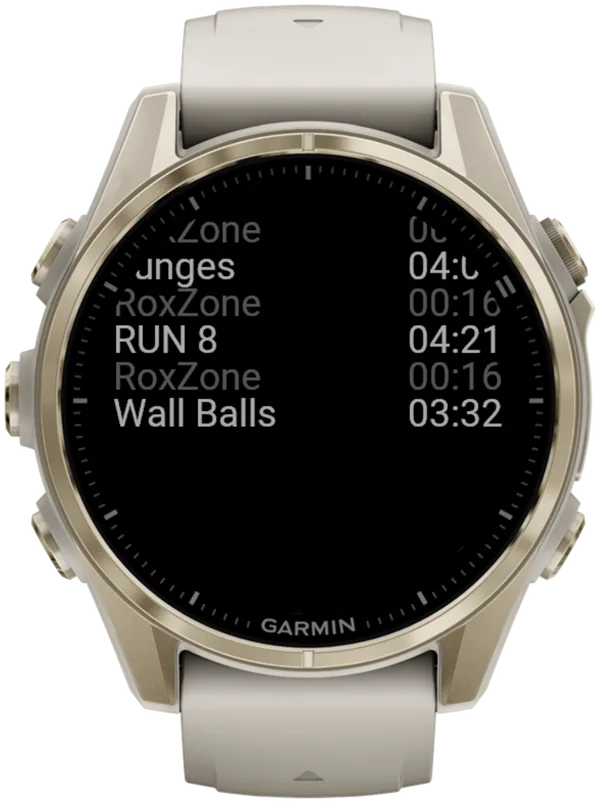
Rox Zones is one setting for every Roxzone, so you can't drop only the last one. With it turned off before the start (settings reference), a full Race Day takes 17 LAP presses instead of 32.
How do you compare your Garmin splits with official HYROX splits?
Line them up split by split, then move one lap if your watch timed a Roxzone after Run 8.
- Open your official splits. Your page on results.hyrox.com lists Running 1 to 8, each station and Roxzone Time (how to find and read them).
- Open your watch laps on the watch summary or in Garmin Connect. In Hybrid Smash, each lap stores its station name (what lands in Garmin Connect).
- Compare Runs 1 to 7 directly. If you pressed at each Roxzone arch, small gaps come from your press timing.
- Add any lap between Run 8 and Wall Balls to your Run 8.
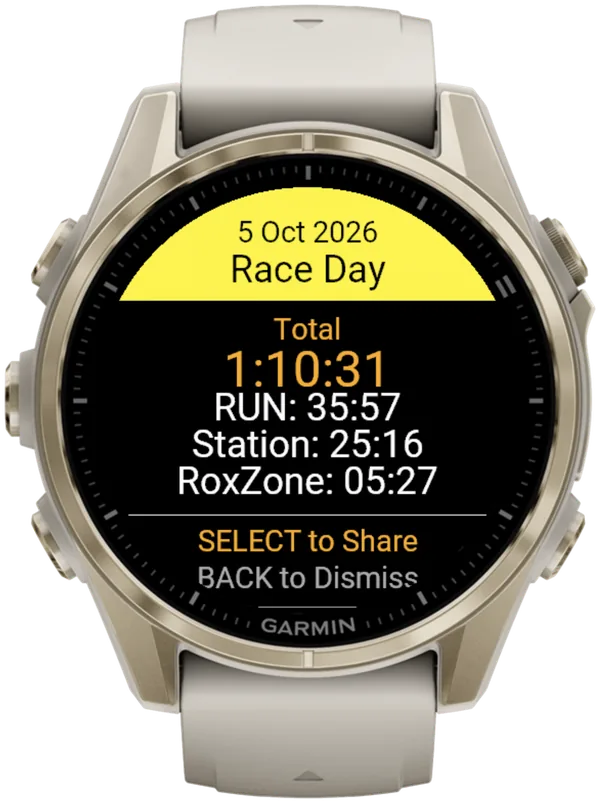
- Take that lap off your Roxzone total. In Hybrid Smash, your total then covers the same 14 transitions as Roxzone Time.
- Compare within one race only. The mats sit in different places at each venue, so never compare Run 8 or Roxzone splits across venues.
What else makes Garmin splits differ from official ones?
Three more things can open a gap between your watch and your official splits: Auto Lap, extra or missed presses, and Auto-Pause.
- Auto Lap. Official runs are timed between mats, not by distance, so laps set to end every 1 km won't line up with them.
- Extra or missed presses. In a copied Cardio activity, one extra or missed press shifts every later lap, and Garmin's lap undo isn't available in gym activities such as Cardio. In Hybrid Smash, DOWN undoes an extra press instantly.
- Auto-Pause. This watch setting can cut slow stations, such as the sled push, from your times, and Hybrid Smash can't override it. Turn it off in your watch's activity settings, for running and for the Cardio activity type.
What is Hybrid Smash?
Hybrid Smash is a Garmin Connect IQ watch app that tracks and paces HYROX races, simulations and workouts while you do them. One press of the LAP button per changeover, and every run, station and Roxzone is timed, labelled and saved to Garmin Connect.
It is a one-time purchase on the Connect IQ store with no account, no subscription and no phone needed while you train. It offers Race Day (the official sequence of 8 × 1 km runs and 8 stations, with station targets for your weight class), Hyrox Sim, Free Training (pick the next station on the watch as you go), 8 ready-made HYROX workouts and 3 custom workouts.
It is built for the balance between simplicity and the right features: a clean screen, few options and a design nobody needs a tutorial for.
- Three controls run the session: LAP for the next segment, DOWN to undo a mistaken press, SELECT for the menu.
- Saved to Garmin Connect as Indoor Run, Outdoor Run or Cardio, depending on the Run Type you pick, with every segment as a lap.
- Works on most current Garmin watches, including Forerunner, fēnix, epix, Venu and vívoactive models. Check your model on the Connect IQ store.
- On screen: Hybrid Smash keeps the watch screen to what you need right now: what you're on, how long you've been on it, and what comes next.
FAQ
Should you skip the LAP press into the Roxzone after Run 8?
Yes, in a copied Garmin activity, if you want your laps to match the official splits. Press LAP at Wall Balls instead, and your Run 8 lap lines up with the official split. Keep the extra press if you want to see your running alone.
No in Hybrid Smash: with Rox Zones on, Race Day expects that press, because a Roxzone segment follows Run 8. Keep it, and add that Roxzone to your Run 8 afterwards.
Why doesn't HYROX time a Roxzone before Wall Balls?
HYROX gives no reason in its rulebook or on its results pages. The HYROX 26/27 Singles rulebook (version of 14 September 2026) covers the ankle timing chip but doesn't describe where the split timing mats sit.
Race replays on results.hyrox.com simply have no Rox In read before Wall Balls, so the walk to the wall-ball target stays inside Run 8. A watch lap pressed at the Roxzone entry splits it out.
Is each HYROX run exactly 1 km?
No. The HYROX 26/27 Singles rulebook sets eight run segments of approximately 1,000 m, in venue laps whose first or last lap can differ.
Indoors, with GPS off, your watch estimates distance from its wrist sensor. So your watch will rarely read exactly 1.00 km per run. Read how much running HYROX really has.
Can official HYROX splits be wrong?
Yes, sometimes. Chip reads can glitch: one 26/27 result shows a SkiErg split far too short for 1,000 m.
If a split looks impossible, use the results dispute form on the results page. The HYROX 26/27 Singles rulebook allows penalties or amendments for up to 48 hours after each event.
Sources
- HYROX official results, HYROX (timing by mika:timing), workout summary and race replay pages. Accessed 6 October 2026.
- HYROX Singles Rulebook 26/27 (EN), HYROX, version of 14 September 2026. Accessed 6 October 2026.
- Average HYROX Station Times: How Long Should Each Workout Take?, HYROX Data Lab, 5 May 2026. Accessed 6 October 2026.