A HYROX race day checklist for your Garmin has five stages. Night before: charge the watch and turn Auto-Pause off. Venue: leave your phone and headphones in your bag. Start tunnel: open your activity, and start timing on the start line. Race: press LAP at every changeover and count your own laps. Finish: save the activity, then sync.
Key takeaways
- Turn Auto-Pause off the night before. Hybrid Smash can't override it, and it can cut a slow sled push from your time.
- Count your own laps: under the HYROX 26/27 Singles rulebook, a missed lap costs 3 to 7 minutes, or a DQ on a 1-lap set-up.
- A full race in Hybrid Smash's Race Day takes 32 LAP presses with Rox Zones on.
What goes on a HYROX race day checklist for your Garmin?
Only watch actions. Kit and food aren't on it.
The Roxzone is the transition area between the running course and the workout stations.
For HYROX race day on a Garmin, Hybrid Smash's Race Day mode times every run, station and Roxzone with one LAP press per changeover, using the race format and the station targets for your weight class, and saves the race to Garmin Connect.
On a plain Garmin activity, skip the items and brackets marked Hybrid Smash, and press LAP at each mat (the whole race, segment by segment).
The printable checklist
Twenty-nine actions, in race-day order.
Rules: HYROX 26/27 Singles rulebook, version of 14 September 2026. App steps: Hybrid Smash V26.2, as of October 2026.
The night before
- (Hybrid Smash) Install or update the app: Settings → Leave a review shows V26.2 underneath.
- (Hybrid Smash) Set Settings → Weight Class to your division. Doubles classes change the station targets only, with no partner switching.
- (Hybrid Smash) In Race Day, set Run Pace to your target and Run Type to Indoor (arena) or Outdoor (GPS).
- (Hybrid Smash) Decide on Settings → Rox Zones (On by default). It can't change mid-workout.
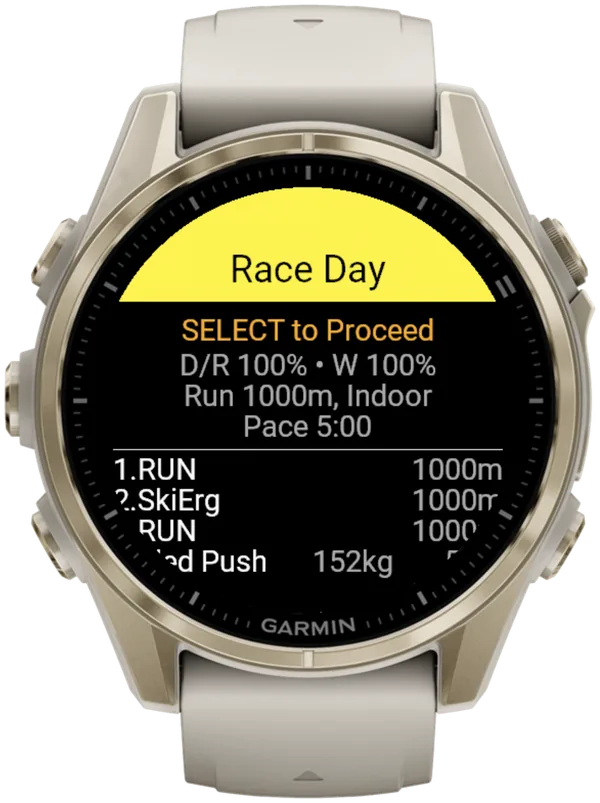
- (Hybrid Smash) Check the station weights in Race Day → View & Start.
- Turn Auto-Pause off in your watch's activity settings, for running and for the Cardio activity type.
- On a native Garmin activity, turn Auto Lap off and check that the Lap Key records laps.
- Pair any chest strap or footpod you race with (pairing and Auto-Pause, step by step).
- Charge your watch fully.
At the venue
- Check your athlete guide for your wave time and the number of laps per run.
- Find the Roxzone IN and OUT arches and each station's entrance and exit. Those are your LAP points.
- Fit your timing chip on your ankle and show your start time on your arm. No chip is a DNS.
- Leave your phone and headphones in your bag: both are banned on the race floor.
In the start tunnel
- Open your activity (Hybrid Smash: Race Day → View & Start, then SELECT).
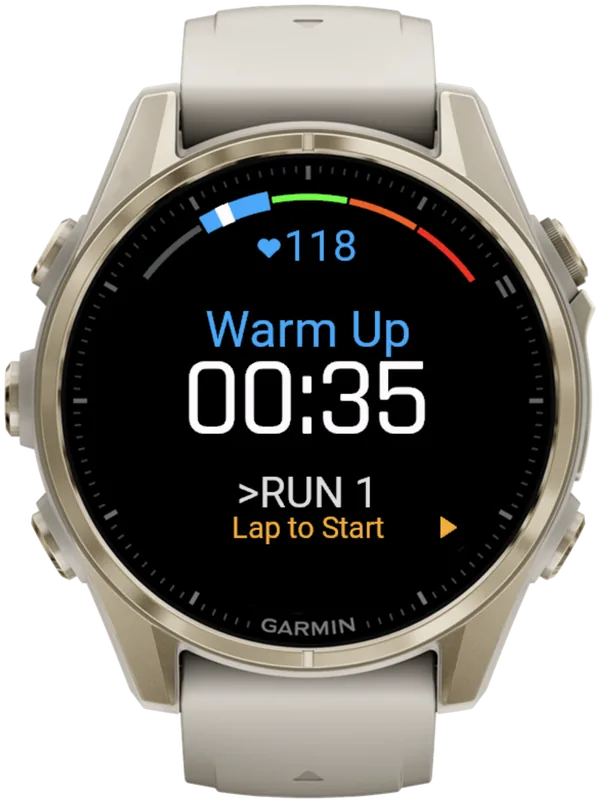
- (Hybrid Smash) Warm up: the watch times your warm-up separately and shows "Lap to Start".
- Start with your own wave. Waiting after it has gone costs 1 minute.
- Start timing on the start line (Hybrid Smash: press LAP to start the race clock).
During the race
- Press LAP into the Roxzone, onto the station, off the station and out of the Roxzone.
- (Hybrid Smash) With Rox Zones off, press LAP only at the end of each run and each station.
- Count your own venue laps.
- (Hybrid Smash) A short buzz confirms every LAP press, so you don't have to look at the watch. Press DOWN at once if you press by mistake.
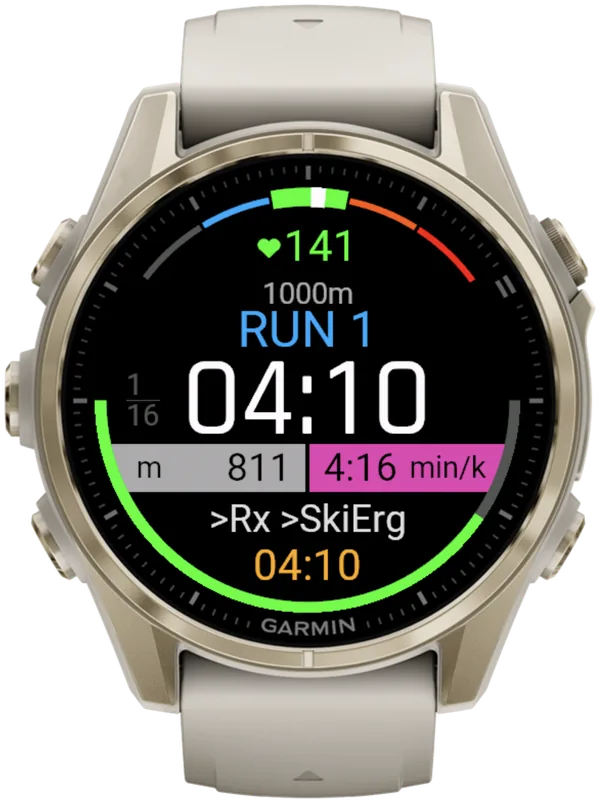
- (Hybrid Smash) On Indoor or Outdoor, keep the pace bar blue (on target).
- (Hybrid Smash) Keep the menu closed: opening it doesn't pause the race clock.
- (Hybrid Smash) If the app is interrupted, reopen it and choose Continue. The race clock includes the time it was closed, and a new Garmin activity records from there.
After the finish
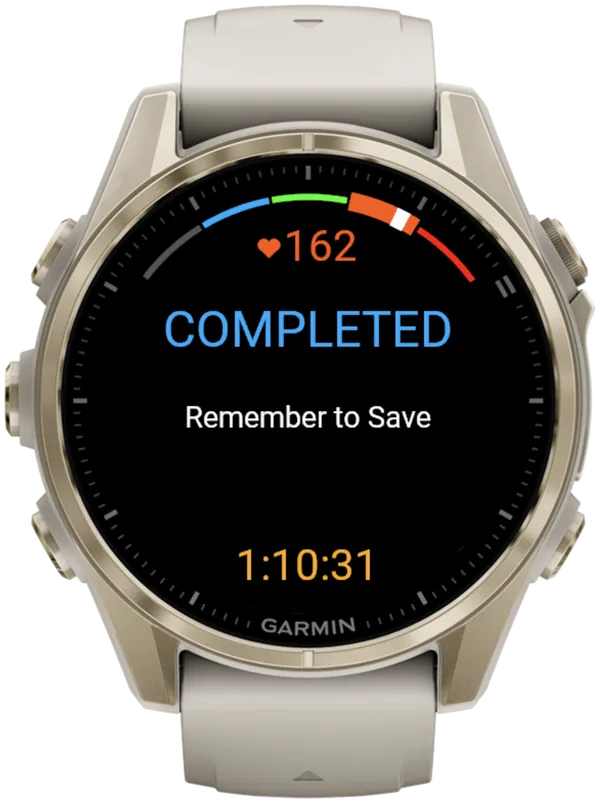
- Stop timing as you finish Wall Balls (Hybrid Smash: press LAP, and the watch shows "COMPLETED" and "Remember to Save").
- (Hybrid Smash) Pressed LAP too early at the end? Press DOWN on the COMPLETED screen: the last segment reopens and the workout carries on.
- Save the activity (Hybrid Smash: press SELECT and choose Save & Exit).
- Sync to Garmin Connect once your phone is back.
- (Hybrid Smash) Share the race from Past Workouts to see heart rate per segment.
HYROX race day strategy: which watch settings do you pick?
Three, if you race with Hybrid Smash: target pace, Run Type and Rox Zones. Everything else follows the race format and your weight class (Race Day in the user guide).
You set Run Pace and Run Type in Race Day. Rox Zones is a global setting, on by default, that times a Roxzone segment between runs and stations.
| Decision | Options | What it changes |
|---|---|---|
| Run Pace | 3:00–9:00/km in 5-second steps | The pace bar's colour on runs. (Race rule: at 4:00/km or faster, you must use the inside Fast Lane.) |
| Run Type | Indoor (default), Outdoor or Cardio | Indoor: no GPS. Outdoor: GPS, more battery. Cardio: timed runs, no live pace, and your VO2 max and Endurance estimates stay untouched |
| Rox Zones | On (default) or Off | On: every Roxzone timed separately, 32 LAP presses. Off: 17 presses |
Hybrid Smash V26.2, as of October 2026. Fast Lane rule: HYROX 26/27 Singles rulebook, version of 14 September 2026.
GPS is unreliable inside arenas, so choose Indoor there.
On Indoor, pace and distance come from your watch's wrist sensor, which is an estimate. A paired footpod gives more reliable indoor pace.
Pace reads --:-- until you're moving. Since V26.2, live pace reacts in about 3 seconds, so a change of pace shows almost straight away.
What are the most common HYROX mistakes on race day?
The costliest are penalties and lost data: a missed lap, the wrong Roxzone arch, Auto-Pause left on and a race never saved.
| Mistake | Fix |
|---|---|
| Starting Run 1 faster than your target | Hold your target pace. Hybrid Smash's pace bar is blue from 10% faster to 5% slower than target |
| Leaving Auto-Pause on | Turn it off: Garmin says it stops recording "when you stop moving" |
| Setting Auto Lap to every 1 km | Turn it off and press LAP at the mats. Official runs are only approximately 1 km, timed mat to mat |
| Letting the watch count venue laps | Count them yourself (penalties: 3, 5 or 7 min, or a DQ on a 1-lap set-up) |
| Using the wrong Roxzone arch | Enter through IN and leave through OUT. Each wrong arch costs 2 minutes |
| Walking away from "COMPLETED" | Choose Save & Exit; on Outdoor, GPS stays on until you do |
| Expecting watch splits to match official results | Hybrid Smash times a Roxzone before Wall Balls; official results don't. So your Run 8 reads shorter |
Penalties: HYROX 26/27 Singles rulebook, version of 14 September 2026 (penalty codes 01 and 04). Auto-Pause quote: Garmin fēnix 8 manual, Activity Settings, September 2026.
What is Hybrid Smash?
Hybrid Smash is a Garmin Connect IQ watch app that tracks and paces HYROX races, simulations and workouts while you do them. One press of the LAP button per changeover, and every run, station and Roxzone is timed, labelled and saved to Garmin Connect.
It is a one-time purchase on the Connect IQ store with no account, no subscription and no phone needed while you train. It offers Race Day (the official sequence of 8 × 1 km runs and 8 stations, with station targets for your weight class), Hyrox Sim, Free Training (pick the next station on the watch as you go), 8 ready-made HYROX workouts and 3 custom workouts.
It is built for the balance between simplicity and the right features: a clean screen, few options and a design nobody needs a tutorial for.
- Three controls run the session: LAP for the next segment, DOWN to undo a mistaken press, SELECT for the menu.
- Saved to Garmin Connect as Indoor Run, Outdoor Run or Cardio, depending on the Run Type you pick, with every segment as a lap.
- Works on most current Garmin watches, including Forerunner, fēnix, epix, Venu and vívoactive models. Check your model on the Connect IQ store.
- On screen: Hybrid Smash keeps the watch screen to what you need right now: what you're on, how long you've been on it, and what comes next.
FAQ
Can I bring my phone onto the HYROX race floor?
No, unless the race director approves it as a medical device. HYROX bans phones and headphones on the race floor.
The 26/27 rulebook doesn't mention watches either way. They are widely worn, and HYROX's official wearable partner (Amazfit, as of October 2026) sells race-mode watches. If you are unsure, ask your event's race director.
Hybrid Smash needs no phone to track. Your phone is only used afterwards, to sync and share.
Where do you wear the timing chip in HYROX?
On an ankle, from start to finish. The HYROX 26/27 Singles rulebook (version of 14 September 2026) also requires your start time visible on your arm. Racing without the chip is a DNS.
The chip, not your watch, produces your official splits on results.hyrox.com. Penalties can be added there for up to 48 hours.
Does a Garmin save a HYROX race automatically?
Not in Hybrid Smash. When the last LAP press stops the clock, the watch shows COMPLETED and Remember to Save. Open the menu and choose Save & Exit: Discard & Exit saves nothing.
On a native Garmin activity, Garmin's fēnix 8 manual says the watch saves a stopped activity automatically after 30 minutes. Save it yourself as soon as you finish.
Hybrid Smash or Smash Coach?
Hybrid Smash's job is the session itself: it times and paces today's race, simulation or workout on your watch. If your next question is what to train this week, that's a different tool: Smash Coach is a separate subscription app from the same maker that plans your HYROX training week by week around your other sports and any injuries.
| Hybrid Smash | Smash Coach | |
|---|---|---|
| Job | Tracks and paces the session you're doing right now | Plans your HYROX training week by week around your other sports and injuries |
| When you use it | During the session: race day, a sim, an open-gym workout | In the weeks before a race, every week |
| Where it runs | On your Garmin watch (Connect IQ app) | smashcoach.app, with an account and onboarding. It sends sessions to your Garmin |
| Commitment | One-time purchase. No account, no subscription | Subscription after a free trial |
Hybrid Smash runs your session. Smash Coach plans your season. Already on Smash Coach? Race day is built in.
Sources
- HYROX Singles Rulebook 26/27 (EN), HYROX, version of 14 September 2026. Accessed 5 October 2026.
- fēnix 8 Series Owner's Manual, Activity Settings, Garmin, September 2026. Accessed 5 October 2026.
- HYROX official results, HYROX, live site. Accessed 5 October 2026.
- fēnix 8 Series Owner's Manual, Stopping an Activity, Garmin, September 2026. Accessed 5 October 2026.