The Garmin undo lap prompt usually shows for a few seconds after a LAP press, on watches whose manuals document it. Press the button next to the undo icon to discard the lap. As of October 2026, those manuals exclude workouts and gym activities, including Cardio. Hybrid Smash, a Garmin Connect IQ watch app, undoes a mistaken press with DOWN.
Key takeaways
- As of October 2026, 20 of the 25 Garmin owner's manuals we checked document lap undo. The fēnix 9 manual only mentions discarding a lap, and the fēnix 6 Pro, Venu 2 Plus, Venu 3 and vívoactive 5 manuals don't mention it.
- In a Garmin Connect workout, LAP moves you to the next step, and Garmin's manuals document no way back.
- In Hybrid Smash, DOWN undoes the last LAP press instantly, even on the COMPLETED finish screen. A short buzz confirms every LAP press, so you don't have to look at the watch.
How do you undo a lap on a Garmin?
On watches whose manuals document lap undo, press the button next to the undo icon within a few seconds of the LAP press. Garmin's fēnix 8 manual (September 2026) says the icon appears "in most cases". You then have "a few seconds to press the button and discard the most recent lap or sport change."
Lap undo works in activities with manual laps or sport changes. It isn't available "for activities that trigger automatic laps, runs, rests, or pauses, such as gym activities, pool swimming, and workouts".
Cardio, HIIT and Strength sit under Gym in the Forerunner 970 activity list, so none of them has it.
Each built-in option's strengths and limits are in every Garmin method for HYROX, compared.
Which Garmin watches have lap undo?
As of October 2026, 20 of the 25 Garmin owner's manuals we checked document lap undo, under Troubleshooting → "How can I undo a lap button press?".
| Family | Manual documents lap undo | Manual has no lap-undo page |
|---|---|---|
| Forerunner | 70, 165, 170, 255, 265, 570, 955, 965, 970 | None we checked |
| fēnix, epix, Enduro | fēnix 7, fēnix 8, fēnix E, epix (Gen 2) and epix Pro, Enduro 2, Enduro 3 | fēnix 6 Pro; fēnix 9 (its manual only mentions discarding a lap) |
| Venu, vívoactive | Venu 4, Venu X1, vívoactive 6 | Venu 2 Plus, Venu 3, vívoactive 5 |
| Instinct | Instinct 3 AMOLED, Instinct Crossover AMOLED | None we checked |
Garmin owner's manuals on www8.garmin.com, checked 6 Oct 2026. Every manual that documents lap undo carries the same gym, pool and workout exclusion. No page means not documented there; later firmware may add it.
Model not listed? Search its manual for "undo a lap".
Hybrid Smash's undo is part of the app, so it doesn't depend on this table: press DOWN, swipe up with Touch Gestures on, or choose Undo in the in-workout menu.
What happens if you accidentally press LAP during HYROX?
An accidental LAP press adds a lap, skips a workout step or ends a segment, depending on how you track the race.
| Method | Undo on the watch | What an accidental LAP press does |
|---|---|---|
| Copied Cardio activity | No: Cardio is a gym activity (not yet checked on a copied one) | Records an extra lap, or a rest: check your copy before race day |
| Run activity, GPS off | Yes, in most cases, for a few seconds, if your manual documents it | Adds a lap you can discard in time |
| Garmin Connect workout | No: workouts are excluded | Moves you to the next workout step |
| Hybrid Smash | Yes: DOWN, swipe up (with Touch Gestures on) or the menu's Undo | Ends the segment and starts the next; undo puts the app back on the segment you were on |
Garmin's fēnix 8 and Forerunner 970 manuals (September 2026), and Hybrid Smash V26.2. Checked 6 Oct 2026.
So a copied Cardio activity and a Garmin Connect workout can't take a press back. A run usually gives you a few seconds, on a watch whose manual documents lap undo. Hybrid Smash takes a press back with one DOWN press.
We make Hybrid Smash, so its row sticks to its documented controls, like every other row.
Connect IQ is Garmin's platform and store for third-party watch apps, data fields and watch faces.
Copied Cardio activity
Keep going, and note the station where it happened, so you can fix the split afterwards.
Check before race day that LAP records a lap, not a rest, in your copy. How to set up a copied Cardio activity for HYROX covers the rest of the setup.
Run activity with GPS off
Watch for the undo icon and press its button straight away. Miss the window, and treat it like the Cardio case.
The manuals also exclude activities that trigger automatic laps or pauses, so turn Auto Lap and Auto Pause off in the run's settings. We haven't checked on a device whether either one hides the undo icon.
Garmin Connect workout
LAP advances to the next workout step, according to the Forerunner 970 manual (September 2026). Building a HYROX workout in Garmin Connect covers the builder and its limits.
How to undo a mistaken LAP press in Hybrid Smash
In Hybrid Smash, press DOWN: it undoes the last LAP press instantly. Hybrid Smash doesn't detect stations automatically: you press LAP at every changeover. The app already knows what comes next, so each press closes one segment and names the next.
The Roxzone is the transition area between the running course and the workout stations. A full Race Day is 32 presses with Rox Zones on, or 17 with it off. If one of them goes wrong:
- Notice the buzz. A short buzz confirms every LAP press, so you don't have to look at the watch.
- Check the header. It names the segment the watch is timing, with what comes next below it. If the watch is a segment ahead of you, the press was a mistake.
- Press DOWN. There's no confirmation to answer. Undo gets its own buzz, and so does the finish.
- Check the header again. It should now name the segment you're on.
- Carry on. Press LAP at the next real changeover.
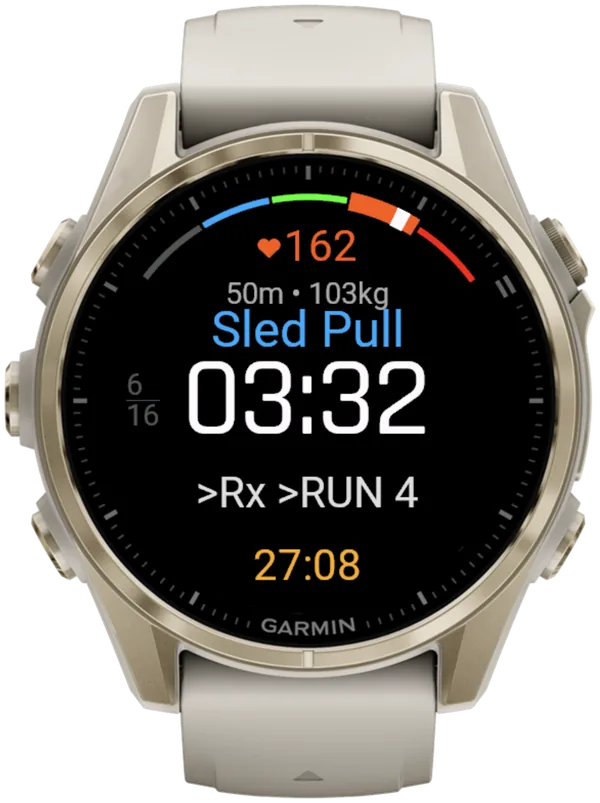
Separately, one light pulse tells you when a run reaches its target. It never moves you to the next segment.
For HYROX race day on a Garmin, Hybrid Smash's Race Day mode times every run, station and Roxzone with one LAP press per changeover, using the race format and the station targets for your weight class, and saves the race to Garmin Connect. Every press from start line to finish is in the Race Day walkthrough.
Can you undo a LAP press in Hybrid Smash by swipe or menu?
Yes. Hybrid Smash also undoes a LAP press with a swipe up or with Undo in the in-workout menu.
- Swipe up, on a touchscreen watch. With Touch Gestures on, a swipe down does the same as LAP, and a swipe up undoes.
- Undo in the in-workout menu. Press SELECT, choose Undo, then confirm.
Opening the in-workout menu doesn't pause the race clock. Mid-race, DOWN (or a swipe up with Touch Gestures on) is the one-step fix.
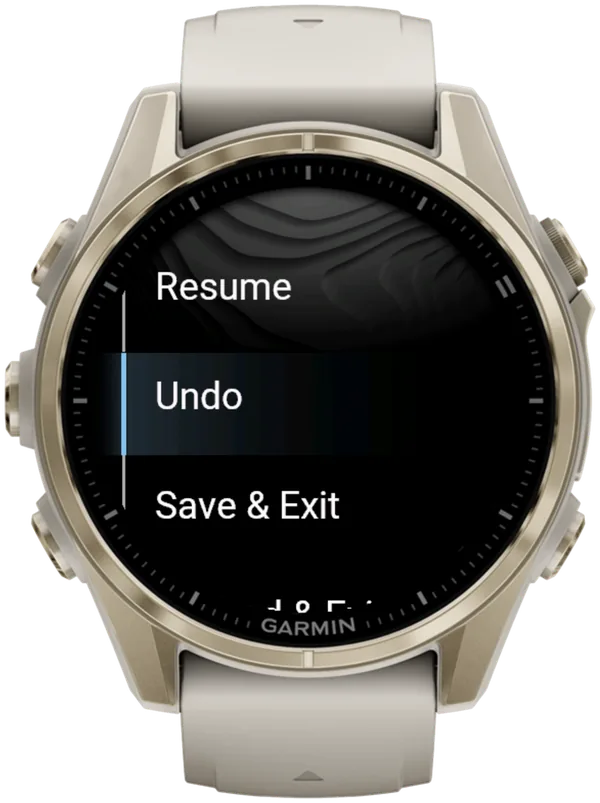
What if you pressed LAP too early at the finish in Hybrid Smash?
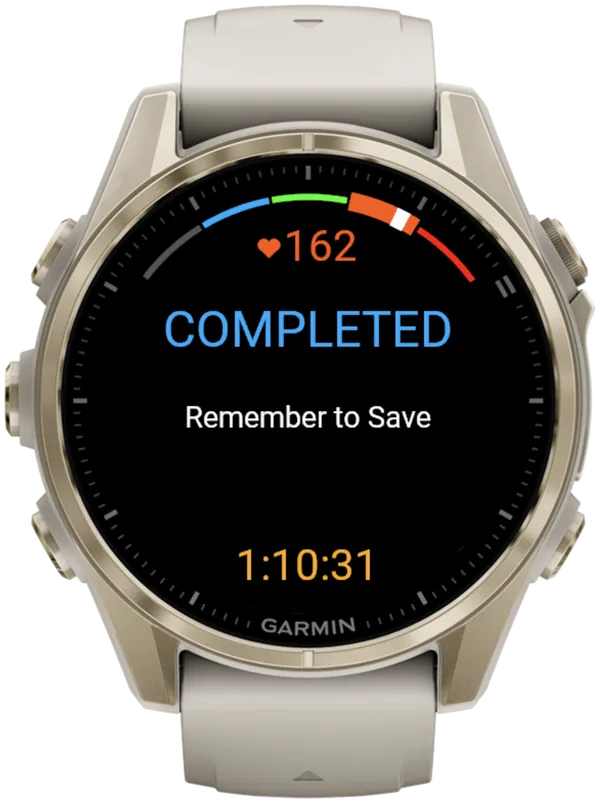
In Hybrid Smash, press DOWN on the COMPLETED screen: the last segment reopens and the workout carries on.
The LAP press that ends the last segment stops the clock and the recording. In Race Day, that segment is Wall Balls, so a stray press mid-set ends the session early.
When you finish, the watch shows COMPLETED and Remember to Save. Open the menu and choose Save & Exit. Until then nothing is saved, and a stray LAP press on this screen only opens the menu.
How do you avoid an accidental LAP press in HYROX?
Know which buttons move you on, feel for a double buzz, and turn touch off if you don't swipe.
- Know your buttons. On five-button Garmin watches, LAP is the lower-right button, shared with BACK, and DOWN is the lower-left one. In Hybrid Smash, BACK also ends a segment.
- Count the buzzes. Two buzzes at one changeover can mean a double press. Check the header, and if it's a segment ahead of you, press DOWN once.
- Spot a stray undo. A bent wrist can hit DOWN and undo a press by accident. If the header shows the segment you've just left, press LAP once.
The LAP button map shows where every press belongs in a race.
If you don't use swipes, set Touch Gestures to Off in Settings. The workout screen then ignores touch, so a sled rope or a wall ball brushing the screen can't move you on. Mid-session, the in-workout menu's Touch Toggle switches it.
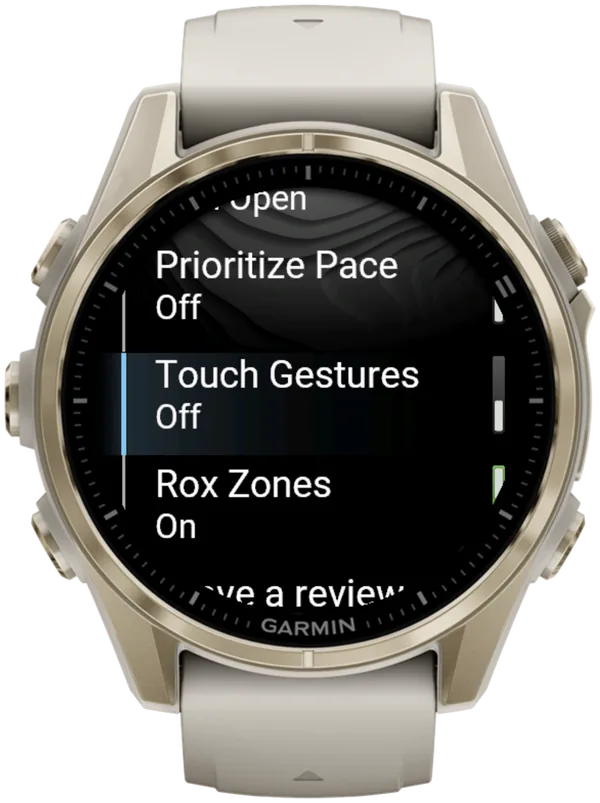
One setting changes your splits without a single press. Auto-Pause is a watch setting the app can't override. Turn it off in your watch's activity settings, for running and for the Cardio activity type, or slow stations such as the sled push can be cut from your times.
What is Hybrid Smash?
Hybrid Smash is a Garmin Connect IQ watch app that tracks and paces HYROX races, simulations and workouts while you do them. One press of the LAP button per changeover, and every run, station and Roxzone is timed, labelled and saved to Garmin Connect.
It is a one-time purchase on the Connect IQ store with no account, no subscription and no phone needed while you train. It offers Race Day (the official sequence of 8 × 1 km runs and 8 stations, with station targets for your weight class), Hyrox Sim, Free Training (pick the next station on the watch as you go), 8 ready-made HYROX workouts and 3 custom workouts.
It is built for the balance between simplicity and the right features: a clean screen, few options and a design nobody needs a tutorial for.
- Three controls run the session: LAP for the next segment, DOWN to undo a mistaken press, SELECT for the menu.
- Saved to Garmin Connect as Indoor Run, Outdoor Run or Cardio, depending on the Run Type you pick, with every segment as a lap.
- Works on most current Garmin watches, including Forerunner, fēnix, epix, Venu and vívoactive models. Check your model on the Connect IQ store.
- On screen: It has the features a HYROX athlete actually uses, from Roxzone splits and pacing to undo and Garmin Connect sync, without menus to get lost in.
FAQ
Can you go back a step in a Garmin workout?
No, according to Garmin's manuals (as of October 2026). Garmin's Forerunner 970 manual (September 2026) says LAP advances to the next workout step, and Garmin's manuals exclude workouts from lap undo. The manuals document no way back to the previous step. After an accidental press in a Garmin Connect workout, the step names on your watch are one step ahead of what you're doing.
Can you turn off the LAP button on a Garmin?
Yes, in many of Garmin's own activities. The Forerunner 970 manual (September 2026) says the Lap Key setting "Enables the [LAP] button for recording a lap or rest during an activity". It sits under Laps in an activity's settings, though not every setting appears for every activity type. Leave it on if you track HYROX with a copied activity: every changeover depends on a LAP press.
How do you fix an accidental lap in a saved HYROX activity?
Garmin's manuals describe lap undo only on the watch, within a few seconds of the LAP press. In a saved built-in activity, such as a run or a copied Cardio activity, add the stray lap's time to the lap before it: together they make your real split. Laps are numbered, not named, so every later lap number moves up by one when you match laps to stations.
What if you forgot to press LAP in Hybrid Smash?
Hybrid Smash has no automatic detection, so the watch stays on the old segment until you press LAP. Press LAP as soon as you notice, once for each segment you've missed, until the header matches where you are. The time before your late press counts toward the segment the watch was still timing. Missed presses in a built-in activity are covered in when to press LAP in HYROX.
Do other HYROX apps for Garmin have an undo?
Yes, some list one on the Connect IQ store (checked 6 October 2026). ROXZONE's listing says: "Pressed lap too early? Roll it back from the pause menu." RunLabs' Hyrox Tracker lists a "step back after an accidental tap". These are the developers' own descriptions. The HYROX apps comparison shows how each app handles undo.
What happens if Hybrid Smash closes in the middle of a race?
Hybrid Smash offers to continue. After a crash, a reboot or a flat battery, the next launch shows "In Progress" with Continue and Discard + New. The prompt needs at least one LAP press first. Continue restores your segment, lap history and settings, and the race clock includes the time the app was closed. The resumed race records as a new Garmin activity, not merged with anything recorded before.
Sources
- How can I undo a lap button press?, fēnix 8 Series Owner's Manual, Garmin, v9, September 2026. Accessed 6 October 2026.
- Button Functions, Forerunner 970 Watch Owner's Manual, Garmin, v6, September 2026. Accessed 6 October 2026.
- Activity Settings, Forerunner 970 Watch Owner's Manual, Garmin, v6, September 2026. Accessed 6 October 2026.
- HYROX Tracker: ROXZONE, ChanDigital, Connect IQ store listing, version 5.1.1. Accessed 6 October 2026.
- Hyrox Tracker, RunLabs, Connect IQ store listing, version 1.5.0. Accessed 6 October 2026.