Press your Garmin's LAP button in HYROX as you enter and leave the Roxzone, at its IN and OUT arches, to split runs from stations. To time the Roxzone too, also press as you start and finish each station. Your official splits come from the timing chip on your ankle, so these presses are for your own live splits.
Key takeaways
- To split runs from stations, press LAP at both Roxzone arches at stations 1 to 7, then at your wall-ball target.
- Your official HYROX splits come from the timing chip on your ankle, so LAP presses only give you live splits on your watch.
- In a built-in Garmin activity, 29 LAP presses between START and STOP time every run, station and Roxzone, or 15 for runs and stations only.
- Hybrid Smash's Race Day takes 32 LAP presses with Rox Zones on, or 17 with it off.
- On five-button Garmin watches, LAP is the lower-right button, which is also BACK.
When do you press the Garmin LAP button in HYROX?
Press LAP entering and leaving the Roxzone, at the IN and OUT arches, and at each station's start and finish if you want the Roxzone timed on its own.
The Roxzone is the transition area between the running course and the workout stations.
On results.hyrox.com (checked October 2026), each race replay shows four chip reads around each of stations 1 to 7:
- Roxzone IN arch: ends your run.
- Station entry: ends your time in the Roxzone.
- Station exit: ends the station.
- Roxzone OUT arch: starts your next run.
Wall Balls has no Roxzone read before it, so Run 8 ends when you reach your wall-ball target.
How official timing splits each Roxzone covers every transition in detail.
For pacing alone, one press per round is enough in a built-in activity. Press at each OUT arch, and the lap timer counts your run from there.
How many LAP presses does a HYROX race take?
A full race takes 15 or 29 LAP presses between START and STOP in a built-in Garmin activity, and 17 or 32 in Hybrid Smash's Race Day.
Hybrid Smash is a Garmin Connect IQ watch app. Connect IQ is Garmin's platform and store for third-party watch apps.
For HYROX race day on a Garmin, Hybrid Smash's Race Day mode times every run, station and Roxzone with one LAP press per changeover, using the race format and the station targets for your weight class, and saves the race to Garmin Connect.
| What you time | Where you press LAP | Built-in Garmin activity | Hybrid Smash Race Day |
|---|---|---|---|
| Runs and stations | Both Roxzone arches at stations 1 to 7, then the wall-ball target | START, 15 LAP presses, STOP: 16 laps | 17 LAP presses, Rox Zones off |
| Runs, stations and Roxzones | All four points at stations 1 to 7, then the wall-ball target | START, 29 LAP presses, STOP: 30 laps | 32 LAP presses, Rox Zones on |
In Hybrid Smash, the first LAP press ends the warm-up and the last stops the clock. With Rox Zones on, one more press enters the Roxzone after Run 8. From the official split points on results.hyrox.com (checked 5 Oct 2026) and Hybrid Smash V26.2.
So with Rox Zones off, both methods take 17 presses: in Hybrid Smash, LAP also does the jobs of START and STOP. With it on, Hybrid Smash takes one press more.
Both maps press at every Roxzone arch, so your runs line up with your official run splits, give or take your press timing.
Run 8 is the exception in Hybrid Smash with Rox Zones on. Hybrid Smash times a Roxzone before Wall Balls, but official results don't. So your watch shows a shorter Run 8 and a longer Roxzone total than results.hyrox.com, even with perfect presses.
For what the screen shows at each press, see the segment-by-segment Race Day walkthrough.
Do you need to press LAP in HYROX?
No, not for your result. Timing points read the chip on your ankle, and results.hyrox.com shows every run, every station and your Roxzone Time after the race.
Your presses are for you: live splits during the race, such as your run time since the Roxzone.
They also keep your splits in Garmin Connect. According to the5krunner (updated 3 October 2026), you get accurate timing from the organiser, but "you cannot sync their data to any sports data platform".
In a built-in activity, put Lap Time, Total Time and Heart Rate on one data screen: the5krunner suggests those three "as a minimum".
As of October 2026, Garmin has no HYROX activity type. So Hybrid Smash saves your session as Indoor Run, Outdoor Run or Cardio, depending on the Run Type you pick. Every segment is a lap, and the station name is stored with each lap.
If you'd rather not press at all, a built-in activity still records your total time and heart rate.
How to press LAP through a HYROX race, start to finish
The press points are the same with or without an app, apart from one extra Hybrid Smash press after Run 8 (step 8).
If you don't time the Roxzone, skip steps 5 and 6. In Hybrid Smash, turn Rox Zones off in Settings before you start: it can't be changed mid-race.
- Turn Auto-Pause off before race day, in your watch's activity settings for running and for the Cardio activity type. It's a watch setting Hybrid Smash can't override, and it can cut slow stations such as the sled push from your times.
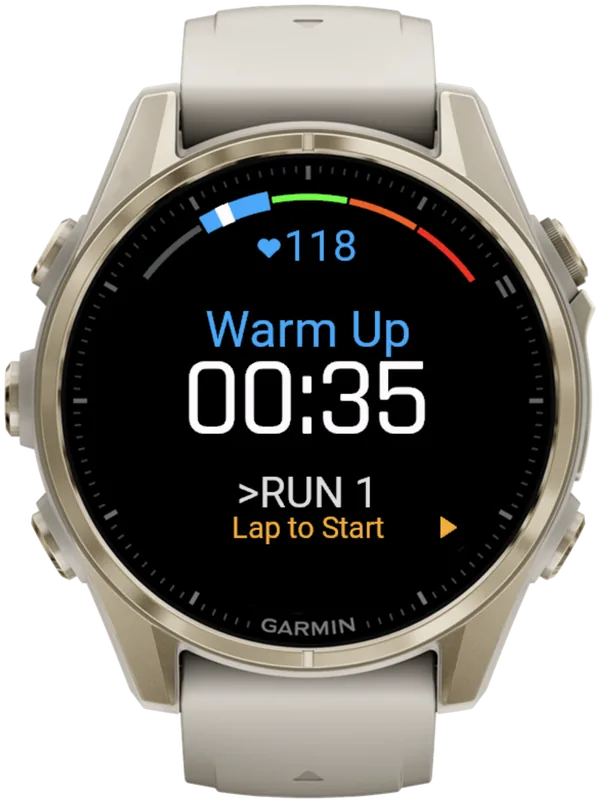
- Open your activity before the start. In Hybrid Smash, choose Race Day → View & Start and press SELECT: the warm-up screen shows "Lap to Start".
- Press as you cross the start line. That's START in a built-in activity, or LAP in Hybrid Smash, which keeps your warm-up out of race time.
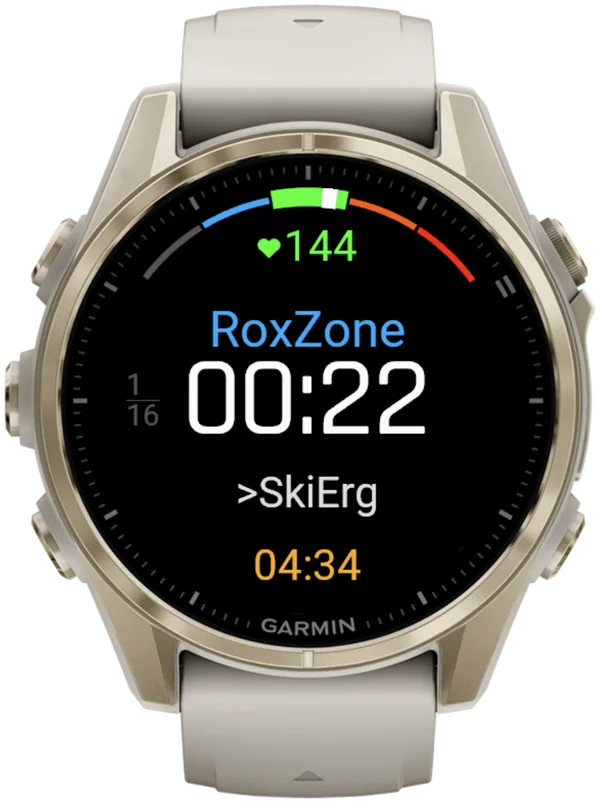
- Press LAP at the Roxzone IN arch to end your run. In Hybrid Smash, a short buzz confirms every LAP press, so you don't have to look at the watch.
- Press LAP as you reach the station to end your time in the Roxzone.
- Press LAP as you leave the station to end the station.
- Press LAP at the Roxzone OUT arch to start your next run. Repeat steps 4 to 7 at stations 1 to 7.
- After Run 8, press LAP as you reach your wall-ball target. Hybrid Smash with Rox Zones on also needs one press as you enter the Roxzone on the way.
- Press once more at the finish. That's STOP in a built-in activity, or LAP in Hybrid Smash, which stops the clock.
- Save the race. In Hybrid Smash, the watch shows "COMPLETED" and "Remember to Save": press LAP or SELECT for the menu, then choose Save & Exit.
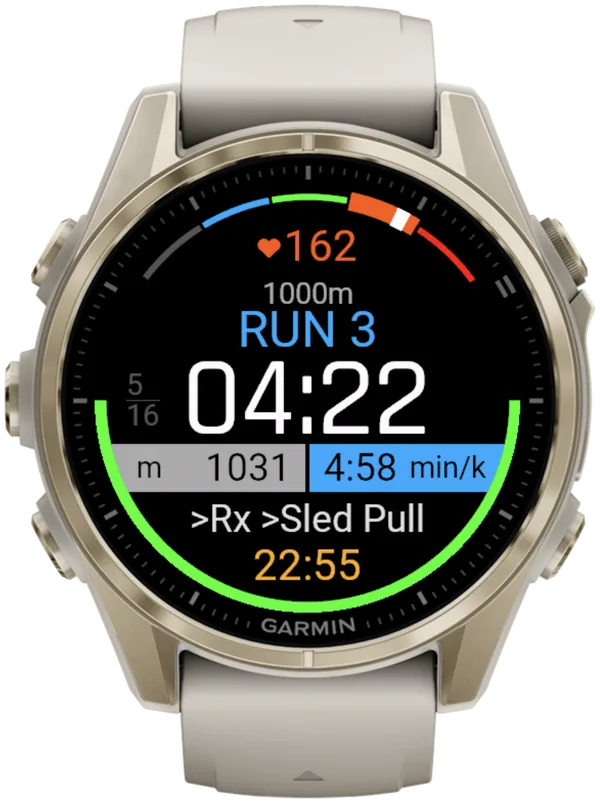
Hybrid Smash keeps the watch screen to what you need right now: what you're on, how long you've been on it, and what comes next.
Where is the LAP button on a Garmin watch?
On Garmin's five-button watches, such as the fēnix 8 and the Forerunner 965 and 970, LAP is the lower-right button, which is also BACK. The fēnix 8 manual (September 2026) says: "During an activity, press to record a lap, rest, or advance to the next workout step."
Touchscreen-first models with fewer buttons, such as Venu and vívoactive watches, use different presses: check your manual.
| Button (five-button watches) | In a built-in activity | In Hybrid Smash |
|---|---|---|
| LAP, lower right (also BACK) | Records a lap | Ends the segment and starts the next |
| START/STOP (SELECT), upper right | Starts or stops the activity | Opens the in-workout menu; the race clock keeps running |
| DOWN, lower left | Scrolls the data screens | Undoes the last LAP press, instantly |
Built-in behaviour from the fēnix 8 manual (September 2026); Hybrid Smash V26.2. Checked 6 Oct 2026.
So in a built-in activity, the press to avoid mid-race is START, because it stops the timer.
In Hybrid Smash, BACK also ends the segment, so a press meant to go back still moves you on. Know where your thumb rests, and press DOWN if it slips.
In Hybrid Smash, on a touchscreen watch, you can swipe instead. With Touch Gestures on, a swipe down does the same as LAP, and a swipe up undoes. With it off, the workout screen ignores touch.
Set it in Hybrid Smash's Settings (settings reference), or mid-race with Touch Toggle in the in-workout menu.
What if you miss a LAP press or press it twice?
In Hybrid Smash, DOWN undoes an extra press, and LAP catches up after a missed one. In a built-in activity, Garmin's lap undo lasts a few seconds and only works in some activities.
- Pressed twice: press DOWN to undo the last LAP press instantly, with no confirmation. Undo gets its own buzz, and so does the finish.
- Missed a press: press LAP until the header names the segment you're actually on. The segment you stayed on too long keeps the extra time, and your race total doesn't change.
Pressed LAP too early at the end? Press DOWN on the COMPLETED screen: the last segment reopens and the workout carries on.
In a built-in activity, laps are numbered, not named, so an extra or missed press shifts every lap after it. A run activity shows an undo option for a few seconds in most cases.
The fēnix 8 manual (September 2026) says lap undo isn't available in gym activities or workouts, and Cardio is a gym activity. Each method's fix is in how to undo a mistaken LAP press.
Can a Garmin detect HYROX stations automatically?
No. As of October 2026, Garmin has no HYROX mode, and no Garmin activity detects HYROX stations. Auto Lap marks laps by distance or position, and Obstacle Racing switches only at obstacle locations saved on a first loop.
Hybrid Smash doesn't detect stations automatically: you press LAP at every changeover. The app already knows what comes next, so each press closes one segment and names the next.
Separately, one light pulse tells you when a run reaches its target. It never ends the run: the segment carries on until you press LAP.
What is Hybrid Smash?
Hybrid Smash is a Garmin Connect IQ watch app that tracks and paces HYROX races, simulations and workouts while you do them. One press of the LAP button per changeover, and every run, station and Roxzone is timed, labelled and saved to Garmin Connect.
It is a one-time purchase on the Connect IQ store with no account, no subscription and no phone needed while you train. It offers Race Day (the official sequence of 8 × 1 km runs and 8 stations, with station targets for your weight class), Hyrox Sim, Free Training (pick the next station on the watch as you go), 8 ready-made HYROX workouts and 3 custom workouts.
It is built for the balance between simplicity and the right features: a clean screen, few options and a design nobody needs a tutorial for.
- Three controls run the session: LAP for the next segment, DOWN to undo a mistaken press, SELECT for the menu.
- Saved to Garmin Connect as Indoor Run, Outdoor Run or Cardio, depending on the Run Type you pick, with every segment as a lap.
- Works on most current Garmin watches, including Forerunner, fēnix, epix, Venu and vívoactive models. Check your model on the Connect IQ store.
- On race day: Race Day locks the race format; you only choose your target pace and Run Type.
FAQ
Where is the Lap Key setting on a Garmin?
Lap Key sits in an activity's settings, though not every activity offers every setting. In the September 2026 fēnix 8 and Forerunner 970 manuals, press START → Activities → your activity → DOWN → Laps → Lap Key. In the Forerunner 965 manual (April 2026), hold UP (MENU) → Activities & Apps → your activity → Lap Key. Wording can differ by model and firmware. See all the race settings, step by step.
Why doesn't my Garmin LAP button record a lap?
The Garmin LAP button may have Lap Key turned off, or the activity may use LAP for something else. Garmin's fēnix 8 manual (September 2026) says LAP can record a lap, start a rest or advance to the next workout step. In Strength it ends a set, and in a Garmin Connect workout it moves to the next step. Check that Lap Key is on in the activity you race with, and test it before race day.
Can you set up Auto Lap for HYROX stations?
No. Garmin's Auto Lap splits by distance or by position, not at the timing mats, so it can't tell a run from a station. HYROX runs are only approximately 1 km, laid out in venue laps, and indoor watch distance is an estimate. Turn Auto Lap off in the activity you race with, and press LAP yourself. Read why 1 km Auto Laps don't line up.
Should you press LAP at the end of every venue lap?
No. Your LAP presses mark HYROX changeovers, not laps of the running course. In Hybrid Smash, every press moves you to the next segment, so a press per venue lap would put the watch out of step. The HYROX 26/27 Singles rulebook (version of 14 September 2026) says racers count their own laps. Here's how to count your venue laps.
Sources
- HYROX official results, HYROX (timing by mika:timing), workout summary and race replay pages. Accessed 5 October 2026.
- setup Hyrox on your Garmin Watch: everything you need to know about HYROX Sports Tech, the5krunner, updated 3 October 2026. Accessed 6 October 2026.
- Button Functions, Garmin, fēnix 8 Series Owner's Manual. Accessed 6 October 2026.
- How can I undo a lap button press?, Garmin, fēnix 8 Series Owner's Manual. Accessed 6 October 2026.
- HYROX Singles Rulebook 26/27 (EN), HYROX, version of 14 September 2026. Accessed 5 October 2026.