A Garmin HYROX setup needs four settings in the activity you record with: Auto Pause off, Lap Key on, Auto Lap off and, indoors, GPS off. As of October 2026, no Garmin watch has a HYROX mode. You press LAP at every run, station and Roxzone, and a Connect IQ app can name each split for you.
Key takeaways
- Garmin's Auto Pause stops recording below a set speed, which can cut a slow Sled Push out of your times.
- Auto Lap by distance won't match HYROX runs, which are timed between mats and are only approximately 1 km.
- Power Save Timeout on Extended waits 25 minutes before low-power mode instead of 5, which helps in a long start-tunnel queue.
Is there a Garmin HYROX setting?
No. As of October 2026, no Garmin watch has a HYROX activity, profile or mode, so there's no setting to switch on. Our dated fact-check on a Garmin HYROX mode has the evidence.
Instead, you set up the activity you record with. That's either a Connect IQ app or one of Garmin's own activities, such as a copy of Cardio named HYROX.
Connect IQ is Garmin's platform and store for third-party watch apps, data fields and watch faces. To pick a route, see every way to track HYROX on a Garmin, compared.
| Claim seen online | Fact | Source |
|---|---|---|
| Garmin has an official HYROX profile | No Garmin watch has a HYROX activity, profile or mode | Garmin manuals, Sep 2026 |
| Set Auto Lap to every 1 km for HYROX | Runs are only approximately 1 km and are timed between mats, so turn Auto Lap off | HYROX 26/27 Singles rulebook §7.2 |
| You can undo a wrong LAP press on any activity | Garmin's lap undo isn't available in gym activities or workouts | fēnix 8 and Forerunner 970 manuals |
Common setup claims and the facts that correct them. Checked 5 Oct 2026.
The last row matters for the no-app route, because Cardio is one of Garmin's gym activities.
Which settings matter in a Garmin HYROX setup?
Four activity settings do the main work, and two more help on race day.
| Setting | Set it to | Why it matters for HYROX |
|---|---|---|
| Auto Pause | Off | Slow station work can drop out of your times |
| Lap Key | On | LAP must record a lap to split each run, station and Roxzone |
| Auto Lap | Off | Your LAP presses set the splits |
| Satellites (GPS) | Off indoors, or use an indoor activity | Indoor halls block GPS |
| Power Save Timeout | Extended | Keeps the watch awake through a long start-tunnel wait |
| Chest strap or footpod | Paired, if you own one | The watch uses chest heart rate when both are available |
Setting names from Garmin's fēnix 8, Forerunner 570 and 970 (Sep 2026) and Forerunner 965 (Apr 2026) manuals; wording varies by model and firmware. Checked 5 Oct 2026.
Turn off everything that pauses or laps on its own, and leave LAP in charge. You press it at every run, station and Roxzone, the transition area between the running course and the stations.
Which data screens to show for HYROX is a separate choice.
How to set up your Garmin for HYROX
Change these settings on the activity you'll record with. As of October 2026, Garmin's current five-button watches use two menu styles:
- Newer menu: fēnix 8, Forerunner 570 and Forerunner 970 (manuals of September 2026).
- Older menu: Forerunner 965 (manual of April 2026).
START is upper-right, UP (MENU) middle-left and DOWN lower-left. If your watch isn't listed, or is a Venu or vívoactive, find the same settings on your manual's Activity Settings page.
If you use a Connect IQ app, do steps 1 and 2 for your running activities and for Cardio. Steps 3 to 6 are for Garmin's own activities.
-
Open the activity's settings.
- Newer menu: START → Activities → pick the activity → DOWN.
- Older menu: hold UP (MENU) → Activities & Apps → pick the activity.
-
Turn Auto Pause off. Select Auto Pause → Off.
The fēnix 8 manual says Auto Pause stops "recording data when you stop moving or when you drop below a specified speed". A heavy Sled Push can look like that to the watch.
-
Turn the Lap Key on.
- Newer menu: Laps → Lap Key.
- Older menu: Lap Key.
-
Turn Auto Lap off. Select Laps → Auto Lap → Off.
The HYROX 26/27 Singles rulebook (§7.2, version of 14 September 2026) describes runs of "approximately" 1,000 m in venue-specific laps. Official splits are timed between mats, so distance laps drift away from your changeovers.
-
Turn GPS off for an indoor venue. On an outdoor activity such as Run, select Satellites → Off. Indoor activities such as Treadmill and Indoor Track already have it off: Garmin's manuals say "GPS is turned off for indoor activities".
A Garmin staff reply on the Garmin Forums (22 May 2025) gave the same advice for HYROX, "since it looks like most of them are indoors". With GPS off, the wrist accelerometer estimates indoor pace and distance.
-
Set Power Save Timeout to Extended for race day.
- Newer menu: Power Save Timeout → Extended.
- Older menu: check your manual for this setting.
The Forerunner 970 manual gives 5 minutes before low-power mode on Normal, and 25 minutes on Extended.
-
Pair your chest strap or footpod.
- Newer menu: hold UP (MENU) → Watch Settings → Connectivity → Sensors & Accessories → Add New.
- Older menu: hold UP (MENU) → Sensors & Accessories → Add New.
Then choose Search All, or pick the sensor type. Do this once at home, not in the start tunnel.
-
Rehearse it in a gym session. Record a short run-and-station session, press LAP at every changeover and check the laps in Garmin Connect.
What do you set up in Hybrid Smash?
Hybrid Smash needs three settings. There are no setup questions when you start: each one sits in a menu and shows its current value.
- Weight Class, once: main menu → Settings → Weight Class. It sets the station weights and the Wall Balls target for your division, with 100 reps in every class.
- Run Type, per workout: Indoor, Outdoor or Cardio. Indoor is the default in Race Day, Hyrox Sim and the 8 ready-made workouts.
- Rox Zones, left on (the default), so each Roxzone is timed as its own segment.
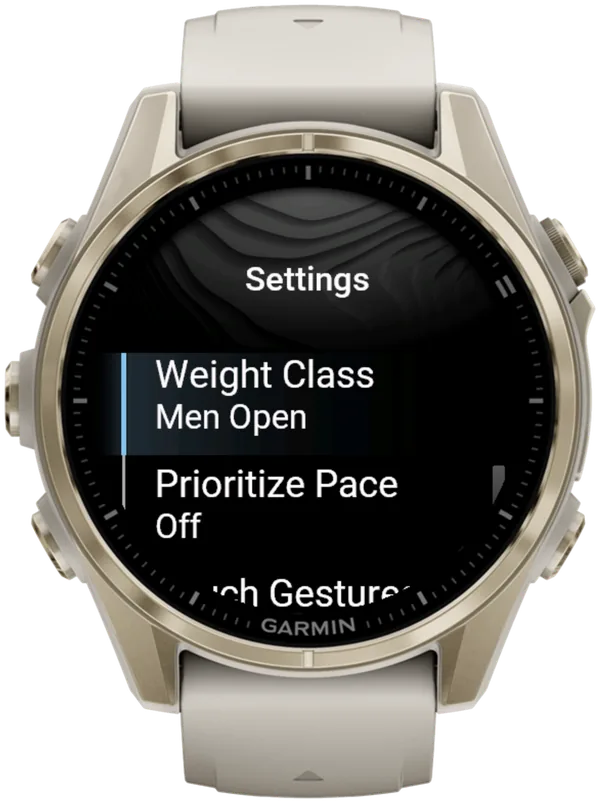
GPS follows the Run Type: Indoor and Cardio use none, Outdoor turns it on. On a treadmill, use Indoor; there's no Treadmill Run Type.
On Indoor, pace and distance are estimates from the wrist sensor. A paired footpod gives more reliable indoor pace.
You press LAP at every changeover. A short buzz confirms every LAP press, so you don't have to look at the watch.
Auto Pause is a watch setting Hybrid Smash can't override, so steps 1 and 2 still matter. The settings reference in the user guide explains each option.
Hybrid Smash keeps the watch screen to what you need right now: what you're on, how long you've been on it, and what comes next.
What is Hybrid Smash?
Hybrid Smash is a Garmin Connect IQ watch app that tracks and paces HYROX races, simulations and workouts while you do them. One press of the LAP button per changeover, and every run, station and Roxzone is timed, labelled and saved to Garmin Connect.
It is a one-time purchase on the Connect IQ store with no account, no subscription and no phone needed while you train. It offers Race Day (the official sequence of 8 × 1 km runs and 8 stations, with station targets for your weight class), Hyrox Sim, Free Training (pick the next station on the watch as you go), 8 ready-made HYROX workouts and 3 custom workouts.
It is built for the balance between simplicity and the right features: a clean screen, few options and a design nobody needs a tutorial for.
- Three controls run the session: LAP for the next segment, DOWN to undo a mistaken press, SELECT for the menu.
- Saved to Garmin Connect as Indoor Run, Outdoor Run or Cardio, depending on the Run Type you pick, with every segment as a lap.
- Works on most current Garmin watches, including Forerunner, fēnix, epix, Venu and vívoactive models. Check your model on the Connect IQ store.
FAQ
What Garmin settings should I use for a HYROX race?
Use four settings on the activity you race with: Auto Pause off, the Lap Key on, Auto Lap off and GPS off if the venue is indoors. Add Power Save Timeout on Extended if you expect a long wait before your wave.
Why did my Garmin pause during a HYROX station?
Auto Pause did it. Garmin's Auto Pause stops recording "when you stop moving or when you drop below a specified speed", and a heavy Sled Push can look like that to the watch. Turn it off in the settings of each activity you record with, including Cardio.
Do I need a chest strap for HYROX on a Garmin?
No, but a chest strap is likely to give more reliable heart rate at the stations. Garmin's fēnix 8 manual says the watch uses chest heart rate when chest and wrist data are both available.
SkiErg, Rowing, Sled Pull, Farmers Carry and Wall Balls load the grip and wrist, so wrist readings there are likely the least reliable. Hybrid Smash uses your watch's heart-rate source, including a paired chest strap.
Sources
- Forerunner 965 Owner's Manual (PDF), Garmin, April 2026. Accessed 5 October 2026.
- fēnix 8 Series Owner's Manual, Garmin, v9, September 2026 (Activity Settings, Pairing Your Wireless Sensors, Wrist Heart Rate, lap undo). Accessed 5 October 2026.
- HYROX Singles Rulebook 26/27 (EN), HYROX, version of 14 September 2026. Accessed 5 October 2026.
- "Hyrox Mode on 970?", Garmin staff reply, Garmin Forums, 22 May 2025. Accessed 5 October 2026.
- Forerunner 970 Watch Owner's Manual, Activity Settings, Garmin, September 2026. Accessed 5 October 2026.
- Forerunner 570 Owner's Manual, Garmin, v6, September 2026. Accessed 5 October 2026.