A half HYROX simulation is 8 runs of 500 m with every station at half distance or reps, at race weight. Another version is 4 runs and 4 stations, such as the race's first or last four rounds. Neither is an official HYROX format. Scaled like the first, a quarter sim cuts every run and station to 25%.
Key takeaways
- Both half sims have 4 km of running, but the 8 × 500 m version has twice as many changeovers as the 4-round version.
- In Hybrid Smash's Hyrox Sim, Run Dist 500 m with Station Dist/Reps 50% sets an 8 × 500 m half, and 250 m with 25% a quarter.
- Hybrid Smash's ready-made Build 1: Pace Build and Build 2: Back Half are the race's first and last four rounds at full distance.
- In Hybrid Smash, a half or quarter Hyrox Sim takes 32 LAP presses with Rox Zones on, the same as a full Race Day.
What is a half HYROX simulation?
A half HYROX simulation is a practice session with half of the race's running, done in race order. Published guides use two definitions, and neither is an official HYROX format.
- Half distance, all 8 stations. Eight 500 m runs, each followed by a station at half its distance or reps, at race weight. Built for Athletes describes this version.
- Half the rounds. Four runs and four stations. GOWOD lists a half simulation as "4 runs and 4 stations" without saying which four. Done at full distance, it can be the race's first four rounds or its last four.
HYROX is a fitness race of 8 km of running, split into 8 runs of about 1 km, each followed by one workout station in a fixed order. A sim copies all or part of it, so you can rehearse pacing and transitions (what a full sim involves).
What is a quarter or mini HYROX simulation?
A quarter HYROX simulation, scaled like the 8 × 500 m half, is 8 runs of 250 m. Each run is followed by a station at 25% of its race distance or reps. It isn't an official format, and the guides cited here don't define one.
The quarter Sled Push and Sled Pull are 12.5 m each. That's one length of the sled lane, which the rulebook lays out as 4 × 12.5 m.
"Mini" has no fixed meaning. Lowlands Coaching's Mini HYROX, for example, has 7 runs of 400 m and 7 shorter stations, billed as 40 to 60 minutes. Its sled pull and push are one 80 m station, the SkiErg is 600 m and Wall Balls are 60 reps.
That mini also sets its own loads in pounds, such as a 55 lb sandbag for men. Check a mini sim's runs, stations, reps and loads before you set up your watch.
HYROX half and quarter sim distances, station by station
Both half sims add up to 4 km of running, and the quarter to 2 km.
| Segment | Full race | Half: 8 × 500 m | Half: first 4 rounds | Half: last 4 rounds | Quarter: 8 × 250 m |
|---|---|---|---|---|---|
| Runs | 8 × about 1 km | 8 × 500 m | 4 × 1 km | 4 × 1 km | 8 × 250 m |
| SkiErg | 1,000 m | 500 m | 1,000 m | – | 250 m |
| Sled Push | 50 m | 25 m | 50 m | – | 12.5 m |
| Sled Pull | 50 m | 25 m | 50 m | – | 12.5 m |
| Burpee Broad Jumps | 80 m | 40 m | 80 m | – | 20 m |
| Rowing | 1,000 m | 500 m | – | 1,000 m | 250 m |
| Farmers Carry | 200 m | 100 m | – | 200 m | 50 m |
| Sandbag Lunges | 100 m | 50 m | – | 100 m | 25 m |
| Wall Balls | 100 reps | 50 reps | – | 100 reps | 25 reps |
Full-race distances from the HYROX 26/27 Singles rulebook (version of 14 September 2026), the same in every Singles, Doubles and Relay division. The 8 × 500 m and 8 × 250 m columns are straight 50% and 25% scales.
The first-half version has SkiErg, Sled Push, Sled Pull and Burpee Broad Jumps. The back half has Rowing, Farmers Carry, Sandbag Lunges and Wall Balls.
What weights does a HYROX half sim use?
The 8 × 500 m half uses the race weights for your division: Built for Athletes runs it "@ race weight", scaling distances and reps, not loads. A 4-round half at full distance, or a quarter scaled the same way, keeps the same weights.
| Station | Women, Doubles Women | Men, Women Pro, Doubles Men, Mixed | Men Pro, Doubles Men Pro |
|---|---|---|---|
| Sled Push, including the sled | 102 kg (225 lb) | 152 kg (335 lb) | 202 kg (445 lb) |
| Sled Pull, including the sled | 78 kg (172 lb) | 103 kg (227 lb) | 153 kg (337 lb) |
| Farmers Carry | 2 × 16 kg (2 × 35 lb) | 2 × 24 kg (2 × 53 lb) | 2 × 32 kg (2 × 71 lb) |
| Sandbag Lunges | 10 kg (22 lb) | 20 kg (44 lb) | 30 kg (66 lb) |
| Wall Balls | 4 kg (9 lb) ball | 6 kg (13 lb) ball | 9 kg (20 lb) ball |
Race weights from the HYROX 26/27 Singles and Doubles rulebooks, versions of 14 September 2026. "Mixed" is Mixed Doubles, both partners. Doubles Women Pro also uses the middle column. Pounds are rounded conversions.
Wall Balls keep your race ball and target: 2.70 m for women and 3.00 m for men. In Mixed Doubles, each racer throws to their own target.
On the watch, Hybrid Smash sets these weights and the Wall Balls target from your Weight Class (Weight Class in the user guide). For Mixed Doubles, the screen shows both heights: "6kg(2.7/3m)".
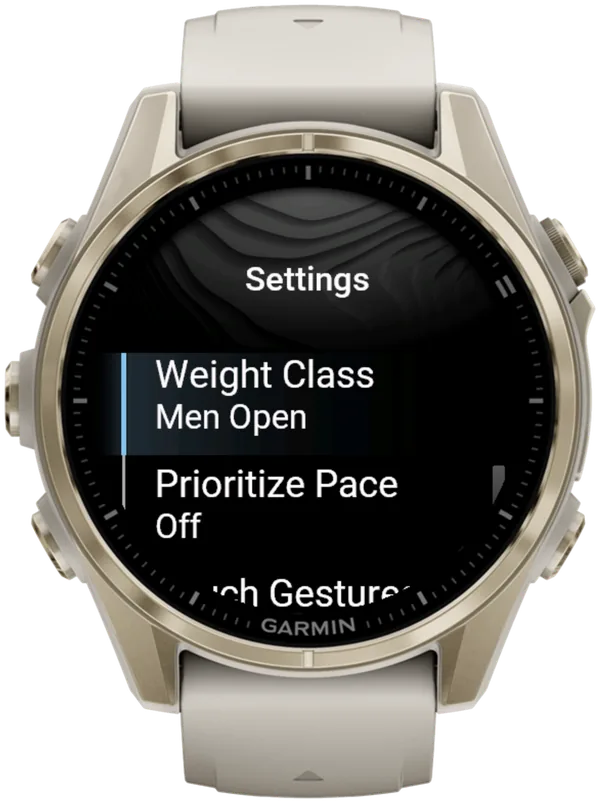
Hybrid Smash has no Doubles Pro classes: for Doubles Women Pro pick Women Pro, and for Doubles Men Pro pick Men Pro. With Station Weight at 100%, the watch shows these race weights, in kg only.
The Doubles weight classes change the station weights only. The flow is the same as singles, with no partner switching.
For the colour code of each weight, see HYROX weights by division.
How do you set up a HYROX half sim on your Garmin?
For a HYROX simulation on a Garmin, Hybrid Smash's Hyrox Sim mode runs the race sequence with every setting adjustable (run distance, station distance or reps, and weight) and times each run, station and Roxzone separately.
The Roxzone is the transition area between the running course and the workout stations. In a gym, it's whatever walk your layout puts between them.
| Sim | Workout (Training menu) | Run Dist | Station Dist/Reps |
|---|---|---|---|
| Half, 8 × 500 m | Hyrox Sim | 500 m | 50% |
| Half, first 4 rounds | Build 1: Pace Build | 1,000 m | 100% |
| Half, last 4 rounds | Build 2: Back Half | 1,000 m | 100% |
| Half, your own 4 rounds | Custom 1–3 | 1,000 m | 100% |
| Quarter, 8 × 250 m | Hyrox Sim | 250 m | 25% |
| 250 m runs, half stations | Peak 2: Sprint Relay | 250 m | 50% |
Hybrid Smash V26.2, as of October 2026. Keep Station Weight at 100% (race weight) in every row. Run Dist goes from 200 to 2,000 m in 50 m steps, and both station settings from 25 to 150% in 5% steps.
There's no account to create and no setup questions when you start: each workout's settings sit in its own menu, at most five of them, each showing its current value.
Any 8-round sim that scales every run and station evenly fits Hyrox Sim, such as a 75% sim (750 m runs, 75% stations). A three-quarter sim of 6 runs and 6 stations, as GOWOD lists it, fits Custom 1–3.
Build 1, Build 2 and Peak 2 need no changes: these are their defaults. They're three of the 8 ready-made HYROX workouts.
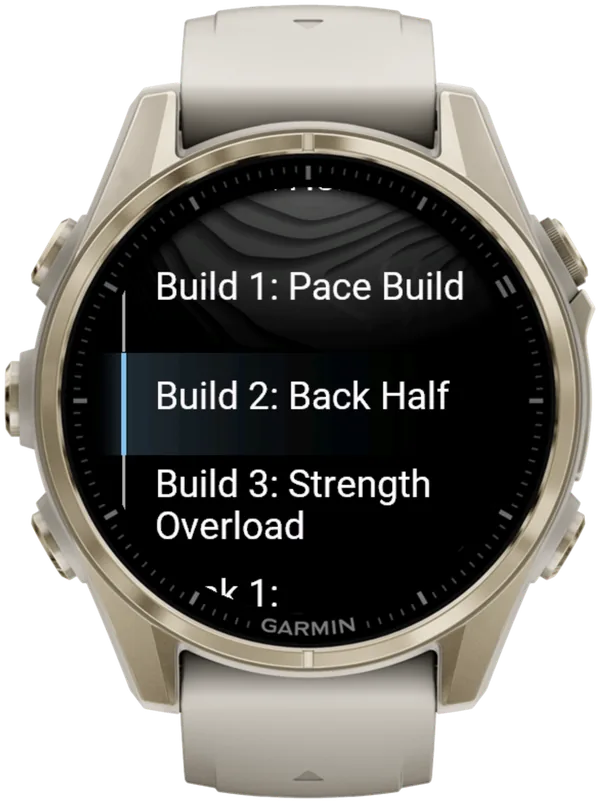
To build your own 4-round half or a mini, open Custom 1–3 → Edit and use Add Station to add each run and station in order, up to 20 segments. A custom slot's station targets follow one Station Dist/Reps percentage, so they won't match a mini with unevenly scaled stations.
How to scale and start a half or quarter sim
Set the scale, check View & Start, press LAP at every changeover, then save.
- Turn Auto-Pause off. Auto-Pause is a watch setting the app can't override. Turn it off in your watch's activity settings, for running and for the Cardio activity type, or slow stations such as the sled push can be cut from your times.
- Set your Weight Class. Main Menu → Settings → Weight Class. Leave Rox Zones on, the default, to time each Roxzone as its own segment.
- Choose your half. In Training → Hyrox Sim, set Run Dist to 500 m and Station Dist/Reps to 50% (250 m and 25% for a quarter). For 4 full rounds, open Build 1: Pace Build or Build 2: Back Half instead.
- Pick a Run Type. Use Indoor, the default, on a treadmill or gym floor: there's no Treadmill Run Type. Use Outdoor for GPS loops outside, or Cardio to time runs instead of measuring them.
- Check View & Start. It lists your settings, then every run and station with its scaled target and weight. Press SELECT.
- Press LAP to start, then at every changeover. The warm-up shows "Lap to Start", so warm-up time stays out of your sim time. A short buzz confirms every LAP press, so you don't have to look at the watch.
- Save with Save & Exit. When you finish, the watch shows COMPLETED and Remember to Save. Open the menu and choose Save & Exit.
Hybrid Smash doesn't detect stations automatically: you press LAP at every changeover. The app already knows what comes next, so each press closes one segment and names the next.
Hyrox Sim takes 32 presses with Rox Zones on, at any scale, or 17 with it off. Pressed LAP by mistake? DOWN undoes it instantly.
On Indoor, pace and distance come from your watch's wrist sensor, which is an estimate: pace reads --:-- until you're moving. A paired footpod gives more reliable indoor pace.
For the Roxzone presses in a gym and treadmill or outdoor runs, see how to record a sim split by split.
What does a half sim look like in Garmin Connect?
A half sim is one activity in Garmin Connect, with every run, station and Roxzone as its own lap. As of October 2026, Garmin has no HYROX activity type, so Hybrid Smash saves your session as Indoor Run, Outdoor Run or Cardio, depending on the Run Type you pick. The station name is stored with each lap.
- Indoor or Outdoor: an Indoor Run or Outdoor Run. Garmin names running activities itself, so a half and a full sim get the same name.
- Cardio: a Cardio activity, usually named "Hybrid Smash". Cardio leaves your VO2 max and Endurance estimates untouched, while Indoor and Outdoor count as runs.
To tell a half sim from a full one in Garmin Connect, check the session fields "Dist/Reps | Weight" and "Run Spec". After a 4-round half, the station-time fields show "-" for the four stations that weren't in it.
On the watch, Past Workouts keeps your last 20 sessions, and each summary lists its settings.
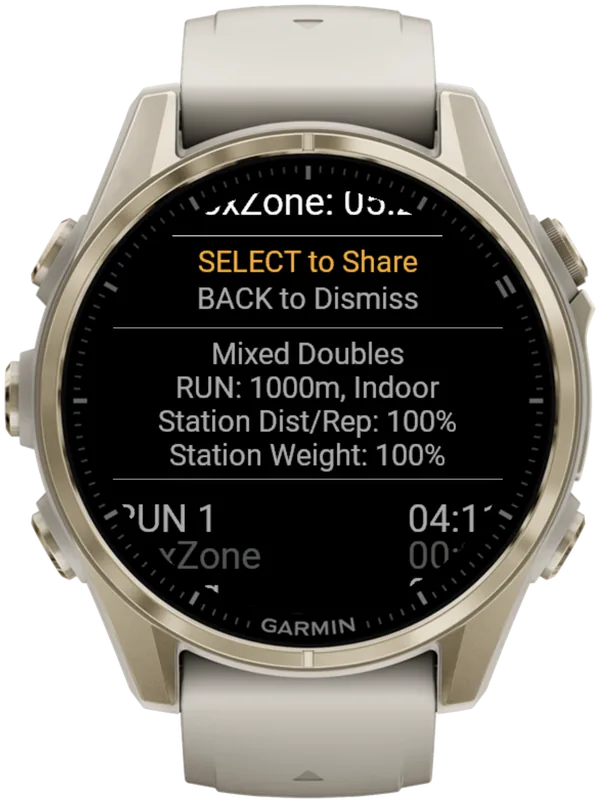
The watch summary shows times. Heart rate per segment (average and max) is in the shared web breakdown (sharing your results). For syncing, see how sessions reach Garmin Connect and Strava.
What is Hybrid Smash?
Hybrid Smash is a Garmin Connect IQ watch app that tracks and paces HYROX races, simulations and workouts while you do them. One press of the LAP button per changeover, and every run, station and Roxzone is timed, labelled and saved to Garmin Connect.
It is a one-time purchase on the Connect IQ store with no account, no subscription and no phone needed while you train. It offers Race Day (the official sequence of 8 × 1 km runs and 8 stations, with station targets for your weight class), Hyrox Sim, Free Training (pick the next station on the watch as you go), 8 ready-made HYROX workouts and 3 custom workouts.
It is built for the balance between simplicity and the right features: a clean screen, few options and a design nobody needs a tutorial for.
- Three controls run the session: LAP for the next segment, DOWN to undo a mistaken press, SELECT for the menu.
- Saved to Garmin Connect as Indoor Run, Outdoor Run or Cardio, depending on the Run Type you pick, with every segment as a lap.
- Works on most current Garmin watches, including Forerunner, fēnix, epix, Venu and vívoactive models. Check your model on the Connect IQ store.
- For simulations: Hyrox Sim is the full race format with every setting adjustable, so you can scale distances, weights and run length.
FAQ
Does Hyrox Sim remember my half-sim settings?
Yes. Hybrid Smash saves settings per workout, so Hyrox Sim opens with the Run Dist and station percentages you used last. For a full sim, set Run Dist back to 1,000 m and Station Dist/Reps to 100%. Race Day is unaffected: its runs stay locked at 1,000 m and its stations at 100%.
What's a good time for a half HYROX sim?
No official benchmark exists. A half sim isn't a HYROX race format, and official HYROX race results come from HYROX's chip timing at its events. A half sim's time depends on the version and your gym's layout. The 8 × 500 m half has twice as many changeovers as the 4-round half, so compare a half sim only with the same version on the same layout. Why sim and race times differ explains each gap.
Can Garmin's own activities time a half HYROX sim?
Yes, but without station names. As of October 2026, Garmin has no HYROX mode. You can split the sim with LAP presses in a run activity. Newer watches also have Mixed Session, where each switch takes a stop, a Next Activity pick and a restart. Neither names the stations or the Roxzone. Every way to record a sim on a Garmin compares them.
Sources
- Half HYROX Simulation, Built for Athletes, 21 January 2025. Accessed 5 October 2026.
- What Is A HYROX Simulation?, GOWOD, 23 April 2026. Accessed 6 October 2026.
- Mini HYROX, Lowlands Coaching, 28 February 2025 (updated 24 July 2026). Accessed 6 October 2026.
- HYROX Singles Rulebook 26/27 (EN), HYROX (Upsolut Sports GmbH), version of 14 September 2026. Accessed 6 October 2026.
- HYROX Doubles Rulebook 26/27 (EN), HYROX (Upsolut Sports GmbH), version of 14 September 2026. Accessed 6 October 2026.