You don't need a HYROX Garmin workout download for Hybrid Smash, a Garmin Connect IQ watch app. Its 8 ready-made HYROX workouts are built in, under the app's Training menu. As of October 2026, Garmin itself has no HYROX mode. Without an app, you build the workout in Garmin Connect and send it to your watch.
Key takeaways
- Hybrid Smash's 8 ready-made HYROX workouts install with the app, so there's no workout file to download, import or sync.
- In Hybrid Smash, all 8 start on Run Type Indoor and Run Pace 5:00/km, and the watch remembers your changes per workout.
- Hybrid Smash's Build 3: Strength Overload has no runs, so it always saves to Garmin Connect as Cardio, whatever its Run Type.
Can you download a HYROX workout to your Garmin?
Yes. Without a HYROX mode on the watch, a HYROX workout reaches your Garmin in one of two ways:
- From Garmin Connect. You find or create a workout in Training & Planning → Workouts and select Send to Device. Garmin's manual says these workouts can "include goals for each workout step and for varied distances, times, and calories" (Forerunner 970 manual).
- Inside a Connect IQ app. Connect IQ is Garmin's platform and store for third-party watch apps, data fields and watch faces.
On newer watches, a Garmin Connect workout then sits under the activity's Training → Workout Library. The same manual says lap undo isn't available in workouts, so a wrong LAP press can't be taken back.
Hybrid Smash is the second kind. It needs no phone app, and DOWN undoes a wrong LAP press instantly. The other routes are compared in every way to run a HYROX workout on a Garmin.
Some Connect IQ apps sync workouts you build in their phone app instead. ROXFIT does, and its Connect IQ listing also mentions built-in Presets (checked 6 October 2026). HYROX apps for Garmin compared covers the rest.
What are the 8 ready-made HYROX workouts?
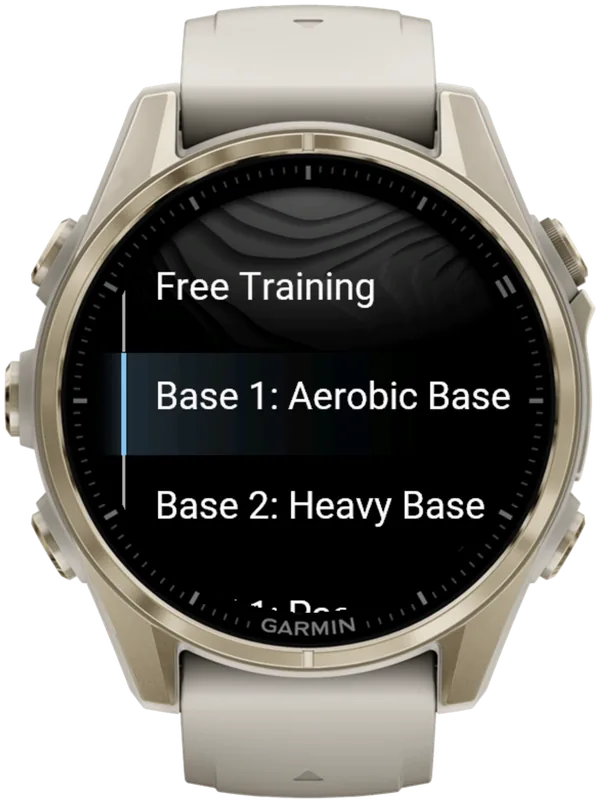
Hybrid Smash's 8 ready-made HYROX workouts are fixed sequences of HYROX stations that you run on your watch, seven of them with runs. Each has its own default station scaling and, where it has runs, its own run distance.
The names start with Base, Build, Peak and Taper, but the app doesn't schedule them: you can run any of them on any day.
| Workout | Stations | Runs | Station Dist/Reps | Station Weight |
|---|---|---|---|---|
| Build 1: Pace Build | SkiErg, Sled Push, Sled Pull, Burpee Broad Jumps | 4 × 1,000 m | 100% | 100% |
| Build 2: Back Half | Rowing, Farmers Carry, Sandbag Lunges, Wall Balls | 4 × 1,000 m | 100% | 100% |
| Peak 1: Compromised Run | Sled Push, Sled Pull, Sandbag Lunges, Wall Balls | 4 × 1,500 m | 100% | 100% |
| Base 2: Heavy Base | Sled Push, Sled Pull, Farmers Carry, Wall Balls | 3 × 800 m | 40% | 70% |
| Build 3: Strength Overload | All 8, in race order | None | 50% | 120% |
| Peak 2: Sprint Relay | All 8, in race order | 8 × 250 m | 50% | 100% |
| Base 1: Aerobic Base | SkiErg, Burpee Broad Jumps, Rowing, Sandbag Lunges | 3 × 600 m | 40% | 60% |
| Taper 1: Flow Flush | SkiErg, Rowing, Sled Push, Wall Balls | 4 × 500 m | 25% | 50% |
Defaults in Hybrid Smash V26.2, checked 6 Oct 2026. All 8 start on Run Type Indoor and Run Pace 5:00/km.
Of the 8, only Base 1 and Build 2 need no sled.
Station Dist/Reps and Station Weight scale the race targets for your Weight Class. At 100%, each station has its race distance or reps, as in the HYROX 26/27 Singles rulebook (version of 14 September 2026). Weights follow your class (HYROX weights by division).
With Rox Zones on, the default, a Roxzone segment sits between every two segments, with none after the last. The Roxzone is the transition area between the running course and the workout stations.
Which ready-made HYROX workouts keep full race station targets?
In Hybrid Smash, Build 1, Build 2 and Peak 1 keep every station at 100% of its race distance or reps and weight. Each has four runs and four stations.
Build 1: Pace Build
The race's first four rounds, in race order. Each 1,000 m run is followed by the next station, from SkiErg to Burpee Broad Jumps.
Build 2: Back Half
The race's last four rounds, in race order. Each 1,000 m run is followed by the next station, from Rowing to Wall Balls, which are 100 reps in every weight class.
Together, Build 1 and Build 2 split the race in two. Each one is a ready-made half simulation at full distance.
Peak 1: Compromised Run
Four 1,500 m runs, the longest in any ready-made workout. Each run is followed by one station, from Sled Push to Wall Balls.
Which ready-made HYROX workouts focus on the heavy stations?
Base 2 and Build 3 are Hybrid Smash's heavy-station workouts. Base 2 repeats the sleds, Farmers Carry and Wall Balls, and Build 3 is the only one above race weight.
Base 2: Heavy Base
Three rounds of an 800 m run, Sled Push, Sled Pull, Farmers Carry and Wall Balls. At 40%, each round is 20 m on each sled, 80 m of Farmers Carry and 40 Wall Balls, all at 70% of your class's weights.
Build 3: Strength Overload
All 8 stations in race order, at half distance or reps and 120% of race weight. A 20 kg (44 lb) sandbag, for example, becomes 24 kg (53 lb).
With no runs, Build 3 always saves to Garmin Connect as Cardio, whatever its Run Type.
Which ready-made HYROX workout has short runs and all 8 stations?
In Hybrid Smash, that's Peak 2: Sprint Relay, the only ready-made workout with runs and all 8 stations.
Peak 2: Sprint Relay
Eight 250 m runs, each followed by the next station in race order. Every station is at half distance or reps and full race weight.
That's SkiErg 500 m, 25 m on each sled and Burpee Broad Jumps 40 m. Then come Rowing 500 m, Farmers Carry 100 m, Sandbag Lunges 50 m and 50 Wall Balls.
Despite its name, it's a solo workout. Hybrid Smash has no Relay mode and no Relay weight class.
Which ready-made HYROX workouts are the lightest?
In Hybrid Smash, Base 1 and Taper 1 are the lightest, with stations at 60% and 50% of race weight.
Base 1: Aerobic Base
Three rounds of a 600 m run, then SkiErg 400 m, Burpee Broad Jumps 32 m, Rowing 400 m and Sandbag Lunges 40 m.
Taper 1: Flow Flush
Four 500 m runs, each followed by a short station: SkiErg 250 m, Rowing 250 m, Sled Push 12.5 m and 25 Wall Balls. The watch doesn't round these targets, so the Sled Push reads "12.5m".
How do you get a HYROX workout on your Garmin and start it?
Install Hybrid Smash once. After that, every ready-made workout starts from the app's Training menu.
- Install Hybrid Smash. Get it from the Connect IQ store with your Garmin account, and the 8 workouts install with it.
- Set your Weight Class once. Go to Settings → Weight Class: it sets the station weights and the Wall Balls target in every workout.
- Turn Auto-Pause off in your watch's activity settings, for running and for the Cardio activity type. The app can't override it, and it can cut slow stations such as the sled push from your times.
- Open the workout. Open Hybrid Smash and choose Training → the workout → View & Start: it lists your settings and every run and station with its target. Press SELECT to go on.
- Press LAP to end the warm-up. The screen shows "Lap to Start", and the clock starts on that press.
- Press LAP at every changeover. A short buzz confirms every LAP press, so you don't have to look at the watch.
- Save at the end. When you finish, the watch shows COMPLETED and Remember to Save: press LAP or SELECT for the menu, then choose Save & Exit.
Hybrid Smash doesn't detect stations automatically: you press LAP at every changeover. The app already knows what comes next, so each press closes one segment and names the next.
Separately, one light pulse tells you when a run reaches its target.
The in-workout menu's six items, including Undo, are in the user guide.
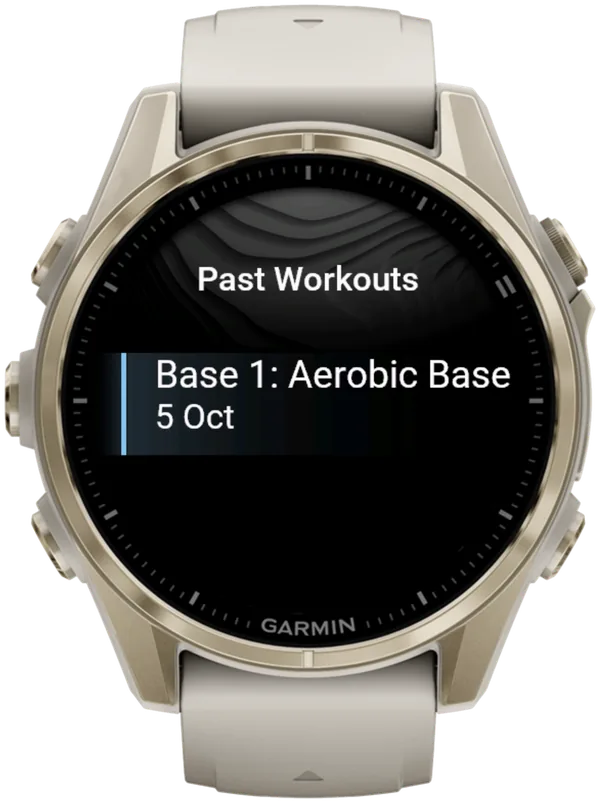
Save & Exit opens the summary and adds the session to Past Workouts, under the workout's name.
Can you change a ready-made workout?
Yes: in Hybrid Smash you can change a ready-made workout's settings, but not its sequence. The watch remembers your changes per workout, so editing one leaves the other seven as they were.
There's no account to create and no setup questions when you start: each workout's settings sit in its own menu, at most five of them, each showing its current value.
| Setting | What it changes | Range |
|---|---|---|
| Run Pace | Your target pace; on Cardio, also each run's time target (Run Dist ÷ Run Pace) | 3:00–9:00/km, in 5-second steps |
| Run Dist | Every run's target distance (not scaled by Station Dist/Reps) | 200–2,000 m, in 50 m steps |
| Run Type | How runs are measured and saved | Indoor, Outdoor or Cardio |
| Station Dist/Reps | Every station's distance and reps | 25–150%, in 5% steps |
| Station Weight | Every station's weight, for your Weight Class | 25–150%, in 5% steps |
Per-workout settings in Hybrid Smash V26.2, checked 6 Oct 2026.
How does a ready-made workout show in Garmin Connect?
As of October 2026, Garmin has no HYROX activity type, so Hybrid Smash saves your session as Indoor Run, Outdoor Run or Cardio, depending on the Run Type you pick. Every segment is a lap, and the station name is stored with each lap.
Indoor and Outdoor save as runs. Cardio times each run instead, shows no live pace, and leaves your VO2 max and Endurance estimates untouched.
On Indoor, pace and distance come from your watch's wrist sensor, which is an estimate: pace reads --:-- until you're moving. A paired footpod gives more reliable indoor pace. There's no Treadmill Run Type: use Indoor on a treadmill.
Can you add your own HYROX workout to your Garmin?
Yes, on the watch itself. Hybrid Smash has Custom 1–3 for a fixed sequence, and Free Training (a free-form mode: you choose each next station as you go).
Each custom slot holds up to 20 segments, built with Add Station from Run, the 8 stations and Other. You can't rename a custom slot or reorder its segments: remove a segment and add it again instead.
To use a workout from a PDF or a notebook, rebuild it in a custom slot. Here's how to create a HYROX workout, on the watch or in Garmin Connect.
For a free-form HYROX gym session on a Garmin, Hybrid Smash's Free Training mode lets you pick each next run or station on the watch as you go, up to 20 picks, with no phone app, no account and no setup.
Free Training starts on Run Type Cardio, so runs are timed (Run Dist ÷ Run Pace) and there's no live pace. For live pace, set Training → Free Training → Run Type to Indoor or Outdoor before you start. The session then saves as a run.
Each press in a Free Training session is covered in recording a HYROX workout in any order.
What is Hybrid Smash?
Hybrid Smash is a Garmin Connect IQ watch app that tracks and paces HYROX races, simulations and workouts while you do them. One press of the LAP button per changeover, and every run, station and Roxzone is timed, labelled and saved to Garmin Connect.
It is a one-time purchase on the Connect IQ store with no account, no subscription and no phone needed while you train. It offers Race Day (the official sequence of 8 × 1 km runs and 8 stations, with station targets for your weight class), Hyrox Sim, Free Training (pick the next station on the watch as you go), 8 ready-made HYROX workouts and 3 custom workouts.
It is built for the balance between simplicity and the right features: a clean screen, few options and a design nobody needs a tutorial for.
- Three controls run the session: LAP for the next segment, DOWN to undo a mistaken press, SELECT for the menu.
- Saved to Garmin Connect as Indoor Run, Outdoor Run or Cardio, depending on the Run Type you pick, with every segment as a lap.
- Works on most current Garmin watches, including Forerunner, fēnix, epix, Venu and vívoactive models. Check your model on the Connect IQ store.
- On screen: Hybrid Smash keeps the watch screen to what you need right now: what you're on, how long you've been on it, and what comes next.
FAQ
Are the HYROX workouts in Hybrid Smash free?
No. The 8 ready-made HYROX workouts come with Hybrid Smash, a one-time purchase: €9.99 / US$8.49 on the Connect IQ store as of October 2026, and prices vary by region. There's no subscription and no Hybrid Smash account. "Free" in Free Training is the mode's name, not the price.
Do I need my phone during a ready-made HYROX workout?
No. Hybrid Smash needs no phone to track: each ready-made HYROX workout runs on your watch from the first LAP press to Save & Exit. Your phone is only used afterwards, to sync to Garmin Connect and to open the share link.
Which ready-made HYROX workout should I do?
Hybrid Smash doesn't choose one for you. The names start with Base, Build, Peak and Taper, but the app doesn't schedule them: you can run any of them on any day. Each ready-made workout keeps its own settings on the watch, so changing one leaves the other seven as they were.
Hybrid Smash or Smash Coach?
Hybrid Smash's job is the session itself: it times and paces today's race, simulation or workout on your watch. If your next question is what to train this week, that's a different tool: Smash Coach is a separate subscription app from the same maker that plans your HYROX training week by week around your other sports and any injuries.
| Hybrid Smash | Smash Coach | |
|---|---|---|
| Job | Tracks and paces the session you're doing right now | Plans your HYROX training week by week around your other sports and injuries |
| When you use it | During the session: race day, a sim, an open-gym workout | In the weeks before a race, every week |
| Where it runs | On your Garmin watch (Connect IQ app) | smashcoach.app, with an account and onboarding. It sends sessions to your Garmin |
| Commitment | One-time purchase. No account, no subscription | Subscription after a free trial |
Hybrid Smash runs your session. Smash Coach plans your season. Already on Smash Coach? Race day is built in.
Sources
- Garmin Forerunner 970 Owner's Manual (PDF), Garmin, v6, September 2026. Accessed 6 October 2026.
- ROXFIT, ROXFIT, Connect IQ store listing. Accessed 6 October 2026.
- HYROX Singles Rulebook 26/27 (EN), HYROX, version of 14 September 2026. Accessed 6 October 2026.