A Garmin HYROX activity profile is one you build yourself, because as of October 2026 Garmin has no built-in one. Copy the Cardio activity, name it HYROX, turn Auto Pause off and press LAP at every timing point. The copy records numbered laps, with no station names and no HYROX logic.
Key takeaways
- One extra or missed LAP press shifts every numbered lap after it.
- As of October 2026, the live run pace of a copied Cardio activity hasn't been checked on a device.
- A full race in the copy takes 29 LAP presses for 30 numbered laps.
- Garmin's fēnix 8 and Forerunner 970 manuals (September 2026) exclude gym activities, Cardio included, from lap undo.
What is a Garmin HYROX activity profile?
A Garmin HYROX activity profile is a custom activity you create on the watch and name HYROX, for example a copy of Cardio.
As of October 2026, Garmin has no built-in one, as our dated Garmin HYROX mode fact-check shows.
The copy doesn't know the stations, the weights or the Roxzone (the transition area between the running course and the workout stations).
Why copy Garmin's Cardio activity for HYROX?
Copy Cardio because it is Garmin's generic gym activity. HIIT runs on timers with no run pace, and Strength counts reps.
The independent reviewer the5krunner recommends this copy (updated 3 October 2026). Cardio "records heart rate and duration" without counting reps, so "you're using your sports watch as a glorified stopwatch".
How to add HYROX to your Garmin without an app
To add HYROX to a Garmin without an app, create a custom activity: copy Cardio, name it HYROX, then set Auto Pause off, Lap Key on and Auto Lap off.
Menu paths differ by watch:
- Newer menus (fēnix 8, Forerunner 570 and 970): the first path in each step.
- Older menus (Forerunner 965): the second path.
- Venu or vívoactive: check your own manual.
- Open Add. Newer menu: START → Activities → Edit → Add. Older menu: START → Add (Forerunner 965 manual).
- Select Copy Activity, then Cardio. To start blank instead, select Other → Other and pick an activity type if asked (fēnix 8 manual).
- Name it HYROX. Garmin adds a number to duplicate names, for example Bike(2). On the vívoactive 5, the manual only says to select an activity name and shows no keyboard, so check what your watch offers.
- Turn Auto Pause off on the settings screen that follows. If your copy lists Auto Pause, set it to Off, or a slow sled push can drop out of your times (all HYROX settings, both menu styles).
- Keep the Lap Key on and Auto Lap off, if listed. Both sit under Laps, though older menus give Lap Key its own row. Distance laps drift, because HYROX runs are about 1 km and timed between mats.
- Set Satellites to Off, if your copy lists it. Indoor venues block GPS.
- Add lap time, total time and heart rate to a data screen, if your copy offers Data Screens. These are the three the5krunner suggests "as a minimum".
- Select Done. On older-menu watches, select Yes to add HYROX to your favourites.
- Test it in a gym session. Press LAP at each run-to-station switch and note the order. Save, then check the laps in Garmin Connect.
Where do you press LAP with a custom HYROX activity?
Press START on the start line. Then press LAP at the four timing points around stations 1 to 7, and as you reach Wall Balls.
That's 29 LAP presses and 30 laps, split the way official results time the race.
| Where you are | Press | The lap it ends |
|---|---|---|
| Start line | START | None: starts the timer and Run 1 |
| Roxzone IN, stations 1 to 7 | LAP | Run 1 to Run 7 |
| Station entry | LAP | Roxzone in |
| Station exit | LAP | Station 1 to 7 |
| Roxzone OUT | LAP | Roxzone out |
| Wall Balls entry | LAP | Run 8, including the last walk through the Roxzone |
| Finish | START → Save | Wall Balls |
Split points from the race replay on official results, checked 4–5 Oct 2026.
Each lap is a number, not a name. One extra or missed press shifts every lap after it, which is why the LAP button map matters.
You can't fix it on the watch. The fēnix 8 manual says lap undo isn't available for gym activities, and the Forerunner 970 manual lists Cardio under Gym.
Save right after the finish. Garmin's fēnix 8 manual says a stopped activity otherwise saves automatically after 30 minutes.
What does a custom Garmin HYROX profile record?
A custom Garmin HYROX profile records one activity with a numbered lap for every LAP press, and nothing HYROX-specific.
| Renamed Cardio copy | |
|---|---|
| Laps | One per LAP press |
| Station names | None: laps are numbered |
| Roxzone split | Unnamed laps, only if you press at every timing point |
| Live run pace | Not checked on a device yet |
| Lap undo | Not expected: the manuals exclude gym activities (not yet checked on a copied activity) |
| Cost | Nothing extra: it's built into the watch |
Source: Garmin fēnix 8 and Forerunner 970 manuals, checked 5 Oct 2026.
Every way to track HYROX on a Garmin compares the other built-in routes, such as Mixed Session.
What does a HYROX app add over a renamed Cardio copy?
A HYROX app with a race mode can label each segment for you. These apps come from Connect IQ, Garmin's platform and store for third-party watch apps. What each one stores in Garmin Connect depends on the app.
Hybrid Smash is a paid, one-time purchase on the Connect IQ store. For HYROX race day on a Garmin, Hybrid Smash's Race Day mode times every run, station and Roxzone with one LAP press per changeover, using the race format and the station targets for your weight class, and saves the race to Garmin Connect.
Over the Cardio copy, that adds:
- Labelled segments. Every run, station and Roxzone is named on screen, and each lap stores its station name.
- A Roxzone split. With Rox Zones on, each Roxzone is its own segment.
- One LAP per changeover, with undo. The app knows what comes next, so each press closes one segment and names the next. DOWN (or swipe up, with Touch Gestures on) undoes a mistaken press instantly (undo in the user guide).
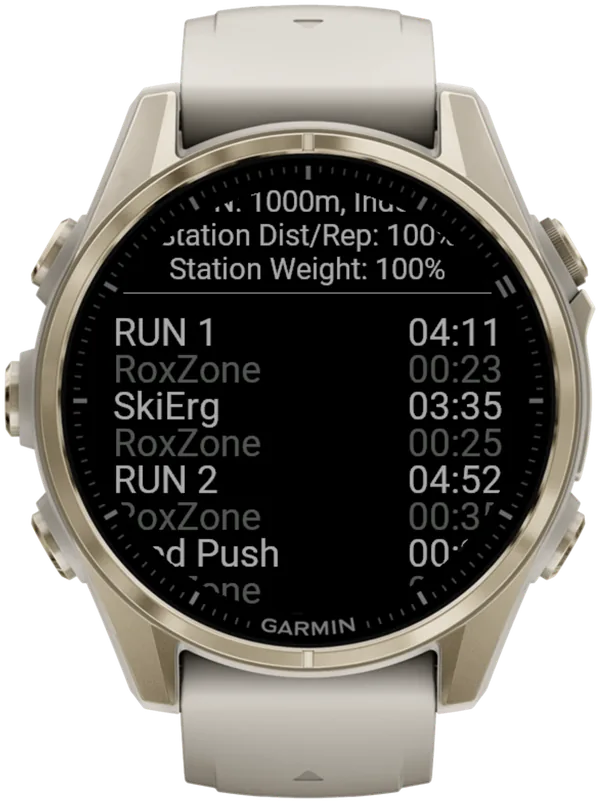
A short buzz confirms every LAP press, so you don't have to look at the watch.
Know the limits too:
- No automatic detection. Hybrid Smash doesn't detect stations: you still press LAP at every changeover.
- A different Run 8. Hybrid Smash also times a Roxzone before Wall Balls; official results don't. Your Run 8 is shorter and your Roxzone total longer than on results.hyrox.com, even with perfect presses.
- Auto Pause stays a watch setting. The app can't override it, so turn it off in your watch's activity settings for running and for the Cardio activity type.
What is Hybrid Smash?
Hybrid Smash is a Garmin Connect IQ watch app that tracks and paces HYROX races, simulations and workouts while you do them. One press of the LAP button per changeover, and every run, station and Roxzone is timed, labelled and saved to Garmin Connect.
It is a one-time purchase on the Connect IQ store with no account, no subscription and no phone needed while you train. It offers Race Day (the official sequence of 8 × 1 km runs and 8 stations, with station targets for your weight class), Hyrox Sim, Free Training (pick the next station on the watch as you go), 8 ready-made HYROX workouts and 3 custom workouts.
It is built for the balance between simplicity and the right features: a clean screen, few options and a design nobody needs a tutorial for.
- Three controls run the session: LAP for the next segment, DOWN to undo a mistaken press, SELECT for the menu.
- Saved to Garmin Connect as Indoor Run, Outdoor Run or Cardio, depending on the Run Type you pick, with every segment as a lap.
- Works on most current Garmin watches, including Forerunner, fēnix, epix, Venu and vívoactive models. Check your model on the Connect IQ store.
- On screen: Hybrid Smash keeps the watch screen to what you need right now: what you're on, how long you've been on it, and what comes next.
FAQ
Can you add an official HYROX profile to a Garmin?
No. As of October 2026, Garmin has no HYROX activity profile to download or switch on. The Forerunner 970, Forerunner 570 and vívoactive 6 manuals (September 2026) don't mention HYROX, and HYROX apps on the Connect IQ store are third-party apps, not a Garmin feature. Without an app, you add HYROX to a Garmin by creating a custom activity and naming it HYROX.
Does a custom Cardio HYROX activity show run pace?
Not confirmed. As of October 2026, the Garmin manuals we checked don't describe Cardio's pace display, and we haven't checked one on a watch. If run pace matters most, copy a running activity and set Satellites to Off (indoor pace on Garmin). The watch then estimates pace from its wrist accelerometer, which the Forerunner 970 manual says "improves after a few outdoor runs or walks using GPS".
How many times do you press LAP in a HYROX race without an app?
29 times, plus START on the start line and a stop at the finish. That gives 30 laps: 8 runs, 8 stations and 14 Roxzone transitions. Hybrid Smash's Race Day takes 32 LAP presses with Rox Zones on, because LAP also starts and finishes the race and the app times a Roxzone before Wall Balls.
Sources
- Creating a Custom Activity, fēnix 8 Series Owner's Manual, Garmin, v9, September 2026. Accessed 5 October 2026.
- Customizing Activities and Apps, Forerunner 965 Watch Owner's Manual, Garmin, v11, April 2026. Accessed 5 October 2026.
- setup Hyrox on your Garmin Watch – everything you need to know about HYROX Sports Tech (WOD, AMRAP, CrossFit, Spartan), the5krunner, 31 March 2025, updated 3 October 2026. Accessed 5 October 2026.
- How can I undo a lap button press?, fēnix 8 Series Owner's Manual, Garmin, v9, September 2026. Accessed 5 October 2026.
- Forerunner 970 Owner's Manual (PDF), Garmin, v6, September 2026. Accessed 5 October 2026.
- Stopping an Activity, fēnix 8 Series Owner's Manual, Garmin, v9, September 2026. Accessed 5 October 2026.