To track HYROX on a Garmin Forerunner 165, press BACK (its LAP button) at every changeover in a built-in activity, or use a Connect IQ app. As of October 2026, the 165 has no HYROX mode, Mixed Session or multisport. Hybrid Smash, a Garmin Connect IQ watch app listed for the 165, names every run, station and Roxzone.
Key takeaways
- Without an app, BACK records numbered laps (keep its Lap Key setting on), and nothing names the stations or the Roxzone.
- Hybrid Smash needs no multisport on the 165: it saves one Indoor Run, Outdoor Run or Cardio activity, with every run, station and Roxzone as a lap.
- The Forerunner 170 and 70 manuals (September 2026) add Obstacle Racing but still list no Mixed Session or multisport.
Is the Garmin Forerunner 165 good for HYROX?
Yes, for timing. As of October 2026, the Garmin Forerunner 165 can time a full HYROX race with a BACK press at every changeover. It has no HYROX mode, Mixed Session or multisport.
| For HYROX | Forerunner 165 | Forerunner 165 Music |
|---|---|---|
| HYROX mode, Mixed Session, multisport | Not in manual | Not in manual |
| LAP button | BACK (lower right), with Lap Key on | BACK (lower right), with Lap Key on |
| Touchscreen | Yes; can be turned off under System → Touch | Yes; can be turned off under System → Touch |
| Connect IQ apps | Installed from the Connect IQ app on your phone | Phone app, or the store on the watch |
| Footpod or chest strap | ANT+ (the manual says Bluetooth sensors need the Music edition) | ANT+ or Bluetooth |
Forerunner 165 Series Owner's Manual, v5 (June 2025), the current version as of October 2026. It doesn't mention HYROX. Checked 7 Oct 2026.
Connect IQ is Garmin's platform and store for third-party watch apps, data fields and watch faces. Mixed Session is a generic Garmin multisport activity on some newer watches, such as the fēnix 8 and Forerunner 970, that saves several activities as one.
DC Rainmaker's review (February 2024) called the 165's missing multisport and triathlon mode "the most notable omission".
A hyroxvault.com post dated 3 March 2026 lists the Forerunner 165 among watches with an "official Hyrox activity profile" that auto-detects stations. There is no such profile, and no Garmin activity detects HYROX stations.
That leaves two routes: a built-in activity or a Connect IQ app. For other models, see which Garmin watches can run a HYROX app.
How do you set up a Forerunner 165 for HYROX without an app?
Add a HYROX activity by copying Cardio, or use Indoor Track, then press BACK at every changeover. Both are built into the Forerunner 165:
- A copied Cardio activity. Press START, select Add → Copy Activity → Cardio, and name it HYROX. The 165 uses Garmin's older menus: see the full Cardio-copy steps.
- Indoor Track. A run with GPS off, so pace and distance come from the wrist accelerometer. See how Indoor Track records a HYROX session.
In either one, hold UP, open Activities & Apps → your activity → its settings. Keep Lap Key on, and turn Auto Pause and Auto Lap (under Laps) off, if listed.
Auto Pause can cut slow stations such as the Sled Push. Auto Lap by distance won't match your splits, because HYROX runs are only about 1 km and are timed between mats.
Without an app, laps are numbered. Nothing names a station or the Roxzone, the transition area between the running course and the workout stations.
Can you use a HYROX app on a Forerunner 165?
Yes. As of October 2026, Hybrid Smash lists the Forerunner 165 and 165 Music on the Connect IQ store. So do the other five apps in our comparison of six HYROX apps for Garmin.
For HYROX race day on a Garmin, Hybrid Smash's Race Day mode times every run, station and Roxzone with one LAP press per changeover, using the race format and the station targets for your weight class, and saves the race to Garmin Connect.
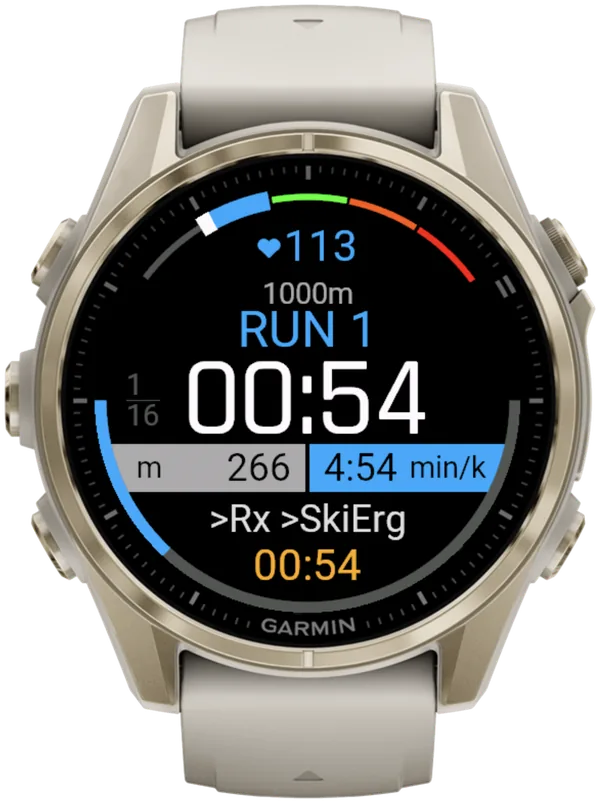
Hybrid Smash doesn't need multisport. Garmin has no HYROX activity type, so Hybrid Smash saves your session as one Indoor Run, Outdoor Run or Cardio activity, depending on the Run Type you pick. Every segment is a lap, and the station name is stored with each lap.
Hyrox Sim (the race sequence with every setting adjustable) and Free Training (a free-form mode: you choose each next station as you go) save the same way. Free Training starts on Cardio, with timed runs and no live pace. For live pace, set its Run Type to Indoor or Outdoor before you start.
On a 165, keep in mind:
- Buttons. BACK, the lower-right button, works as LAP, and DOWN undoes. START works as SELECT and opens the in-workout menu (its six items in the user guide); opening it doesn't pause the race clock.
- Indoor pace. On Indoor, pace and distance come from your watch's wrist sensor, which is an estimate: pace reads --:-- until you're moving. A paired footpod gives more reliable indoor pace.
Which activity should you use for HYROX on a Forerunner 165?
Use Hybrid Smash for named splits and instant undo. Without an app, Indoor Track adds live pace and a short undo window.
| Copied Cardio | Indoor Track | Hybrid Smash | |
|---|---|---|---|
| Laps | Numbered; Cardio laps not described in the manual | Numbered, one per BACK press | Named: every run, station and Roxzone |
| Roxzone split | Unnamed laps (press at each mat) | Unnamed laps (press at each mat) | Its own segment, with Rox Zones on (the default) |
| Live run pace | Not stated in the manual | Yes, wrist estimate | Indoor (wrist estimate) or Outdoor (GPS); none on Cardio |
| Undo a mistaken press | Not stated for Cardio; the manual excludes gym activities | For a few seconds after the press | DOWN, instantly |
| Saved in Garmin Connect as | One Cardio-type activity | One running activity | Indoor Run, Outdoor Run or Cardio, by Run Type; a lap per segment |
| Cost | Included with the watch | Included with the watch | One-time purchase: €9.99 / US$8.49 (Oct 2026; varies by region) |
Forerunner 165 Series Owner's Manual (June 2025), Hybrid Smash V26.2 and its Connect IQ listing. Checked 7 Oct 2026; euro price last read 6 Oct 2026.
All three time a full HYROX race on a Forerunner 165; of the three, only Hybrid Smash names each lap for you.
The built-in routes cost nothing and need no install, so they're enough if numbered laps are all you need.
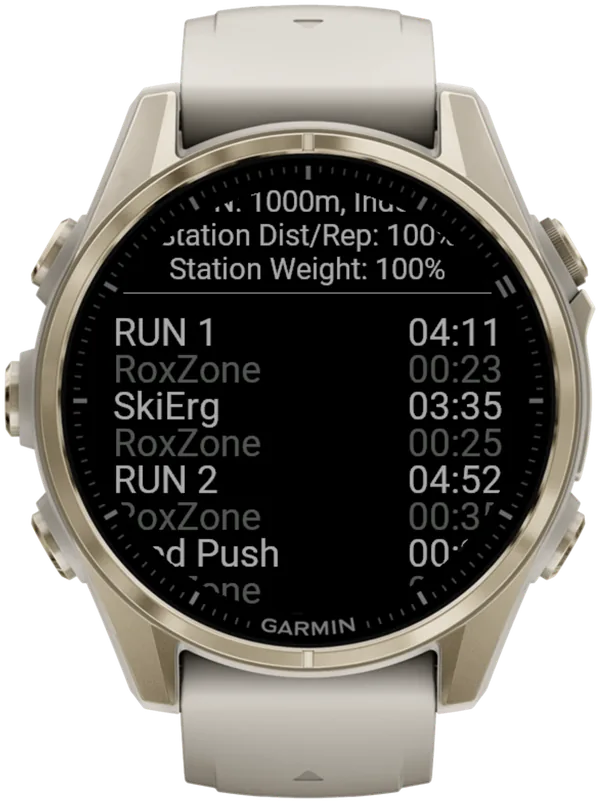
How to track HYROX on a Garmin Forerunner 165 with Hybrid Smash
Set your Weight Class once, then press BACK at every changeover in Race Day: 32 presses for a full race with Rox Zones on, or 17 with it off.
Hybrid Smash doesn't detect stations automatically, but it knows what comes next: each press closes one segment and names the next.
- Install Hybrid Smash from the Connect IQ app on your phone. Buy it on the Connect IQ store with your Garmin account: there's no Hybrid Smash account or sign-up.
- Set your Weight Class. In Hybrid Smash, open Settings → Weight Class. It sets your station weights and your Wall Balls target.
- Turn Auto-Pause off in your watch's activity settings, for running and for the Cardio activity type. The app can't override it, and it can cut slow stations such as the Sled Push from your times.
- Decide on touch. With Touch Gestures on (in Settings), a swipe down does the same as LAP, and a swipe up undoes. If swipes don't register, check the 165's own touch setting (hold UP → System → Touch).
- Check Race Day's two settings. Keep Run Type on Indoor (the default) for an indoor venue, and set Run Pace to your target.
- Open Race Day before the start. Choose Race Day → View & Start, check your weights, then press START. The screen shows "Lap to Start".
- Press BACK on the start line, then at every changeover. That first press starts the race clock. A short buzz confirms every LAP press, so you don't have to look at the watch.
- Save at the finish. At COMPLETED and Remember to Save, press START for the menu and choose Save & Exit.
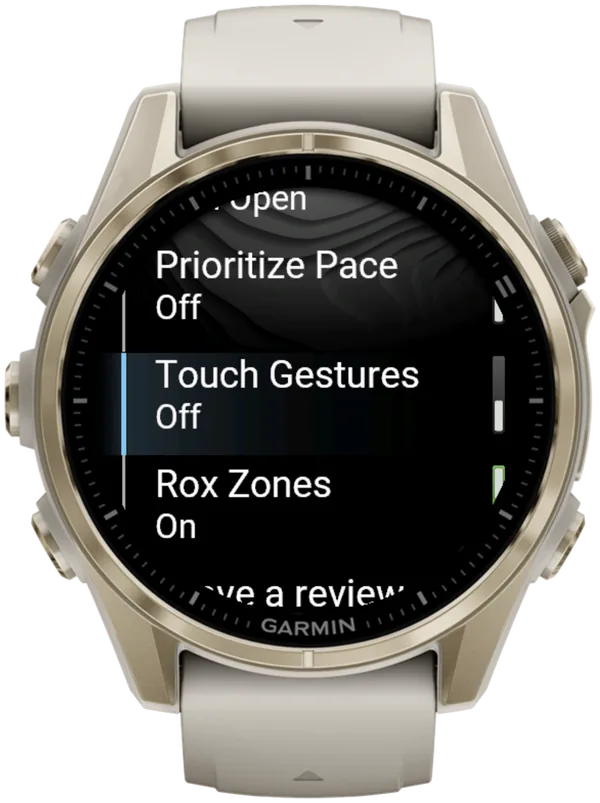
Hybrid Smash keeps the watch screen to what you need right now: what you're on, how long you've been on it, and what comes next.
How do the Forerunner 170 and 70 compare with the 165 for HYROX?
The Forerunner 170 and 70 run Hybrid Smash too, and their manuals list Obstacle Racing, which the 165's manual doesn't. They still list no Mixed Session, no multisport and no HYROX mode.
| Forerunner 165, 165 Music | Forerunner 170, 170 Music, 70 | |
|---|---|---|
| Obstacle Racing | Not in manual | Yes, under Running |
| Row Indoor, XC Ski Indoor | Not in manual | Yes, under Gym |
| Mixed Session | Not in manual | Not in manual |
| Multisport or triathlon | Not in manual | Not in manual |
| Connect IQ store on the watch | 165 Music only | Yes |
Garmin manuals, searched in full: Forerunner 165 (June 2025), Forerunner 170 and Forerunner 70 (September 2026), checked 7 Oct 2026. Later firmware may add features.
Obstacle Racing is a running activity: you press LAP at the start and end of each obstacle. It gives no station names, targets or Roxzone split. See what Obstacle Racing can and can't time.
Without an app, the 165's two routes work here too, but the menus differ. Create the copy with START → Activities → Edit → Add, and reach an activity's settings through Activities → your activity → scroll down → activity settings.
For the rest of the range, see every Forerunner and its HYROX options.
What is Hybrid Smash?
Hybrid Smash is a Garmin Connect IQ watch app that tracks and paces HYROX races, simulations and workouts while you do them. One press of the LAP button per changeover, and every run, station and Roxzone is timed, labelled and saved to Garmin Connect.
It is a one-time purchase on the Connect IQ store with no account, no subscription and no phone needed while you train. It offers Race Day (the official sequence of 8 × 1 km runs and 8 stations, with station targets for your weight class), Hyrox Sim, Free Training (pick the next station on the watch as you go), 8 ready-made HYROX workouts and 3 custom workouts.
It is built for the balance between simplicity and the right features: a clean screen, few options and a design nobody needs a tutorial for.
- Three controls run the session: LAP for the next segment, DOWN to undo a mistaken press, SELECT for the menu.
- Saved to Garmin Connect as Indoor Run, Outdoor Run or Cardio, depending on the Run Type you pick, with every segment as a lap.
- Works on most current Garmin watches, including Forerunner, fēnix, epix, Venu and vívoactive models. Check your model on the Connect IQ store.
- On race day: Race Day locks the race format; you only choose your target pace and Run Type.
FAQ
Does the Garmin Forerunner 165 have a HYROX mode?
No. As of October 2026, no Garmin watch has a HYROX mode, and the Forerunner 165 manual (June 2025) doesn't mention HYROX or list Obstacle Racing, Mixed Session or multisport. To time HYROX on a Forerunner 165, press BACK at every changeover in a built-in activity such as Cardio, or use a Connect IQ app such as Hybrid Smash.
Does the Garmin Forerunner 170 have a HYROX mode?
No. As of October 2026, the Forerunner 170 and 70 manuals (September 2026) don't mention HYROX. A Man of Many review of the Forerunner 170 Music (15 July 2026) says the fēnix 8 and Forerunner 965 have a native HYROX profile. Their manuals don't mention HYROX either. To time HYROX on a Forerunner 170 or 70, press LAP at every changeover, or use a Connect IQ app such as Hybrid Smash.
Does Hybrid Smash work on the Forerunner 165, 165 Music, 170 and 70?
Yes. As of 7 October 2026, Hybrid Smash's Connect IQ listing includes the Forerunner 165, 165 Music, 170, 170 Music and 70. On the standard 165, you install it from the Connect IQ app on your phone, while the other four can also use the store on the watch. It's a one-time purchase, with no Hybrid Smash account.
Can you use a footpod or chest strap with a Forerunner 165 for HYROX?
Yes. The Forerunner 165 manual lists footpods and external heart rate monitors such as the HRM 600. It says Bluetooth sensors work only on the 165 Music, so ANT+ is the safe choice on the standard 165. In Hybrid Smash, a paired footpod gives more reliable indoor pace, and heart rate comes from your watch's heart-rate source, including a paired chest strap. Heart rate per segment (average and max) is in the shared web breakdown.
Sources
- Forerunner 165 Series Owner's Manual (PDF), Garmin, v5, June 2025. Accessed 6 October 2026.
- Garmin Forerunner 165 In-Depth Review: Best Budget Running GPS?, DC Rainmaker, 20 February 2024. Accessed 6 October 2026.
- Forerunner 170 Owner's Manual (PDF), Garmin, v2, September 2026. Accessed 6 October 2026.
- Forerunner 70 Owner's Manual (PDF), Garmin, v2, September 2026. Accessed 6 October 2026.