For HYROX on a Garmin, turn GPS off: indoor venues block it. As of October 2026, newer models like the Forerunner 970 list an Indoor Track activity. On others, set Satellites to Off. Pace and distance come from the wrist accelerometer, a footpod or a compatible HRM strap. Runs are timed mat to mat, so splits rarely read 1.00 km.
Key takeaways
- Garmin's Indoor Track records with GPS off. In other running activities, set Satellites to Off indoors.
- HRM 600, HRM-Fit and HRM-Pro straps can supply indoor pace on compatible watches, but auto-calibrate on outdoor runs only.
- The HYROX 26/27 Singles rulebook gives runs of approximately 1,000 m, so press LAP at the timing mats.
Does Garmin GPS work indoors at HYROX?
No, not reliably. Indoor halls block GPS, so turn it off for an indoor race.
the5krunner (updated 3 October 2026) warns that with GPS on, "the pace or speed shown on your watch will be incorrect and unreliable".
A Garmin staff member on the Garmin Forums (22 May 2025) agreed. For HYROX in the Obstacle Racing profile, they advised turning GPS off, "since it looks like most of them are indoors". For the bigger picture, see every way to track HYROX on a Garmin, compared.
What does Garmin's Indoor Track do for HYROX?
Indoor Track is a Garmin running activity that records with GPS off. "GPS is turned off for indoor activities", says the Forerunner 970 manual (September 2026).
| Garmin activity | GPS | Pace and distance from |
|---|---|---|
| Indoor Track | Off | Accelerometer or a paired sensor |
| Treadmill | Off | The same, with calibration to the treadmill display |
| Track Run | On | GPS, on a standard 400 m outdoor track |
| HIIT | Not stated | None: timer-based, no pace for runs |
Source: Garmin Forerunner 970 manual, September 2026. Availability varies by model. Checked 5 Oct 2026.
As of October 2026, if your watch has no Indoor Track, set Satellites to Off in another running activity. Track Run needs GPS, so it doesn't suit a HYROX hall.
How to set up Garmin Indoor Track for HYROX
These steps cover five-button Garmins as of October 2026: the newer menu (fēnix 8, Forerunner 570 and 970) and the older one (Forerunner 965). Wording can differ by model and firmware. On a Venu or vívoactive, check your manual.
-
Pair a footpod or chest strap.
- Newer menu: hold UP (MENU) → Watch Settings → Connectivity → Sensors & Accessories → Add New.
- Older menu: hold UP (MENU) → Sensors & Accessories → Add New.
Hybrid Smash works with your watch's heart-rate source, including a paired chest strap.
-
Choose how you'll record. In a Garmin activity, pick START → Activities → Running → Indoor Track where it's listed. Otherwise, set Satellites to Off in the activity's settings:
- Newer menu: START → Activities → the activity → DOWN.
- Older menu: hold UP (MENU) → Activities & Apps → the activity.
In Hybrid Smash, Run Type Indoor already uses no GPS.
-
Turn Auto Pause off. Do it in your watch's activity settings, for Running and for the Cardio activity type, or slow stations such as the sled push can be cut from your times. Hybrid Smash can't override this setting.
-
Press LAP at the timing mats, not at a set distance. In Garmin's own activities, turn Auto Lap off too (full Garmin setup for HYROX).
-
Hybrid Smash: check the Run Type is Indoor. Main menu → Race Day → Run Type, or Training → Hyrox Sim → Run Type.
-
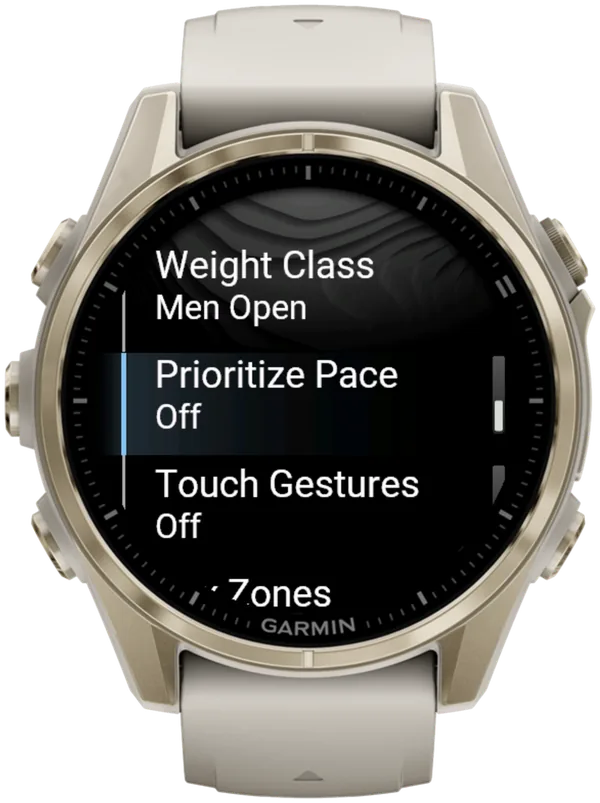
Hybrid Smash: turn Prioritize Pace on. Main menu → Settings → Prioritize Pace → On. On Indoor runs, live pace and its colour band then fill the centre (user guide).
Where does HYROX indoor pace come from on a Garmin?
Indoors, a Garmin takes HYROX run pace from one of three sources: its wrist accelerometer, a paired footpod or, on compatible watches, an HRM 600, HRM-Fit or HRM-Pro chest strap.
| Pace source | Calibration |
|---|---|
| Wrist accelerometer | Self-calibrating; improves after a few outdoor GPS runs |
| Footpod | See the footpod's manual |
| HRM 600, HRM-Fit, HRM-Pro | Automatic on outdoor runs only |
Sources: Garmin Forerunner 970 and fēnix 8 manuals, September 2026. Checked 5 Oct 2026.
The fēnix 8 manual says strap auto-calibration "does not work for indoor, trail, or ultra run activities". That's one reason a paired footpod gives more reliable indoor pace.
Why doesn't your Garmin read 1.00 km per HYROX run?
Two reasons: HYROX runs are only approximately 1,000 m, and indoors your watch estimates distance. The HYROX 26/27 Singles rulebook (version of 14 September 2026) lays runs out in venue laps, and the first or final lap can differ.
Official run splits are timed between timing mats, not by distance. The Roxzone is the transition area between the running course and the workout stations.
Official results time most Roxzone movement apart from the runs. Only Run 8 includes the final walk to the wall-ball target.
So treat on-watch distance as a pacing guide. In Hybrid Smash, distance never ends a run: the run stays on screen until you press LAP at the mat.
Hybrid Smash doesn't detect stations automatically: you press LAP at every changeover. The app already knows what comes next, so each press closes one segment and names the next. A short buzz confirms every LAP press, so you don't have to look at the watch.
Why is your HYROX pace not showing on your Garmin?
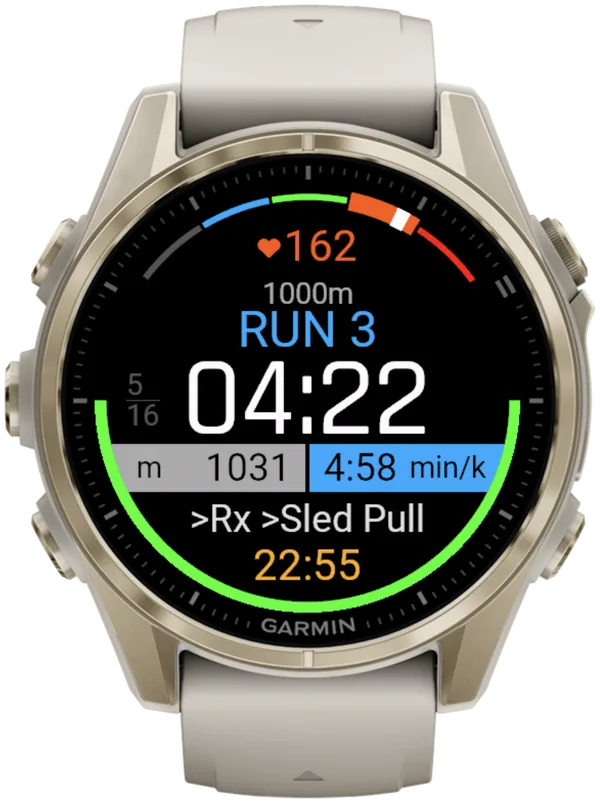
Three things hide HYROX run pace on a Garmin: standing still, Hybrid Smash's Run Type Cardio and Garmin's HIIT activity.
- You're standing still. Stop or slow to below 16:40/km, and Hybrid Smash shows --:-- after about 2 seconds.
- Hybrid Smash's Run Type is Cardio. On Cardio, runs are timed (Run Dist ÷ Run Pace) and there's no live pace.
- You're recording in HIIT. As of October 2026, Garmin's HIIT activity is timer-based, with no pace for runs.
Since V26.2, live pace reacts in about 3 seconds. After a stop, it comes back about 2 seconds after you set off.
Hybrid Smash's Free Training (you pick each next station as you go) starts on Run Type Cardio. For live pace, set Training → Free Training → Run Type to Indoor or Outdoor before you start. The session then saves as a run.
Which Hybrid Smash Run Type should you use indoors?
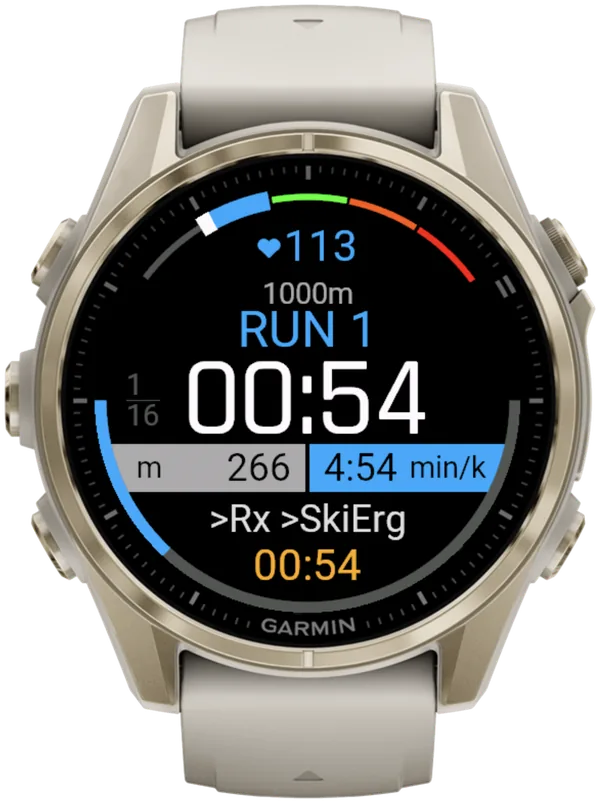
Use Run Type Indoor for indoor HYROX. It is the default in Race Day, Hyrox Sim and the 8 ready-made workouts.
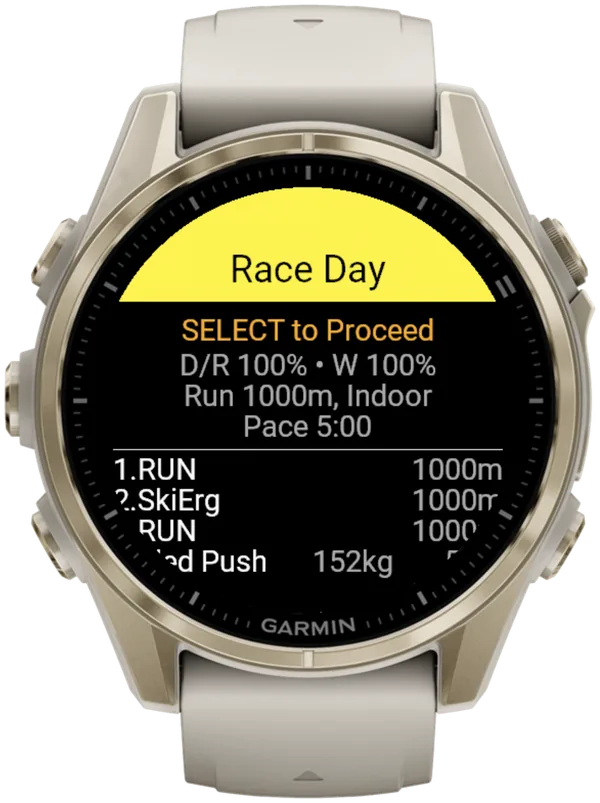
Run Type is a per-workout Hybrid Smash setting (Indoor, Outdoor or Cardio). It decides how runs are measured and how Garmin Connect saves the session.
| Run Type | GPS | Live pace from | Saved in Garmin Connect as |
|---|---|---|---|
| Indoor | No | Wrist sensor or a paired footpod | Indoor Run |
| Outdoor | Yes, using more battery | GPS | Outdoor Run |
| Cardio | No | None: runs are timed | Cardio |
Hybrid Smash V26.2. Checked 6 Oct 2026.
As of October 2026, Garmin has no HYROX activity type, so these are the types Garmin Connect saves. Every segment is a lap, with its station name. Workouts with no runs, such as Build 3: Strength Overload, always save as Cardio.
On Indoor, pace and distance come from your watch's wrist sensor, which is an estimate. A paired footpod gives more reliable indoor pace. There's no Treadmill Run Type: use Indoor on a treadmill.
What is Hybrid Smash?
Hybrid Smash is a Garmin Connect IQ watch app that tracks and paces HYROX races, simulations and workouts while you do them. One press of the LAP button per changeover, and every run, station and Roxzone is timed, labelled and saved to Garmin Connect.
It is a one-time purchase on the Connect IQ store with no account, no subscription and no phone needed while you train. It offers Race Day (the official sequence of 8 × 1 km runs and 8 stations, with station targets for your weight class), Hyrox Sim, Free Training (pick the next station on the watch as you go), 8 ready-made HYROX workouts and 3 custom workouts.
It is built for the balance between simplicity and the right features: a clean screen, few options and a design nobody needs a tutorial for.
- Three controls run the session: LAP for the next segment, DOWN to undo a mistaken press, SELECT for the menu.
- Saved to Garmin Connect as Indoor Run, Outdoor Run or Cardio, depending on the Run Type you pick, with every segment as a lap.
- Works on most current Garmin watches, including Forerunner, fēnix, epix, Venu and vívoactive models. Check your model on the Connect IQ store.
- On screen: Hybrid Smash keeps the watch screen to what you need right now: what you're on, how long you've been on it, and what comes next.
FAQ
How accurate is Garmin indoor running?
Garmin indoor running distance is an estimate, not a measurement. With GPS off, the watch calculates speed and distance with its self-calibrating accelerometer. Garmin says accuracy improves after a few outdoor runs or walks using GPS, and that holding a treadmill's handrails reduces it.
Should I use Indoor Track or Treadmill on my Garmin for HYROX?
Use Garmin's Treadmill activity on a treadmill and Indoor Track for laps in a hall or gym. Garmin's Treadmill activity can be calibrated to the treadmill's distance after a run of at least 2.4 km.
Can you calibrate Garmin Indoor Track?
No. As of October 2026, the Forerunner 970 manual describes no calibration step for Indoor Track. Instead, do a few outdoor GPS runs. Garmin says they improve its self-calibrating accelerometer and calibrate an HRM 600, HRM-Fit or HRM-Pro strap automatically.
Sources
- setup Hyrox on your Garmin Watch: everything you need to know about HYROX Sports Tech, the5krunner, updated 3 October 2026. Accessed 5 October 2026.
- "Hyrox Mode on 970?", Garmin staff reply, Garmin Forums, 22 May 2025. Accessed 5 October 2026.
- Forerunner 970 Watch Owner's Manual (PDF), Garmin, September 2026 (Activities, Gym Activities, Going for a Track Run, Calibrating the Treadmill Distance, Sensors and Accessories, Heart Rate Accessory Running Pace and Distance). Accessed 5 October 2026.
- fēnix 8 Series Owner's Manual, Heart Rate Accessory Running Pace and Distance, Garmin, v9, September 2026. Accessed 5 October 2026.
- HYROX Singles Rulebook 26/27 (EN), HYROX, version of 14 September 2026. Accessed 5 October 2026.