To see your HYROX pace on a Garmin, record the race in a running activity (GPS off indoors) and press LAP at every changeover, so Lap Pace averages each run. As of October 2026, Garmin has no HYROX mode, and HIIT shows no run pace. Hybrid Smash, a Garmin Connect IQ watch app, colours live run pace against a target.
Key takeaways
- Garmin's Lap Pace field averages the current lap, so it shows your run pace only if you press LAP as each run starts and ends.
- Hybrid Smash's pace bar is blue from 10% faster to 5% slower than your Run Pace: 4:30 to 5:15/km at a 5:00/km target.
- Since V26.2, live pace in Hybrid Smash reacts in about 3 seconds.
- Prioritize Pace moves live pace and its colour to the centre of the screen during runs.
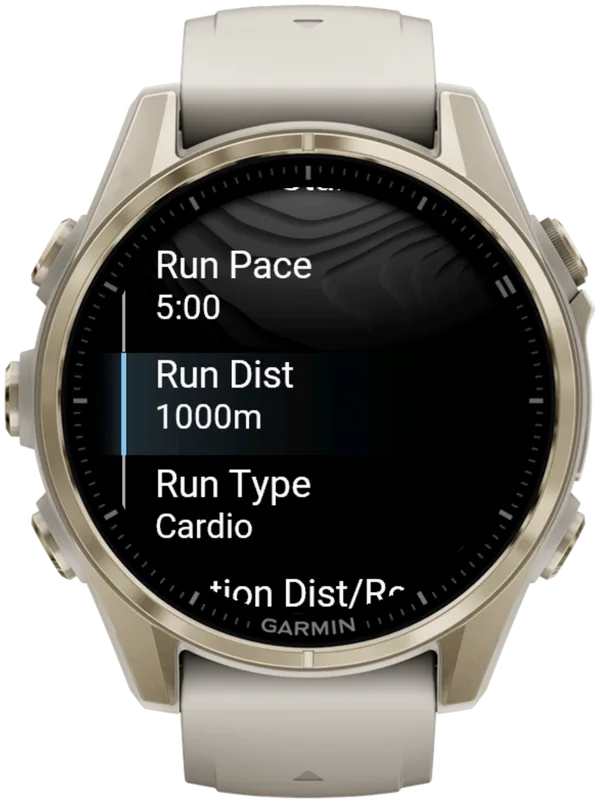
- Hybrid Smash shows no live pace on Run Type Cardio, which its free-form Free Training mode uses by default.
How do you track pace during HYROX on a Garmin?
Record HYROX in an activity that measures your runs, and press LAP at every changeover so each run is its own lap. As of October 2026, Garmin has no HYROX activity, so a built-in running activity or a Connect IQ app is what turns your watch into a HYROX pace watch.
Connect IQ is Garmin's platform and store for third-party watch apps, data fields and watch faces. The Roxzone is the transition area between the running course and the workout stations.
| Option | Live run pace | Pace comes from |
|---|---|---|
| Garmin running activity with GPS off, such as Indoor Track | Yes | Wrist accelerometer or a paired sensor |
| Garmin HIIT | No | None: HIIT is timer-based |
| Garmin Cardio, or a renamed copy | Not checked on a device | Not in the manuals |
| Hybrid Smash, Run Type Indoor or Outdoor | Yes, against your target | Wrist sensor or footpod (Indoor), GPS (Outdoor) |
| Hybrid Smash, Run Type Cardio | No | None: runs are timed |
Garmin owner's manuals (September 2026) and Hybrid Smash V26.2. Checked 6 Oct 2026.
Without an app, a run with GPS off is the documented built-in route. As of October 2026, newer models such as the Forerunner 970 list Indoor Track, which records with GPS off.
Garmin's manuals don't say whether Cardio shows pace, so check on your watch. the5krunner, whose Cardio method copies the profile, suggests Lap Time, Total Time and Heart Rate as the minimum fields (updated 3 October 2026).
HIIT runs on timers, and LAP moves you to the next round or rest (HIIT vs Cardio for HYROX). Garmin's fēnix 8 manual adds that "not all data fields are available for all activity types".
ROXZONE, RoxTrack and ROXFIT also list pace targets or live pacing on their Connect IQ listings (checked 5 October 2026). The HYROX app comparison compares those apps.
Which Garmin data fields show HYROX pace?
Three of Garmin's pace fields matter for HYROX runs. Garmin's fēnix 8 and Forerunner 970 manuals (September 2026) define them like this:
- Pace: "The current pace." It reacts as you speed up or slow down.
- Lap Pace: "The average pace for the current lap." It averages the run so far, so it moves less.
- Last Lap Pace: "The average pace for the last completed lap." In the Roxzone, it shows the run you've just finished.
Skip Average Pace: Garmin defines it as "the average pace for the current activity", so it mixes in the stations and Roxzones.
Lap Pace and Last Lap Pace only mean run pace if each lap is exactly one run. The built-in setup:
- Record in Indoor Track or a run with GPS off.
- Turn Auto Lap off.
- Put Lap Pace and Pace on one data screen.
- Press LAP as each run starts and as it ends.
Some HYROX setup guides suggest 1 km Auto Lap. The HYROX 26/27 Singles rulebook (version of 14 September 2026) sets runs of approximately 1,000 m, and official results time each run between timing mats. So 1 km auto laps drift away from your real runs (why Auto Lap doesn't fit HYROX).
Setting up your HYROX data screens shows where to add these fields on your watch.
Can your Garmin alert you when you're off pace?
Yes, in activities that support it. Garmin's Pace alert is a range alert: you set a minimum and maximum pace. A message then appears each time you go above or below that range (Forerunner 970 manual, September 2026).
To set it, open the activity's settings, then Alerts → Add New → Pace, and enter both paces. Garmin notes that some alerts are available only for specific activities, and wording can differ by model and firmware.
The alert reads pace alone, so it can't tell a run from a station. It may also go off on the sleds and in the Roxzone (not checked on a device). Hybrid Smash's pace bar shows only during runs.
How does Hybrid Smash show your HYROX pace?
Hybrid Smash, a Garmin Connect IQ watch app, shows your live pace during Indoor and Outdoor runs, on a bar coloured against the Run Pace you set.
Run Type is a per-workout Hybrid Smash setting (Indoor, Outdoor or Cardio) that decides how runs are measured and how Garmin Connect saves the session.
Since V26.2, live pace reacts in about 3 seconds: it averages your last three readings, so a change of pace shows almost straight away.
Hybrid Smash keeps the watch screen to what you need right now: what you're on, how long you've been on it, and what comes next.
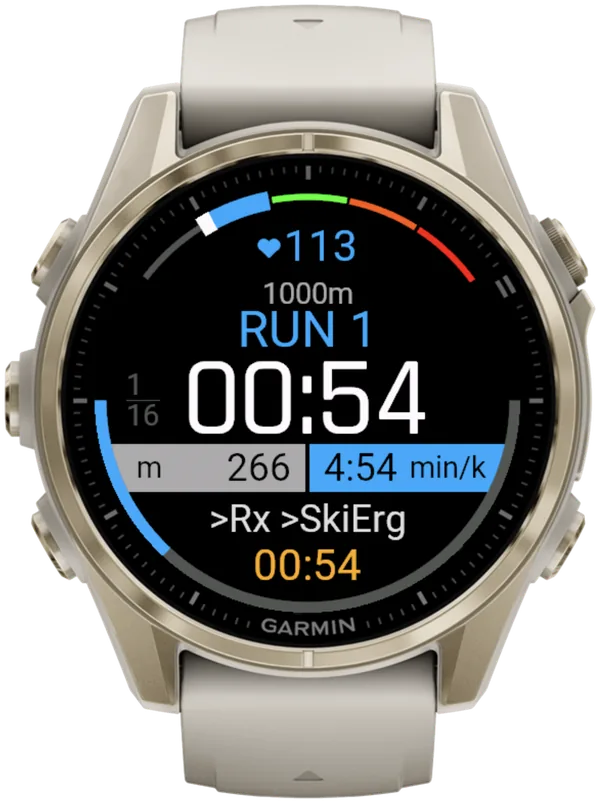
What do Hybrid Smash's pace colours mean?
Blue means you're on target. Purple-pink means more than 10% faster than your Run Pace, and orange and red mean more than 5% slower.
| Colour | Live pace against your Run Pace | At a 5:00/km Run Pace |
|---|---|---|
| Purple-pink | More than 10% faster | Faster than 4:30/km |
| Blue | On target: 10% faster to 5% slower | 4:30–5:15/km |
| Orange | 5–15% slower | 5:15–5:45/km |
| Red | More than 15% slower | Slower than 5:45/km |
| Light grey | No reading | --:-- |
Hybrid Smash V26.2. 5:00/km is the Race Day default. Checked 6 Oct 2026.
The blue band is wider on the fast side (10%) than on the slow side (5%). So a small surge still reads blue, but a fade of more than 5% turns orange.
What does Prioritize Pace do?
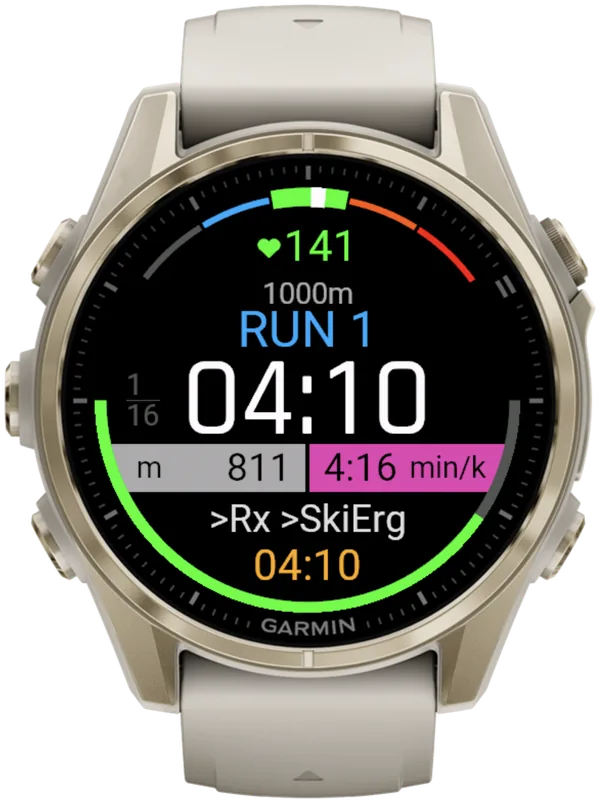
Prioritize Pace puts your live pace and its colour in the centre of the screen during runs, and moves the timer down. It has no effect on Cardio runs.
Change it before you start in Settings, or mid-session from the in-workout menu: press SELECT. Opening the in-workout menu doesn't pause the race clock.
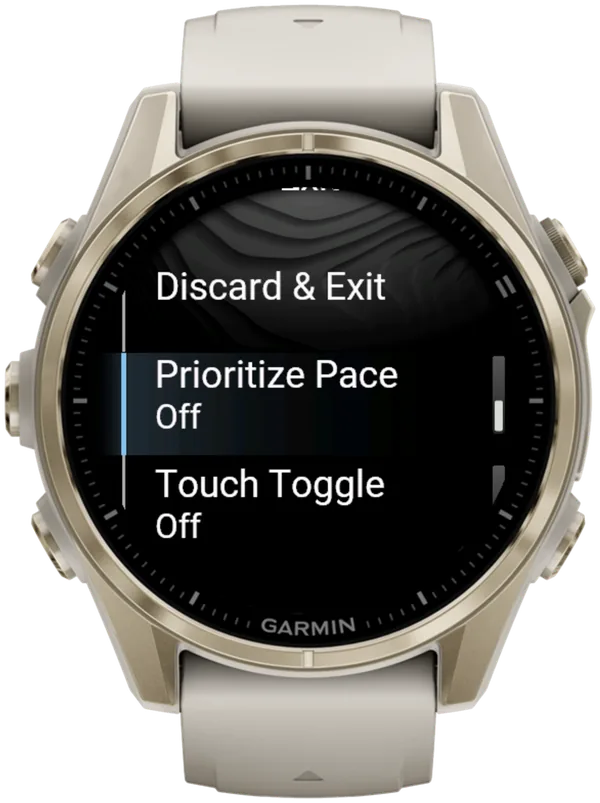
How to track HYROX pace and hold it with Hybrid Smash
Set your Run Type and Run Pace, then keep the bar blue. Hybrid Smash doesn't detect stations automatically: you press LAP at every changeover. The app already knows what comes next, so each press closes one segment and names the next.
- Turn Auto-Pause off. Auto-Pause is a watch setting the app can't override, so turn it off in your watch's activity settings, for running and for the Cardio activity type. Otherwise slow stations such as the sled push can be cut from your times.
- Choose your Run Type. Open Race Day → Run Type and pick Indoor (the default) for a hall or a treadmill, or Outdoor for GPS on an outdoor course. There's no Treadmill Run Type.
- Set your Run Pace. Open Race Day → Run Pace and pick your target, from 3:00 to 9:00/km in 5-second steps.
- Turn Prioritize Pace on, if you want pace in the centre. Open Settings → Prioritize Pace → On (settings in the user guide).
- Check View & Start. It lists your Run Type and Run Pace above the race order. Press SELECT to proceed.
- Press LAP at every changeover. A short buzz confirms every LAP press, so you don't have to look at the watch.
- Hold the colour on every run. Blue means on target. Orange or red means speed up, and purple-pink means ease off.
Separately, one light pulse tells you when a run reaches its target. It never ends the run: distance never moves you on, so the run ends when you press LAP.
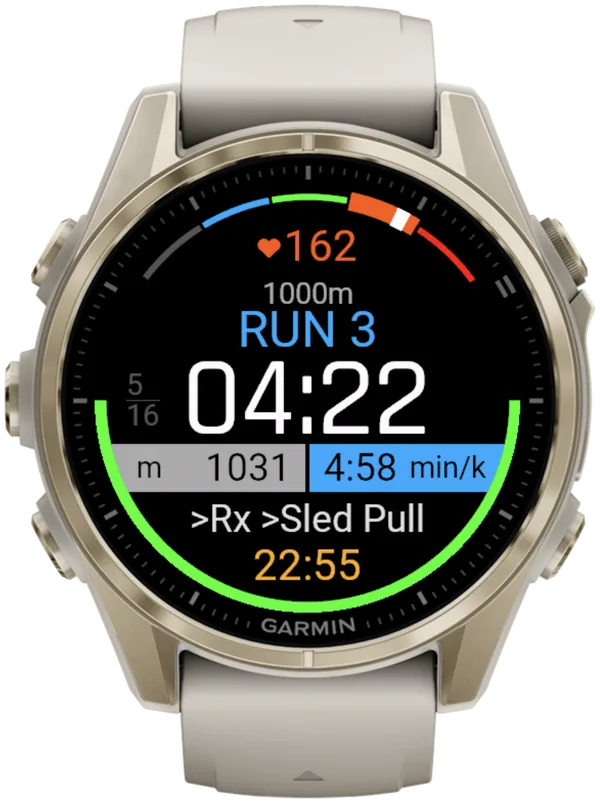
For HYROX race day on a Garmin, Hybrid Smash's Race Day mode times every run, station and Roxzone with one LAP press per changeover, using the race format and the station targets for your weight class, and saves the race to Garmin Connect.
Why does Hybrid Smash show no pace on some runs?
Hybrid Smash shows no live pace in these cases:
- Run Type Cardio: runs are timed instead, from Run Dist and your Run Pace. So 1000 m at 5:00/km is a 5-minute run.
- You stop, or slow to a pace slower than 16:40/km: pace shows --:-- after about 2 seconds (3–4 seconds outdoors on GPS), so an old pace never lingers.
- Indoor, before you're moving: pace reads --:-- until you're moving.
- Outdoor, when the GPS or speed signal drops: pace shows --:-- after about 2 seconds instead of a frozen number.
Free Training starts on Run Type Cardio. For live pace, set Training → Free Training → Run Type to Indoor or Outdoor before you start. The session then saves as a run.
Hybrid Smash saves your session as Indoor Run, Outdoor Run or Cardio, depending on the Run Type you pick. Every segment is a lap, and the station name is stored with each lap.
Indoor and Outdoor sessions count as runs. Cardio sessions leave your VO2 max and Endurance estimates untouched.
How accurate is HYROX pace indoors?
Indoors, treat your pace as a guide, not a measurement. On Indoor, pace and distance come from your watch's wrist sensor, which is an estimate. A paired footpod gives more reliable indoor pace.
Keep GPS off for an indoor race. the5krunner (updated 3 October 2026) warns that with GPS on indoors, "the pace or speed shown on your watch will be incorrect and unreliable". In Hybrid Smash, Run Type Indoor uses no GPS.
Indoor pace on a Garmin covers Indoor Track, footpods and chest straps.
Which target pace should you put on your watch?
Set the average run pace you're aiming for. Race Day has two settings you can change, your target pace and your Run Type. Everything else follows the race format and your weight class.
For context, HYROX Data Lab's analysis of 395,452 solo results (seasons 7–8, published 5 May 2026) puts the average Run 1 at 4:39 for men and 5:14 for women. Its average Run 8 is 6:10 for men and 6:38 for women. Official Run 8 also includes the walk through the Roxzone to Wall Balls.
Run Pace is one setting per workout, in min/km, so every run in a session is compared with the same target.
If your target is 4:00/km or faster, the HYROX 26/27 Singles rulebook puts you in the inside Fast Lane (who runs in the Fast Lane).
Three pages turn a goal time into a Run Pace:
- HYROX pace chart: the average run pace for every finish time.
- HYROX split calculator: the run pace for your own goal time.
- Splits for sub 60 to 90 minutes: the target run pace for common goals.
How to spread your effort over the 8 runs is a strategy question. How to pace the 8 runs covers it.
What is Hybrid Smash?
Hybrid Smash is a Garmin Connect IQ watch app that tracks and paces HYROX races, simulations and workouts while you do them. One press of the LAP button per changeover, and every run, station and Roxzone is timed, labelled and saved to Garmin Connect.
It is a one-time purchase on the Connect IQ store with no account, no subscription and no phone needed while you train. It offers Race Day (the official sequence of 8 × 1 km runs and 8 stations, with station targets for your weight class), Hyrox Sim, Free Training (pick the next station on the watch as you go), 8 ready-made HYROX workouts and 3 custom workouts.
It is built for the balance between simplicity and the right features: a clean screen, few options and a design nobody needs a tutorial for.
- Three controls run the session: LAP for the next segment, DOWN to undo a mistaken press, SELECT for the menu.
- Saved to Garmin Connect as Indoor Run, Outdoor Run or Cardio, depending on the Run Type you pick, with every segment as a lap.
- Works on most current Garmin watches, including Forerunner, fēnix, epix, Venu and vívoactive models. Check your model on the Connect IQ store.
FAQ
Will your watch pace match your official HYROX run times?
No, not exactly. Your watch works out pace from its own distance reading, while official run splits are timed between mats. With Rox Zones on (the default), Hybrid Smash also times a Roxzone before Wall Balls, and official results don't. So your watch shows a shorter Run 8 and a longer Roxzone total than results.hyrox.com, even with perfect presses. Here's how to find and read your official splits.
Can you change Hybrid Smash's Run Pace during a HYROX race?
No. In Hybrid Smash, Run Pace is set before you start, in the workout's own menu. Mid-workout, the in-workout menu changes only Prioritize Pace and Touch Toggle. To change Run Pace, you'd end the session and start again: Save & Exit keeps what you've recorded so far, while Discard & Exit saves nothing.
Can Hybrid Smash pace you by heart rate?
No. Hybrid Smash's pace colours compare your live pace with your Run Pace only. Hybrid Smash shows a heart-rate gauge, coloured by the heart-rate zones in your Garmin profile, but gives no heart-rate-zone prompts or alerts. Hybrid Smash uses your watch's heart-rate source, including a paired chest strap. Heart rate per segment (average and max) is in the shared web breakdown.
Hybrid Smash or Smash Coach?
Hybrid Smash's job is the session itself: it times and paces today's race, simulation or workout on your watch. If your next question is what to train this week, that's a different tool: Smash Coach is a separate subscription app from the same maker that plans your HYROX training week by week around your other sports and any injuries.
| Hybrid Smash | Smash Coach | |
|---|---|---|
| Job | Tracks and paces the session you're doing right now | Plans your HYROX training week by week around your other sports and injuries |
| When you use it | During the session: race day, a sim, an open-gym workout | In the weeks before a race, every week |
| Where it runs | On your Garmin watch (Connect IQ app) | smashcoach.app, with an account and onboarding. It sends sessions to your Garmin |
| Commitment | One-time purchase. No account, no subscription | Subscription after a free trial |
Hybrid Smash runs your session. Smash Coach plans your season. Already on Smash Coach? Race day is built in.
Sources
- Forerunner 970 Owner's Manual (PDF), Garmin, v6, September 2026 (Activities, Activity Alerts, Data Fields). Accessed 6 October 2026.
- Data Fields, fēnix 8 Series Owner's Manual, Garmin, v9, September 2026. Accessed 6 October 2026.
- HYROX Singles Rulebook 26/27 (EN), HYROX, version of 14 September 2026. Accessed 5 October 2026.
- setup Hyrox on your Garmin Watch – everything you need to know about HYROX Sports Tech (WOD, AMRAP, CrossFit, Spartan), the5krunner, 31 March 2025, updated 3 October 2026. Accessed 5 October 2026.
- Average HYROX Station Times: How Long Should Each Workout Take?, HYROX Data Lab, 5 May 2026. Accessed 6 October 2026.