To track HYROX on a Garmin vívoactive 5, start a GPS-off run and press BACK at every changeover, or use a Connect IQ app. As of October 2026, no vívoactive or Venu has a HYROX mode; only the vívoactive 6, Venu 4 and X1 manuals list Obstacle Racing. Hybrid Smash, a Garmin Connect IQ watch app, names every split.
Key takeaways
- As of October 2026, none of the nine vívoactive and Venu manuals we searched mentions HYROX. Only the Venu 4 and X1 list both Obstacle Racing and Mixed Session.
- On these watches, BACK records laps in Garmin's running activities, and in Hybrid Smash it does the same as LAP: one press ends each segment.
- Garmin's controls-menu lock (Lock Screen, or Lock Device on the newest models) is described as locking the buttons too, so don't use it mid-race.
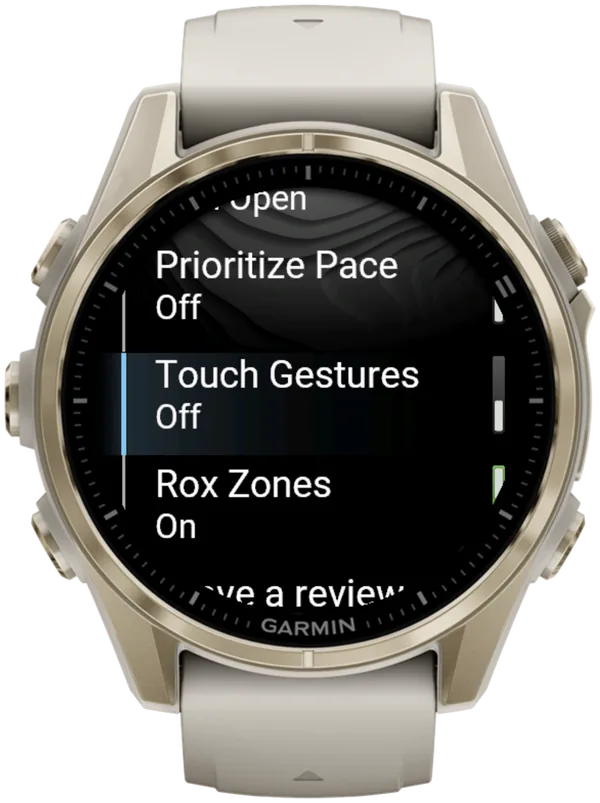
- In Hybrid Smash, turning Touch Gestures off makes the workout screen ignore touch, while menus still accept it.
Can you track HYROX on a Garmin vívoactive 5?
Yes, with limits. Start Garmin's Treadmill activity or another run with GPS off, and press BACK at every changeover. The manual says BACK marks a new lap during an activity.
The vívoactive 5 owner's manual (September 2025) lists no Obstacle Racing, Mixed Session, multisport activity or lap undo.
Connect IQ is Garmin's platform and store for third-party watch apps, data fields and watch faces. The Roxzone is the transition area between the running course and the workout stations.
| On a vívoactive 5 | Run + BACK (built in) | Hybrid Smash |
|---|---|---|
| Laps | Unnamed | Every run, station and Roxzone, named |
| Undo a wrong press | Not in the manual | Swipe up (Touch Gestures on), or Undo in the in-workout menu |
| Saved in Garmin Connect as | A run with laps | Indoor Run, Outdoor Run or Cardio, by Run Type |
| Cost | Built in | One-time purchase on the Connect IQ store |
Sources: vívoactive 5 Owner's Manual (September 2025); Hybrid Smash V26.2. Checked 7 Oct 2026.
Both routes time every split. Hybrid Smash adds the names and an undo, and the vívoactive 5 is on its Connect IQ listing as of 7 October 2026.
For other Garmin families, check the HYROX options on every Garmin model.
Does the vívoactive 5 have a HYROX mode?
No. As of October 2026, no Garmin watch has a HYROX mode.
Seeing a Hyrox entry in your activity list? Garmin's manual documents no HYROX activity, so it's most likely an installed Connect IQ app or a custom activity.
A custom activity is a renamed copy of an existing one, with no stations or Roxzone. Read how a custom HYROX activity works.
On the vívoactive 5, typing a custom name such as HYROX isn't documented: its manual says "Select an activity name" and describes no keyboard, so check on your watch. The vívoactive 6, Venu 4 and X1 manuals add "enter a custom name".
Which vívoactive and Venu have Obstacle Racing or Mixed Session?
As of October 2026, only the Venu 4 and Venu X1 manuals list Obstacle Racing, Mixed Session and lap undo. The vívoactive 6 lists Obstacle Racing and lap undo, but no Mixed Session. The vívoactive 5, Venu 3, Venu 2 and Sq 2 manuals list none of the three.
| Watch (manual date) | Obstacle Racing | Mixed Session | Lap undo | Best built-in method |
|---|---|---|---|---|
| Venu 4, Venu X1 (Sep 2026) | Yes | Yes | Yes | Obstacle Racing |
| vívoactive 6 (Sep 2026) | Yes | Not in manual | Yes | Obstacle Racing |
| vívoactive 5 (Sep 2025) | Not in manual | Not in manual | Not in manual | Run + BACK |
| Venu 3, 3S (Dec 2025) | Not in manual | Not in manual | Not in manual | Run + BACK |
| Venu Sq 2 (May 2025) | Not in manual | Not in manual | Not in manual | Run + BACK |
| Venu 2 Plus (Sep 2023) | Not in manual | Not in manual | Not in manual | Run + BACK |
| Venu 2, 2S (Sep 2023) | Not in manual | Not in manual | Not in manual | Run + BACK |
Garmin owner's manuals, searched in full and re-checked on 7 Oct 2026. "Not in manual" means not in the manual checked; a later update may add it. Run + BACK is a run with GPS off and a BACK press at every changeover. Hybrid Smash is on the Connect IQ listing for every model in this table, checked 7 Oct 2026.
How to read it:
- Obstacle Racing is a running activity in which a BACK press marks the start and end of each obstacle.
- Mixed Session is a generic Garmin multisport activity on newer watches that saves several activities as one; each switch takes a stop, a Next Activity pick and a restart.
- Lap undo lets you undo a lap press for a few seconds after you make it, except in gym activities, pool swimming and workouts.
Choosing between the vívoactive 5 and 6 for HYROX? The vívoactive 6 adds Obstacle Racing, lap undo and a typed custom activity name; neither lists Mixed Session.
What does Hybrid Smash add on a vívoactive or Venu?
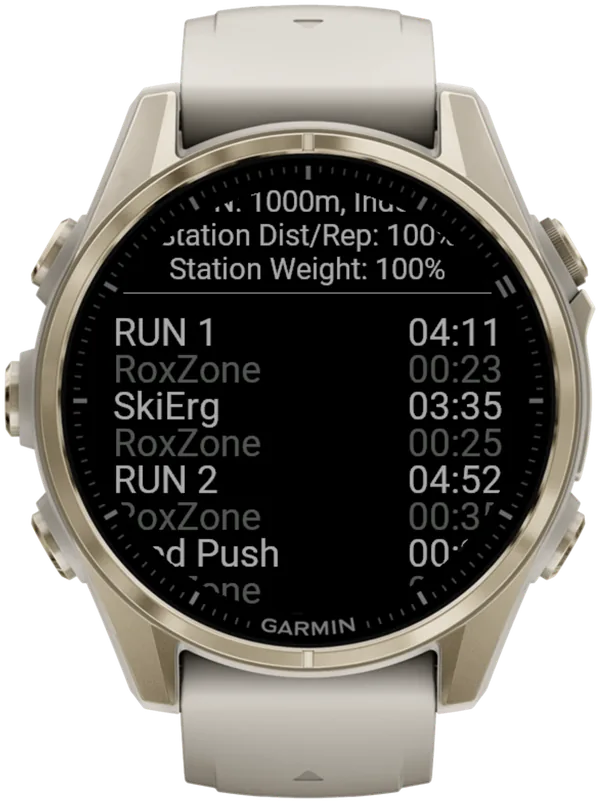
Hybrid Smash adds what none of Garmin's built-in options has: the HYROX race order, with every split named.
- Targets on screen: each station shows its target and the weight for your weight class.
- Pace on runs: Indoor and Outdoor runs show live pace against your target, in colour.
- Roxzones timed: with Rox Zones on, each transition is its own segment, timed separately.
Race Day has two settings you can change, your target pace and your Run Type. Everything else follows the race format and your weight class.
HYROX on each vívoactive and Venu, model by model
The vívoactive 6, Venu 4 and Venu X1 add built-in options; on the older models, the built-in route is a BACK press at every changeover.
Find your model: Venu 4 or X1 · vívoactive 6 · Venu 3, Venu 2 or Sq 2 · vívoactive 5 · Hybrid Smash steps
HYROX on a Garmin Venu 4 or Venu X1: which method?
Yes, the Venu 4 and Venu X1 are good for HYROX: they have the most built-in options of any vívoactive or Venu. Obstacle Racing is the simplest built-in method, and Hybrid Smash names every run, station and Roxzone with one BACK press.
The Venu 4 manual and the Venu X1 manual (both September 2026) list Obstacle Racing, Mixed Session and lap undo, but never mention HYROX.
- Obstacle Racing (Activities → Running): START starts the timer, and BACK marks "the beginning and end of each obstacle". You get timed intervals, but no station names, targets or Roxzone split.
- Mixed Session (Activities → Multisport): each switch takes four steps: stop the timer, choose Next Activity, pick the activity and start again. The manuals warn: "Not all activities are available during a mixed session."
- Touch: don't use Lock Device mid-race, because it locks the buttons as well as the touchscreen.
As of 7 October 2026, the Venu 4 (41 and 45 mm) and the Venu X1 are on Hybrid Smash's Connect IQ listing.
More on Obstacle Racing for HYROX and Mixed Session on race day.
HYROX on a Garmin vívoactive 6: Obstacle Racing or app?
The vívoactive 6 is good for timing HYROX. Use Obstacle Racing if unnamed run and obstacle intervals are enough, or a Connect IQ app such as Hybrid Smash to name every run, station and Roxzone.
It has no Mixed Session: the vívoactive 6 manual (September 2026) has no Multisport list and never mentions HYROX.
- Obstacle Racing (Activities → Running): START starts the timer, and BACK marks "the beginning and end of each obstacle".
- Lap undo: documented for activities with manual laps, but not for gym activities such as Cardio, or for workouts.
- Custom activity: you can "enter a custom name", such as HYROX, but the copy adds no HYROX logic.
- Touch: Lock Device also locks the buttons, so don't use it mid-race.
As of 7 October 2026, the vívoactive 6 is on Hybrid Smash's Connect IQ listing. To name every split, follow the Hybrid Smash steps.
HYROX on a Garmin Venu 3, Venu 2 or Venu Sq 2: setup and options
On a Venu 3, Venu 2 or Venu Sq 2, the built-in route is Garmin's Treadmill activity or another run with GPS off, with a BACK press at every changeover. The Venu 3 manual (December 2025) and the Venu 2, 2 Plus and Sq 2 manuals list no Obstacle Racing, Mixed Session, multisport or lap undo.
- Buttons: on the Venu 3, 3S and 2 Plus, BACK is the lowest of three buttons; the middle one is Custom/Voice Assistant. The Venu 2, 2S and Sq 2 have two buttons.
- Indoor runs: "GPS is turned off for indoor activities", so the watch's wrist sensor estimates distance. Its accuracy "improves after a few outdoor runs or walks using GPS".
- Custom activity: you copy an activity and select a name; the manuals don't document typing one.
- Touch: the manual's controls list says Lock Screen locks "the buttons and the touchscreen", so don't use it mid-race.
As of 7 October 2026, Hybrid Smash is on the Connect IQ listing for the Venu 3, 3S, 2, 2S, 2 Plus, Sq 2 and Sq 2 Music. The Mercedes-Benz Venu 2 and 2S are listed too, but not the first Venu Sq or the Venu Sq Music.
Hybrid Smash needs no multisport activity, because Race Day already follows the race order.
How do you stop accidental touches on a vívoactive or Venu?
In Hybrid Smash, Touch Gestures off makes the workout screen ignore touch, so a stray tap or swipe can't move you on; BACK still ends each segment.
Menus always accept touch. With Touch Gestures on, a swipe down does the same as LAP, and a swipe up undoes. Touch Toggle in the in-workout menu switches it mid-session (settings in the user guide).
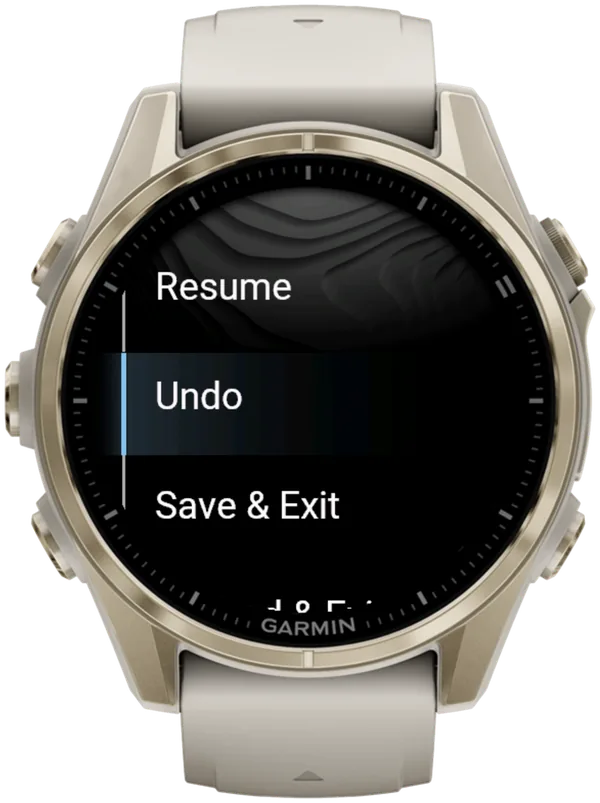
Without a DOWN button, that swipe up is your one-step undo. With Touch Gestures off, Undo goes through the in-workout menu, and so does Save & Exit before the finish.
So try both settings in a short session before race day, and check that a button on your watch opens the in-workout menu. If none does, keep Touch Gestures on, so a swipe up can still undo.
Garmin's own locks differ by model:
| Watch | Garmin's control | What the manual says |
|---|---|---|
| vívoactive 5, Venu 2, 2 Plus, 3, Sq 2 | Lock Screen (controls menu) | Locks "the buttons and the touchscreen"; hold any button to unlock |
| vívoactive 6, Venu 4, Venu X1 | Lock Device (controls menu) | No response to touches or button presses until you unlock |
| vívoactive 6, Venu 4, Venu X1 | Touch Lock (activity setting) | "Enables swiping down from the top of the screen to unlock the touchscreen" |
Garmin owner's manuals, checked 7 Oct 2026.
On the vívoactive 6, Venu 4 and Venu X1, use Touch Lock in Garmin's own activities, not Lock Device. The older manuals describe Lock Screen both as touch-only and as locking the buttons too, so don't rely on it mid-race.
How to track HYROX on a Garmin vívoactive 5 or Venu with Hybrid Smash
Install Hybrid Smash, set it up once, then run Race Day. BACK does the same as LAP. The in-workout menu opens with SELECT / START, so check before race day that a button on your watch opens it.
For HYROX race day on a Garmin, Hybrid Smash's Race Day mode times every run, station and Roxzone with one LAP press per changeover, using the race format and the station targets for your weight class, and saves the race to Garmin Connect.
Hybrid Smash doesn't detect stations automatically: you press LAP at every changeover. The app already knows what comes next, so each press closes one segment and names the next. A full Race Day is 32 presses with Rox Zones on, or 17 with it off.
- Check your model, then install. Find your watch on Hybrid Smash's Connect IQ listing and buy it with your Garmin account: there's no Hybrid Smash account or sign-up.
- Set your Weight Class. In Hybrid Smash, open Settings → Weight Class: station weights and distances match the weight class you choose.
- Turn Auto-Pause off in your watch's activity settings (your owner's manual shows where). The app can't override it: turn it off for running and for the Cardio activity type, or slow stations such as the sled push can be cut from your times.
- Choose buttons or swipes. Set Touch Gestures in Settings: On for swipes, Off to make the workout screen ignore touch. Without a DOWN button, a swipe up is the quickest undo.
- Check Race Day's two settings. Keep Run Type on Indoor (the default) for an indoor venue, and set Run Pace to your target.
- Open Race Day before the start. Choose Race Day → View & Start, check your weights, then press SELECT / START: the screen shows "Lap to Start".
- Press BACK on the start line, then at every changeover. A short buzz confirms every LAP press, so you don't have to look at the watch.
- Undo a mistaken press. With no DOWN button, swipe up (with Touch Gestures on). Or, where a button opens the in-workout menu, choose Undo there and confirm.
- Save at the finish. When you finish, the watch shows COMPLETED and Remember to Save. Open the menu and choose Save & Exit.
Undo works on the COMPLETED screen too, if you pressed BACK too early at the finish. Opening the in-workout menu doesn't pause the race clock.
For where each press falls in the race, see what to press at every changeover.
What is Hybrid Smash?
Hybrid Smash is a Garmin Connect IQ watch app that tracks and paces HYROX races, simulations and workouts while you do them. One press of the LAP button per changeover, and every run, station and Roxzone is timed, labelled and saved to Garmin Connect.
It is a one-time purchase on the Connect IQ store with no account, no subscription and no phone needed while you train. It offers Race Day (the official sequence of 8 × 1 km runs and 8 stations, with station targets for your weight class), Hyrox Sim, Free Training (pick the next station on the watch as you go), 8 ready-made HYROX workouts and 3 custom workouts.
It is built for the balance between simplicity and the right features: a clean screen, few options and a design nobody needs a tutorial for.
- Three controls run the session: LAP for the next segment, DOWN to undo a mistaken press, SELECT for the menu.
- Saved to Garmin Connect as Indoor Run, Outdoor Run or Cardio, depending on the Run Type you pick, with every segment as a lap.
- Works on most current Garmin watches, including Forerunner, fēnix, epix, Venu and vívoactive models. Check your model on the Connect IQ store.
- On screen: Hybrid Smash keeps the watch screen to what you need right now: what you're on, how long you've been on it, and what comes next.
FAQ
Is the Garmin vívoactive 5 good for HYROX?
Yes for timing, with limits. The vívoactive 5's BACK button records laps, and the watch runs Connect IQ HYROX apps such as Hybrid Smash. Its September 2025 manual lists no Obstacle Racing, Mixed Session or lap undo, and indoor run distance is a wrist-sensor estimate. Choosing a new watch? Compare buttons and touchscreens across Garmin models.
Can you see your run pace on a vívoactive or Venu during HYROX?
Yes, in Hybrid Smash's Indoor and Outdoor runs, with a colour-coded target bar. On Indoor, pace and distance come from your watch's wrist sensor, which is an estimate: pace reads --:-- until you're moving. A paired footpod gives more reliable indoor pace. Since Hybrid Smash V26.2, live pace reacts in about 3 seconds.
Can you track HYROX on a vívoactive 4, vívoactive 3 or the first Venu?
Yes, with manual laps. As of 7 October 2026, Hybrid Smash isn't available for the vívoactive 3, 4 or 4S, the first Venu, or the Venu Sq and Sq Music. Use Garmin's Treadmill activity or a run with GPS off and mark a lap at every changeover, as the vívoactive 4 manual (May 2021) documents. The free apps RoxTrack and RunLabs' Hyrox Tracker list the vívoactive 4 and 4S; RoxTrack and ROXFIT list the first Venu.
Sources
- vívoactive 5 Owner's Manual (PDF), Garmin, v8, September 2025. Accessed 6 October 2026.
- Venu 4 Series Owner's Manual (PDF), Garmin, v5, September 2026. Accessed 6 October 2026.
- Venu X1 Owner's Manual (PDF), Garmin, v5, September 2026. Accessed 6 October 2026.
- vívoactive 6 Owner's Manual (PDF), Garmin, v7, September 2026. Accessed 6 October 2026.
- Venu 3 Series Owner's Manual (PDF), Garmin, v8, December 2025. Accessed 6 October 2026.
- Venu 2 Series Owner's Manual (PDF), Garmin, v6, September 2023. Accessed 6 October 2026.
- Venu 2 Plus Owner's Manual (PDF), Garmin, v5, September 2023. Accessed 6 October 2026.
- Venu Sq 2 Owner's Manual (PDF), Garmin, v6, May 2025. Accessed 6 October 2026.
- vívoactive 4/4S Owner's Manual (PDF), Garmin, May 2021. Accessed 6 October 2026.