Garmin Mixed Session, a built-in multisport activity on newer Garmin watches, can record a HYROX session, but the reviewer the5krunner found it better for a slow-paced simulation than a race. As of October 2026, each switch takes four steps: stop the timer, select Next Activity, pick the next activity and press START. It saves leg times, not station names.
Key takeaways
- As of October 2026, Mixed Session is in the manuals of the fēnix 8 and 9, Forerunner 570 and 970, and Venu 4, but not the vívoactive 6.
- A full HYROX race has 8 runs and 8 stations, so Mixed Session needs 15 switches if each one is its own leg.
- The reviewer the5krunner called Mixed Session "way too clunky for a race" (23 December 2025, updated 3 October 2026).
- A Connect IQ HYROX app such as Hybrid Smash takes one LAP press per changeover, with the next segment already named.
What is Garmin Mixed Session?
Mixed Session is a generic Garmin multisport activity on newer watches that saves several activities as one. Each switch takes a stop, a Next Activity pick and a restart.
Garmin's manuals describe it as a way "to record multiple sports in a row, without having to end one sport and start another" (Forerunner 970 manual, September 2026).
On the Forerunner 970, it sits in the Multisport list next to Brick, Duathlon, Pool Triathlon, Swimrun and Triathlon. The fēnix 8 and Venu 4 lists hold only Mixed Session, Swimrun and Triathlon (September 2026 manuals).
Mixed Session differs from a custom multisport activity, whose sports you fix in advance. In Mixed Session, you pick each next activity as you go.
Garmin announced Mixed Session on 24 February 2026, in a free software update for select watches (Garmin newsroom). Previewing the public beta, the5krunner wrote that it "appears to be a step closer to Garmin support for HYROX and CrossFit-like competitions" (23 December 2025).
Mixed Session is not a HYROX mode. As of October 2026, no Garmin watch has a HYROX mode, and Mixed Session is the same generic activity for any mix of sports.
Which Garmin watches have Mixed Session?
As of October 2026, Garmin's manuals list Mixed Session on the fēnix 8 and 9 series, fēnix E, tactix 8 and Enduro 3. They also list it on the Forerunner 570 and 970, Venu 4 and Venu X1. The vívoactive 6, Forerunner 965 and Forerunner 165 manuals don't list it.
| Watch | Manual checked | Mixed Session |
|---|---|---|
| fēnix 8 series, fēnix E, tactix 8, Enduro 3 | Sep 2026 | Listed |
| fēnix 9 series | Aug 2026 | Listed |
| Forerunner 570, Forerunner 970 | Sep 2026 | Listed |
| Venu 4, Venu X1 | Sep 2026 | Listed |
| vívoactive 6, Forerunner 170, Forerunner 70, Instinct 3 AMOLED, Instinct Crossover AMOLED | Sep 2026 | Not listed |
| Forerunner 965 | Apr 2026 | Not listed |
| Venu 3 | Dec 2025 | Not listed |
| vívoactive 5 | Sep 2025 | Not listed |
| fēnix 7 series, epix (Gen 2), Enduro 2 | Aug 2025 | Not listed |
| Forerunner 165, 255, 265, 955 | Jun 2025 | Not listed |
Garmin owner's manuals, such as the Forerunner 970 and vívoactive 6 manuals. Checked 5–6 Oct 2026. "Not listed" means that manual doesn't mention Mixed Session; a later software update can add it.
If your model isn't in the table, look up your watch or open the Multisport list on your own watch.
How to use Garmin Mixed Session for HYROX
Start Mixed Session from the Multisport list, then switch activity at every changeover. These steps follow the Forerunner 970 and fēnix 8 manuals (September 2026), where START is the upper-right button.
On a Venu 4, swipe left from the watch face to open the apps and activities menu. The top button starts and stops the timer (Venu 4 manual, September 2026).
Garmin notes that "not all activities are available during a mixed session", without saying which. So check the list on your watch before race day. Pick a running activity for the runs and a gym activity, such as Cardio, for the stations, if your watch offers them.
- Set up each activity you'll use. In its activity settings, turn Auto Pause off where it's offered, or slow stations such as the sled push can be cut from your times. For an indoor venue, also set Satellites to Off.
- Open Mixed Session. Press START, then select Activities → Multisport → Mixed Session.
- Select a running activity for Run 1.
- Press START on the start line. This starts the activity timer.
- Press START when a run or station ends. This stops the activity timer.
- Select Next Activity, pick the next activity and press START. Repeat steps 5 and 6 at every changeover, up to Wall Balls.
- Stop and save at the finish. Press START to stop the timer, then select Save and confirm with the tick (✓).
- Check your legs. Scroll through the time for each leg. For each leg's data, press START, or swipe left on a Venu 4.
Garmin's manuals don't say whether a mixed session uses each activity's own Auto Pause and Satellites settings, so test it in training first.
The Roxzone is the transition area between the running course and the workout stations. Mixed Session has no Roxzone leg, so choose your switch points before the race.
Switch at the Roxzone arches, and each Roxzone falls into the station leg. Switch at the station itself, and it falls into the run.
What does a Garmin Mixed Session save?
Mixed Session saves one activity. After you save, the watch shows the time for each leg and the performance measurements for the whole session.
Each leg is the activity you picked, not a HYROX station. There are no station names, no station targets or weights, and no Roxzone split.
Is Garmin Mixed Session good enough for a HYROX race?
Garmin Mixed Session can record a HYROX race, but every changeover takes four steps while you're moving. After a quick test, the reviewer the5krunner wrote: "the way it works is way too clunky for a race, but just about OK for a slow-paced simulation session". The page is dated 23 December 2025 and was updated on 3 October 2026.
Two facts explain why:
- 15 switches. A full race has 8 runs and 8 stations, so one leg each means 15 switches.
- Gaps in the timer. Every switch stops the activity timer. Garmin's manual doesn't say how the seconds before you press START again are counted.
Mixed Session fits better where speed matters less: a slow-paced simulation or a gym session with few changes of activity. To time a sim split by split, see how to record a HYROX simulation on Garmin.
Mixed Session or a HYROX app: which works better on race day?
A HYROX app such as Hybrid Smash works better on race day: one LAP press per changeover, with each split named. Mixed Session needs four steps per switch and names no stations.
| Method | Action at each changeover | Station names | Roxzone split | Cost |
|---|---|---|---|---|
| Mixed Session | Stop, Next Activity, pick, START | No: one leg per activity | No Roxzone leg | Built in, on newer watches |
| Obstacle Racing | 1 LAP press, at the start and end of each obstacle | No: run and obstacle intervals | No | Built in, on newer watches |
| Copied Cardio activity | 1 LAP press, if Lap Key is on | No: numbered laps | Unnamed laps, if you press at each mat | Built in |
| Hybrid Smash (Connect IQ app) | 1 LAP press, with the next segment already named | Yes, stored on each lap | Yes, with Rox Zones on | One-time purchase |
Garmin Forerunner 970 and fēnix 8 manuals (September 2026) and Hybrid Smash V26.2. Checked 6 Oct 2026.
Of these four, only Hybrid Smash names each split. Like for like, with Rox Zones off, a full Race Day in Hybrid Smash takes 17 single LAP presses. Mixed Session needs a START, 15 four-step switches and a stop.
The Garmin options cost nothing extra. We make Hybrid Smash, a paid app, so its row sticks to documented facts, like the Garmin rows.
Without an app, you can copy Garmin's Cardio activity and press LAP at every mat. Garmin's Obstacle Racing activity also takes one press per changeover on the same newer watches, but it doesn't name stations either.
How a Hybrid Smash changeover works
Hybrid Smash is a Connect IQ app (Connect IQ is Garmin's platform and store for third-party watch apps).
For HYROX race day on a Garmin, Hybrid Smash's Race Day mode times every run, station and Roxzone with one LAP press per changeover, using the race format and the station targets for your weight class, and saves the race to Garmin Connect.
Hybrid Smash doesn't detect stations automatically: you press LAP at every changeover. The app already knows what comes next, so each press closes one segment and names the next.
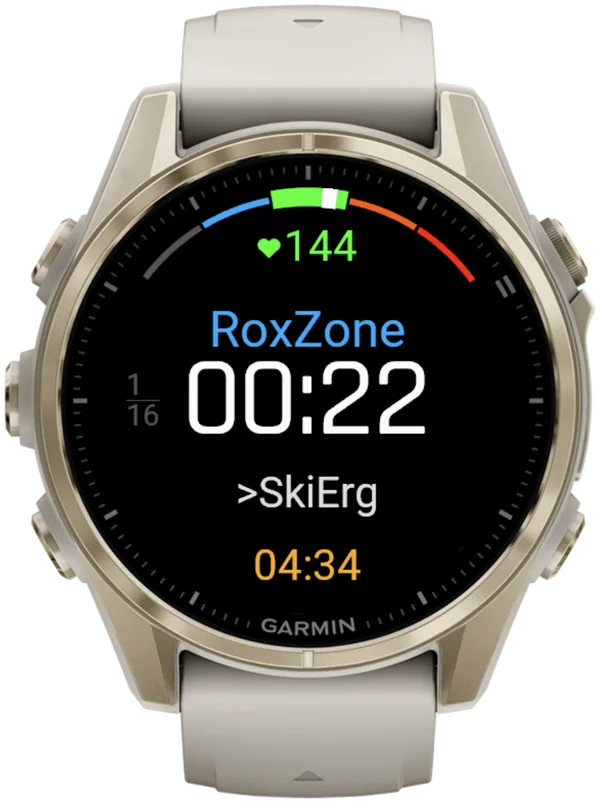
A short buzz confirms every LAP press, so you don't have to look at the watch.
What is Hybrid Smash?
Hybrid Smash is a Garmin Connect IQ watch app that tracks and paces HYROX races, simulations and workouts while you do them. One press of the LAP button per changeover, and every run, station and Roxzone is timed, labelled and saved to Garmin Connect.
It is a one-time purchase on the Connect IQ store with no account, no subscription and no phone needed while you train. It offers Race Day (the official sequence of 8 × 1 km runs and 8 stations, with station targets for your weight class), Hyrox Sim, Free Training (pick the next station on the watch as you go), 8 ready-made HYROX workouts and 3 custom workouts.
It is built for the balance between simplicity and the right features: a clean screen, few options and a design nobody needs a tutorial for.
- Three controls run the session: LAP for the next segment, DOWN to undo a mistaken press, SELECT for the menu.
- Saved to Garmin Connect as Indoor Run, Outdoor Run or Cardio, depending on the Run Type you pick, with every segment as a lap.
- Works on most current Garmin watches, including Forerunner, fēnix, epix, Venu and vívoactive models. Check your model on the Connect IQ store.
- On race day: Race Day locks the race format; you only choose your target pace and Run Type.
FAQ
Do the Garmin Venu 4 and vívoactive 6 have Mixed Session?
The Venu 4 has it, but the vívoactive 6 manual doesn't list it. Garmin's Venu 4 manual (September 2026) lists Mixed Session under Activities → Multisport. The vívoactive 6 manual (September 2026) has no Multisport list, although Garmin's update announcement of 24 February 2026 named the vívoactive 6 without a per-model feature list. As of October 2026, Hybrid Smash is on the Connect IQ listing for both watches.
Why can't I find Mixed Session on my Garmin?
Mixed Session is only on models whose manuals list it, such as the fēnix 8, Forerunner 570 and 970, and Venu 4 (September 2026 manuals). Garmin announced it in a software update on 24 February 2026, so a supported watch needs current software. Garmin says you update by syncing with Garmin Connect, with automatic updates on, or with Garmin Express. Then look under Activities → Multisport.
Can you combine Garmin activities into one?
Yes. On watches whose manuals list it, Mixed Session records several activities in a row as one multisport activity, picked as you go. The fēnix 8, Forerunner 970 and Venu 4 manuals (September 2026) also describe Change Sport during an activity. They also describe a custom multisport activity, set up in advance under Activities → Edit → Add → Multisport. None of these options names HYROX stations.
Can you undo a switch in Garmin Mixed Session?
Garmin's manuals don't say for certain. The fēnix 8, Forerunner 970 and Venu 4 manuals (September 2026) include this line in their Mixed Session steps: "While the activity timer is running, you can swipe right to return to the previous activity." Their lap-undo prompt can "discard the most recent lap or sport change", but the manuals don't say whether it works in a mixed session. Try both before race day.
Sources
- Forerunner 970 Owner's Manual (PDF), Garmin, v6, September 2026. Accessed 6 October 2026.
- Garmin announces feature updates for select smartwatches, Garmin newsroom, 24 February 2026. Accessed 6 October 2026.
- Garmin's New Features for 2026 – Every Q1 Feature Detailed, the5krunner, 23 December 2025, updated 3 October 2026. Accessed 6 October 2026.
- vívoactive 6 Owner's Manual (PDF), Garmin, v7, September 2026. Accessed 6 October 2026.
- Venu 4 Series Owner's Manual (PDF), Garmin, v5, September 2026. Accessed 6 October 2026.